How do I check the total size of a PostgreSQL database?
Run SELECT pg_size_pretty(pg_database_size(current_database())); or \l+ in psql. That number counts every relation file in the one database, including its objects in other tablespaces, but excludes WAL, temporary files and every other database on the instance. For what the disk actually holds, add pg_ls_waldir() and sum all databases.
Key facts
| Fact | Value | |---|---| | Function for one database | pg_database_size(name or oid) returns bytes; wrap in pg_size_pretty() | | psql shortcut | \l+ adds a Size column to the database list (psql docs) | | Who can call it | Members of pg_read_all_stats, or any user with CONNECT on that database (docs) | | What is excluded | WAL (pg_wal), replication-slot retained WAL, temp files, pg_stat_tmp, and other databases | | Whole-cluster WAL size | SELECT sum(size) FROM pg_ls_waldir(); (docs) | | Temp file volume | pg_stat_database.temp_bytes, cumulative since stats reset (docs) | | Default max_wal_size | 1 GB, a soft limit checkpoints try to stay under (docs) | | Fleet data | Across 46 monitored instances, 2.2% failed the 24-hour database-growth check; across 47, 40.4% failed the temp-file check |
Why this happens
The confusion around "how big is my database" comes from the fact that PostgreSQL has three different things a person might mean, and one function that measures only the first.
A database is a collection of relations (tables, indexes, TOAST tables, materialized views) stored as files under base/<oid>/. pg_database_size() walks those files and returns the total in bytes. If some of the database's relations live in a non-default tablespace, those files are counted too, because they belong to this database. What is not counted is anything belonging to a different database that happens to share the same tablespace. So pg_database_size is honest about one database and silent about everything else.
A tablespace is a directory. pg_tablespace_size() measures the whole directory across every database that stores objects in it. Summing pg_tablespace_size over all tablespaces and summing pg_database_size over all databases will not agree if you have moved objects around, and neither is wrong; they are answering different questions.
The cluster is the data directory plus whatever else you configured to live outside it. On top of the relation files it contains:
- WAL in
pg_wal. Its size is governed bymax_wal_size(default 1 GB, a soft limit that checkpoints try to respect, not a hard cap),wal_keep_size, and by any replication slot that has not been consumed. A slot with a stalled consumer retains WAL indefinitely unlessmax_slot_wal_keep_sizeis set;pg_replication_slots.wal_statusreportsreserved,extended,unreservedorlostso you can see which slot is holding what. - Temporary files created when a sort, hash or aggregate exceeds
work_mem. They live underbase/pgsql_tmp(or a temp tablespace), are deleted when the query finishes, and so rarely show up in a size snapshot, butpg_stat_database.temp_bytesaccumulates how much was written. A large transient spike here can fill a disk thatpg_database_sizesaid was half empty. - Statistics, logs and the rest:
pg_stat_tmp,pg_xact,pg_multixact, server logs iflog_directoryis inside the data directory, and pgBackRest or archive spool directories if you put them there.
This is why du -sh $PGDATA almost never matches sum(pg_database_size). du sees WAL, temp files, logs and transaction-status files that no size function reports. In the other direction, du on the data directory misses any tablespace symlinked elsewhere, which pg_database_size does include. The two numbers are useful together, not interchangeable.
On managed platforms the gap widens. Amazon RDS reports FreeStorageSpace at the volume level, which includes WAL, temp and logs, so it can drop while pg_database_size stays flat. Aurora bills for a distributed storage volume that grows with the data and does not shrink when you DROP TABLE; its VolumeBytesUsed metric is the number on the invoice, and it has no direct equivalent inside SQL. We cover that model in Aurora PostgreSQL storage model.
How to detect it
Start with every database on the instance, largest first. This works on any role with CONNECT on each database, or on any member of pg_read_all_stats.
SELECT datname,
       pg_size_pretty(pg_database_size(datname)) AS size,
       pg_database_size(datname)                 AS size_bytes
FROM   pg_database
WHERE  NOT datistemplate
ORDER  BY size_bytes DESC;
Expected output:
 datname   |  size   | size_bytes
-----------+---------+-------------
 app_prod  | 412 GB  | 442381516800
 analytics | 38 GB   |  40802189312
 postgres  | 8532 kB |      8736768
Now the cluster total, including WAL and how much of that WAL a slot is pinning:
SELECT pg_size_pretty(sum(pg_database_size(datname)))              AS all_databases,
       pg_size_pretty((SELECT sum(size) FROM pg_ls_waldir()))       AS wal_dir,
       pg_size_pretty(sum(pg_database_size(datname))
                      + (SELECT sum(size) FROM pg_ls_waldir()))     AS databases_plus_wal
FROM   pg_database;

SELECT slot_name, active, wal_status,
       pg_size_pretty(pg_wal_lsn_diff(pg_current_wal_lsn(), restart_lsn)) AS retained_wal,
       pg_size_pretty(safe_wal_size)                                       AS headroom
FROM   pg_replication_slots
ORDER  BY pg_wal_lsn_diff(pg_current_wal_lsn(), restart_lsn) DESC;
pg_ls_waldir() needs pg_monitor or superuser. If wal_dir is several times max_wal_size, look at the second result set: a slot with active = false and a large retained_wal is the usual reason. safe_wal_size is NULL when max_slot_wal_keep_size is -1, meaning there is no ceiling at all.
Temp files are the third leg. This query shows cumulative temp volume per database since the last statistics reset, which is enough to spot a database whose queries spill far more than its size suggests:
SELECT datname,
       temp_files,
       pg_size_pretty(temp_bytes) AS temp_bytes_total,
       stats_reset
FROM   pg_stat_database
WHERE  datname IS NOT NULL
ORDER  BY temp_bytes DESC;
Across 47 monitored instances, 40.4% fail our temp-file check, so on a typical fleet this is the number most likely to surprise you.
Finally, a one-off size is a point, not a direction. Keep a daily snapshot and derive a growth rate and days-to-full from it. The table is deliberately tiny:
CREATE TABLE IF NOT EXISTS db_size_history (
    captured_at_utc timestamptz NOT NULL DEFAULT now(),
    datname         name        NOT NULL,
    size_bytes      bigint      NOT NULL,
    PRIMARY KEY (captured_at_utc, datname)
);

-- Run once a day (cron, pg_cron, or a systemd timer)
INSERT INTO db_size_history (datname, size_bytes)
SELECT datname, pg_database_size(datname)
FROM   pg_database
WHERE  NOT datistemplate;

-- 7-day growth rate and days until the disk is full
WITH recent AS (
    SELECT datname, captured_at_utc, size_bytes
    FROM   db_size_history
    WHERE  captured_at_utc >= now() - interval '7 days'
), slope AS (
    SELECT datname,
           regr_slope(size_bytes, extract(epoch FROM captured_at_utc)) * 86400 AS bytes_per_day,
           max(size_bytes) AS latest_bytes
    FROM   recent
    GROUP  BY datname
    HAVING count(*) >= 3
)
SELECT datname,
       pg_size_pretty(latest_bytes)             AS size_now,
       pg_size_pretty(bytes_per_day::bigint)    AS growth_per_day,
       round(100.0 * bytes_per_day / latest_bytes, 2) AS pct_per_day,
       CASE WHEN bytes_per_day > 0
            THEN round(:free_bytes_on_volume / bytes_per_day)
       END                                      AS days_to_full
FROM   slope
ORDER  BY bytes_per_day DESC;
Replace :free_bytes_on_volume with the free space on the volume that holds the data directory (df --output=avail -B1 $PGDATA gives it in bytes). regr_slope is a linear fit over the window, so a bulk load on day one will inflate the rate for a week; three or more points and a glance at the raw rows keep it honest. We use the same shape of calculation, with a longer window and per-mount free space, for the runway figure below, and the PostgreSQL capacity planning guide walks through the disk, WAL and sequence versions of it.
How MyDBA shows this
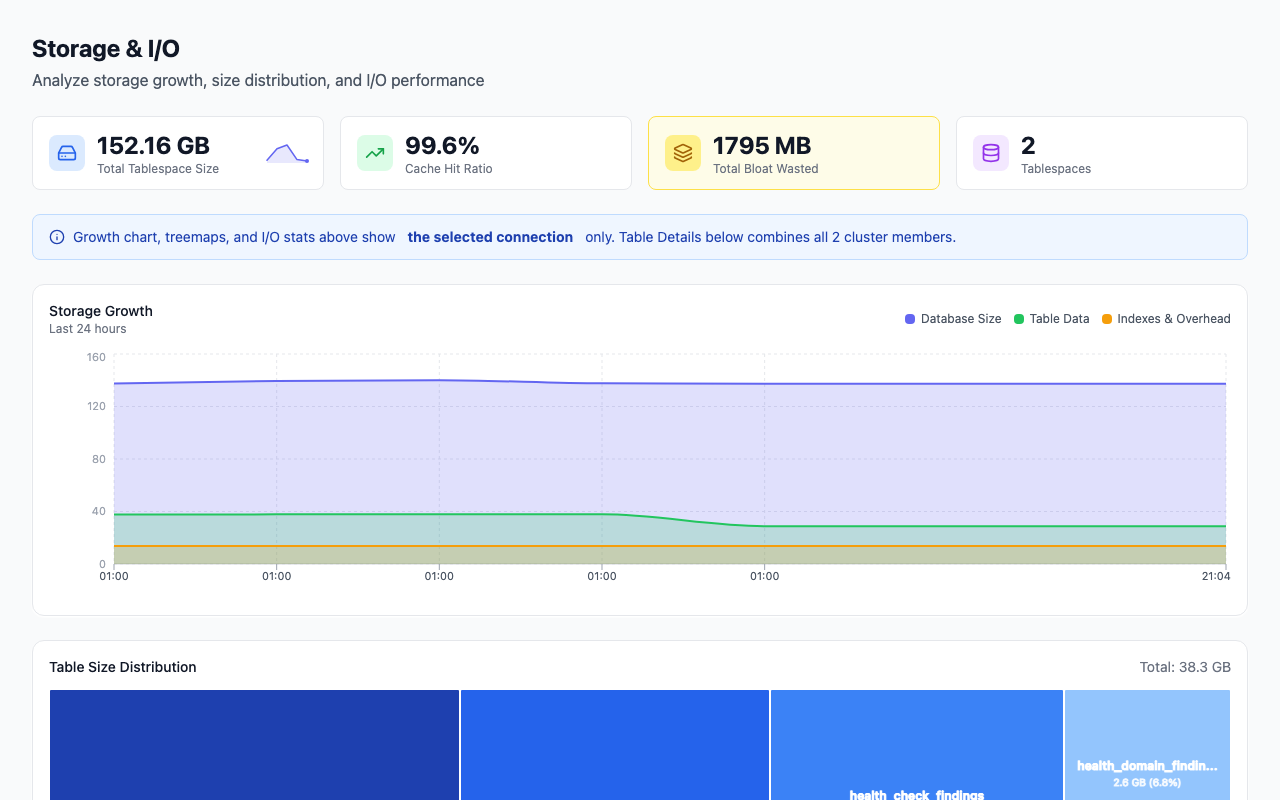
The Storage page shows each database's total size as a trend line rather than a single figure, using the same pg_database_size() reading the collector takes every cycle, so the slope from the snapshot query above is drawn for you. The point of the chart is the direction: a database that is 400 GB and flat is a very different situation from one that is 40 GB and doubling monthly. Below the trend, the same page breaks the total down by schema and by the largest relations, which is where you go next when a database is growing and you want to know which table is responsible; checking table and schema sizes covers that drill-down.
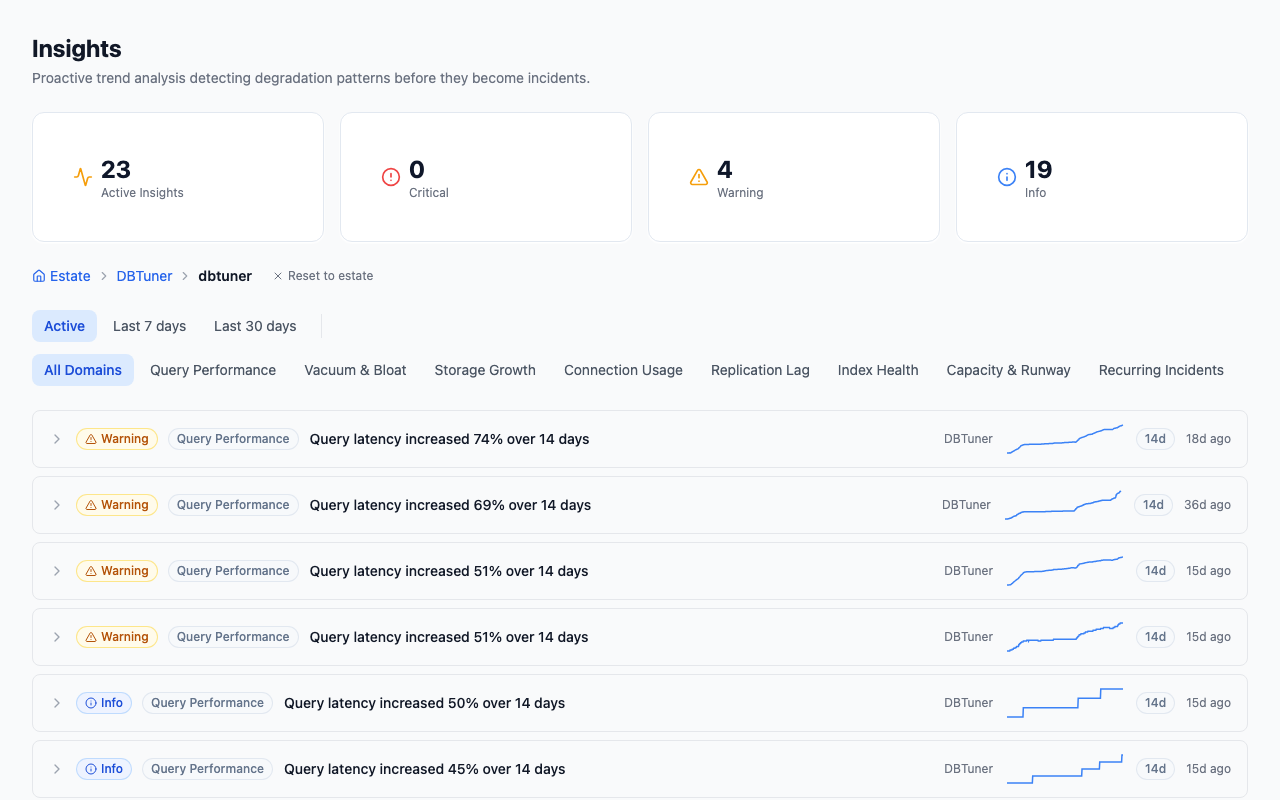
The Insights page has a Capacity & Runway domain that turns the growth rate into a time-to-impact figure per disk mount, shown as an ETA chip such as "≈ N days to limit". It uses the collector's disk-space readings for the mount, not pg_database_size, so it accounts for WAL and temp files that the database size function cannot see, and it also tracks WAL retained by replication slots as its own runway. The two continuously scored storage checks behind this are database size against a threshold and 24-hour growth; across 46 monitored instances, 2.2% currently fail the growth check. If you want to see where your own instance sits, the free health check runs the same checks against your database within a few minutes of connecting a collector.
How to fix it
If the number is larger than you expected, work through these in order; each one is a different root cause with a different remedy.
1. Confirm which layer is big. Compare sum(pg_database_size), sum(size) FROM pg_ls_waldir() and df on the volume. If the databases account for most of the disk, continue to step 2; if WAL does, skip to step 4; if neither does, look for logs, backup spool or a temp-file spike (step 5). 2. Find the relations. SELECT relname, pg_size_pretty(pg_total_relation_size(oid)) FROM pg_class WHERE relkind IN ('r','m') ORDER BY pg_total_relation_size(oid) DESC LIMIT 20; names the tables, including their indexes and TOAST. Do this inside each large database, since the size functions only see the current one. 3. Check whether it is bloat rather than data. Dead tuples retained by an old transaction or a slow autovacuum are counted in the size but hold nothing you want. pg_stat_user_tables.n_dead_tup versus n_live_tup is the first look; the pgstattuple extension gives an exact figure. Bloat is reclaimed by VACUUM (space reusable, file not shrunk) or VACUUM FULL/pg_repack (file shrunk, but VACUUM FULL takes an exclusive lock for the duration). 4. Release retained WAL. Query pg_replication_slots as shown above. An inactive slot whose consumer is gone should be dropped with SELECT pg_drop_replication_slot('name');. A slot that is active but lagging needs the consumer fixed, not the slot dropped. Set max_slot_wal_keep_size so a future stall cannot fill the disk; the trade-off is that a slot which exceeds it is invalidated and its consumer must be re-synced. If archive_command is failing, WAL is retained until it succeeds: check pg_stat_archiver.failed_count. 5. Stop temp files spilling. log_temp_files = 0 logs every temp file with its size and the query that made it. For the identified queries, raising work_mem for that session or role is usually the fix; raising it globally multiplies by every concurrent sort and can push the server into swap. temp_file_limit caps what a single session can write so one bad query cannot take the volume down. 6. Drop what nobody reads. Unused indexes (pg_stat_user_indexes.idx_scan = 0 over a long window) and abandoned tables are the cheapest space you will ever recover.
How to prevent it
- Snapshot size daily with the
db_size_historytable above, or let a monitoring tool do it, and alert on the growth rate crossing a threshold you have thought about, not on absolute size. - Alert on days-to-full, not percent used. 85% used with 400 days of runway is fine; 60% used with 9 days is not. The runway calculation needs the volume's free space and a growth rate, both of which you now have.
- Set
max_slot_wal_keep_sizeto a value the disk can absorb. The default of-1means a stalled replica or logical consumer can consume every byte. - Set
temp_file_limitper role for anything that runs ad-hoc analytics. Turn onlog_temp_filesso the spills are attributable. - Watch
pg_stat_archiverif you archive WAL. A silent archive failure looks exactly like WAL growth until you checklast_failed_time. - Reconcile against the volume. Once a week, compare
sum(pg_database_size) + pg_ls_waldirwithdf. A widening gap is something outside PostgreSQL's size functions, usually logs or a backup tool's local spool.
Our own fleet data is a reminder that the database size itself is rarely the thing that goes wrong: across 50 monitored instances, 0% fail the absolute database-size check, while the temp-file check fails on 40.4% of 47 and the growth check on 2.2% of 46. The disk fills from the parts pg_database_size does not measure more often than from the part it does. The rest of the PostgreSQL monitoring tools guide covers the other signals that tend to move before the disk does.
FAQ
Does pg_database_size include indexes and TOAST?
Yes. It measures every file belonging to the database's relations, which includes heap tables, all of their indexes, TOAST tables and their indexes, materialized views and sequences. What it does not include is WAL, temp files, or any relation belonging to another database.
Why is du on the data directory bigger than the sum of pg_database_size?
Because the data directory also holds pg_wal, pg_xact, pg_multixact, pg_stat_tmp, temporary files in base/pgsql_tmp, and possibly server logs. None of those belong to a database, so no size function counts them. If the difference is large, sum(size) FROM pg_ls_waldir() will usually explain most of it.
Why does the RDS or Aurora console show more storage used than my query?
RDS FreeStorageSpace measures the volume, which includes WAL, temp files and logs. Aurora VolumeBytesUsed measures a shared storage layer that keeps space allocated after deletes. pg_database_size measures only the live relation files, so it will always be the smallest of the three. The Aurora storage model article goes into why the Aurora figure behaves the way it does.
How much WAL is normal?
Between one and two times max_wal_size (default 1 GB) while checkpoints keep up, plus whatever wal_keep_size reserves. Anything much beyond that is being retained by a replication slot, a failing archive_command, or a checkpoint that cannot finish; pg_replication_slots.wal_status and pg_stat_archiver tell you which.
Can I shrink a database after deleting data?
DELETE and plain VACUUM mark space reusable inside the file but do not return it to the operating system, so pg_database_size stays the same until new rows reuse it. To actually shrink the file you need VACUUM FULL, CLUSTER, or an online tool such as pg_repack, all of which rewrite the table. Plan for the rewrite to need roughly the table's size in free disk while it runs.
Part of the PostgreSQL Monitoring Tools Compared (2026) guide. Last verified against PostgreSQL 18, 2026-09-16.