How do you see what is running right now in PostgreSQL?
Query pg_stat_activity. It has one row per server process, with the session's state, the statement in query, when it started in query_start, and what it is waiting on in wait_event_type/wait_event. Filter state = 'active' and order by now() - query_start to see the longest-running queries; call pg_blocking_pids(pid) to see who is blocking whom.
Key facts
| Fact | Value | |---|---| | Rows in pg_stat_activity | One per server process, including background workers, autovacuum and WAL processes; backend_type = 'client backend' isolates user sessions (docs) | | state values | active, idle, idle in transaction, idle in transaction (aborted), fastpath function call, disabled (docs) | | query column | The most recent statement, even when the session is idle; only the executing statement when state = 'active' (docs) | | track_activity_query_size | Default 1024 bytes; longer statements are truncated; changing it needs a restart (docs) | | idle_in_transaction_session_timeout | Default 0 (disabled); terminates a session idle inside an open transaction for longer than the value (docs) | | Who sees other users' rows | Superusers and members of pg_read_all_stats; everyone else sees their own sessions in full and NULL query/wait columns for the rest (docs) | | pg_cancel_backend vs pg_terminate_backend | Cancel stops the current query and keeps the session; terminate ends the session and rolls back its transaction (docs) | | Fleet data | Across 47 monitored instances, 2.1% currently fail the idle-in-transaction check; across 38, 52.6% have log_lock_waits off (seo_aggregate_health_stats, 2026-09-16) |
Why this happens
PostgreSQL runs one process per connection, and each publishes a small block of shared memory describing what it is doing. pg_stat_activity is a read of those blocks: cheap, always current, and unlike pg_stat_statements not a history. The monitoring docs list every column; the ones that answer "what is running right now" are:
state— the session's current condition.activemeans a statement is executing.idlemeans connected with nothing in flight.idle in transactionmeans aBEGINwas issued and the client has not yet committed or rolled back.wait_event_type/wait_event— if the process is not on CPU, what it is waiting for.Lockmeans it is queued behind another session;IOmeans it is reading or writing;Clientmeans it is waiting for the application. Both are NULL when the process is on CPU. The full table of event names is in the wait event reference, and our wait events guide explains which ones matter.backend_type—client backendfor user sessions, plusautovacuum worker,walsender,checkpointer,background workerand so on. Filter on it, or a "long-running query" list will include the checkpointer.xact_start,query_start,state_change— when the transaction began, when the current (or most recent) statement began, and whenstatelast changed.now() - query_startis the age of the statement;now() - state_changeon anidle in transactionrow is how long the client has been sitting on an open transaction.query— the statement text. The docs are explicit that this is the most recently executed query: for anidleoridle in transactionsession it shows what ran last, not something that is running. A longquerynext tostate = 'idle'is history, not load. Text longer thantrack_activity_query_size(default 1024 bytes) is cut off.backend_xid/backend_xmin— the transaction ID this backend holds, and the oldest transaction ID it can still see. An oldbackend_xminpins the vacuum horizon for the whole database, which is why one forgotten transaction makes dead tuples pile up everywhere. Our WAL and vacuum monitoring post follows that thread.leader_pid— for a parallel worker, thepidof the client backend it belongs to; NULL otherwise. Group by it to count a parallel query once.
The idle-in-transaction trap
idle in transaction is the state most worth watching. The session is doing nothing, but the locks it acquired are still held and its backend_xmin still pins vacuum. The usual shape: an application opens a transaction, runs an UPDATE, then makes an HTTP call or crashes without closing the connection. Anything needing a conflicting lock queues behind it; a migration that needs ACCESS EXCLUSIVE then queues everything else behind itself. PostgreSQL ships idle_in_transaction_session_timeout for exactly this, and its default is 0, disabled.
How to detect it
All three queries below need only pg_read_all_stats (or pg_monitor) to see every session; without it, other users' query text comes back NULL.
Connections by state, per database. Run this first: it tells you whether the problem is one query or a pool that has drifted into idle in transaction.
SELECT datname,
       state,
       count(*)                                          AS sessions,
       max(now() - state_change)                         AS oldest_in_state
FROM   pg_stat_activity
WHERE  backend_type = 'client backend'
GROUP  BY datname, state
ORDER  BY datname, sessions DESC;
Healthy output is mostly idle with short oldest_in_state and a few active. A row for idle in transaction with oldest_in_state in minutes is the trap above; a row for idle in transaction (aborted) means a statement errored and the client never rolled back.
Longest-running statements. This is the "what is running right now" query. It excludes background processes and your own session, and shows the wait state so you can tell "slow" from "queued".
SELECT pid,
       leader_pid,
       datname,
       usename,
       application_name,
       state,
       wait_event_type,
       wait_event,
       now() - xact_start                                AS xact_age,
       now() - query_start                               AS query_age,
       left(query, 120)                                  AS query
FROM   pg_stat_activity
WHERE  backend_type = 'client backend'
AND    state <> 'idle'
AND    pid <> pg_backend_pid()
ORDER  BY query_start NULLS LAST
LIMIT  20;
Read state and wait_event_type together. active with NULL wait columns is genuinely computing. active with Lock is waiting on another session and no amount of tuning the statement will help until the blocker is dealt with. idle in transaction with a large xact_age is the row you cancel, terminate, or go and find in the application. If query ends abruptly at about a kilobyte, that is track_activity_query_size, not a broken statement.
Who is blocking whom. pg_stat_activity cannot draw the chain by itself; pg_blocking_pids(pid) returns the array of process IDs that are holding or queued ahead of the lock that the given process wants.
SELECT blocked.pid                                       AS blocked_pid,
       blocked.usename                                   AS blocked_user,
       now() - blocked.query_start                       AS blocked_for,
       left(blocked.query, 80)                           AS blocked_query,
       blocker.pid                                       AS blocking_pid,
       blocker.state                                     AS blocker_state,
       now() - blocker.state_change                      AS blocker_in_state_for,
       left(blocker.query, 80)                           AS blocker_last_query
FROM   pg_stat_activity blocked
JOIN   LATERAL unnest(pg_blocking_pids(blocked.pid)) AS b(pid) ON true
JOIN   pg_stat_activity blocker ON blocker.pid = b.pid
WHERE  cardinality(pg_blocking_pids(blocked.pid)) > 0
ORDER  BY blocked_for DESC;
Each output row is one edge in the blocking graph. A blocker whose blocker_state is idle in transaction is the classic root cause: it is holding a lock and doing nothing. A blocker that is itself active and waiting on Lock is an intermediate link; follow its pid back through the same query to find the root. This is what the /locks page in MyDBA draws as a tree (below); the wait event analysis post covers lock-heavy waits over time.
How MyDBA shows this
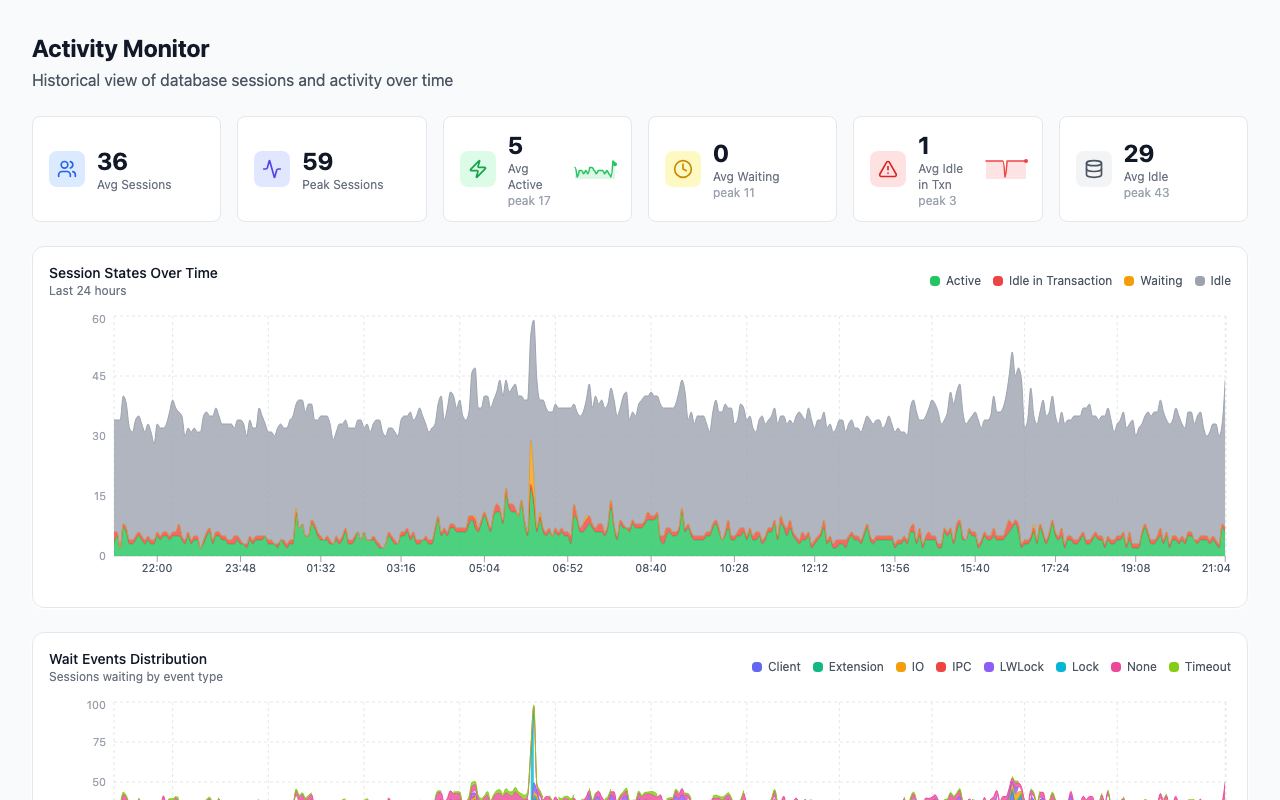
The collector samples pg_stat_activity on its fast tier and keeps the samples, so the Activity Monitor at /activity shows the same columns as the query above — state, wait event, backend type, statement age and the statement itself — but for any point in the retained window, not just the moment you happened to run psql. Sessions sort by age, and idle in transaction rows are highlighted because they usually need a decision. The current-database triage page at /now ("What's happening now?") sits one level above it: it ranks deterministic findings for the selected database, shows a sparkline per signal with the previous 24-hour average drawn alongside so a spike reads as a spike rather than a number, and labels each card with source and freshness so a stale collector is not mistaken for a quiet database. The activity monitor post walks through the page.
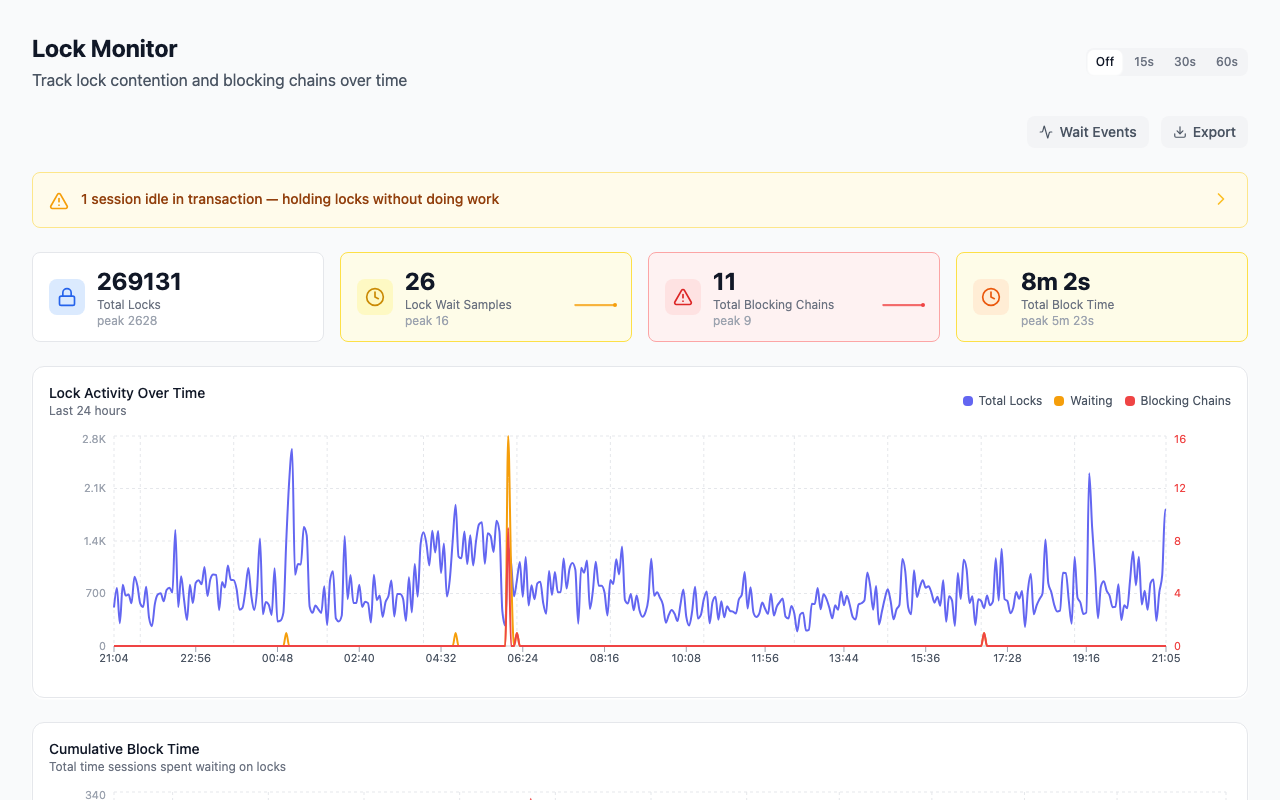
The Lock Monitor at /locks resolves the pg_blocking_pids() graph into a tree and labels each node Root Blocker, Intermediate or Blocked, so the session to act on is the one at the top rather than whichever row happened to sort first. It also keeps a "Blocking Chains in Period" history and a deadlock history, which a live query cannot give you after the fact. Across the 47 monitored instances in our aggregate stats, 0.0% currently fail the blocking-chains check and 2.1% fail the idle-in-transaction check — lock trouble is rare in steady state, which is why the history matters when it happens. You can start with a free health check of your own instance at mydba.dev and see the same views against your data.
How to fix it
1. Identify the root. Run the blocking query above. Note the blocking_pid whose own blocker_state is not waiting on Lock; that is the root. Note its application_name and client_addr too. 2. Cancel before you terminate. pg_cancel_backend(pid) sends the equivalent of Ctrl-C: the running statement aborts, the session stays connected, and the transaction is left open for the client to roll back. It only helps when the root is active. For an idle in transaction root there is no statement to cancel, so cancel does nothing. 3. Terminate an idle-in-transaction root. pg_terminate_backend(pid) ends the session, rolls back its open transaction, and releases every lock it held. Since PostgreSQL 14 it takes an optional timeout in milliseconds and waits for the process to exit. Which of the two to reach for, and what each does to the application, is the subject of pg_cancel_backend vs pg_terminate_backend. Both need superuser, the pg_signal_backend role, or ownership of the target session. 4. Confirm the chain drained. Re-run the blocking query. If new edges appear with a different root, the first termination exposed a second stalled transaction; repeat. 5. Fix the application, not just the symptom. A session that went idle in transaction did so because the code opened a transaction and did not close it on every path. Look for transaction scopes that wrap network calls, ORM sessions that autobegin, and pools that return a connection without a ROLLBACK. Terminating the pid buys minutes; the pattern recurs until the code changes.
How to prevent it
- Set
idle_in_transaction_session_timeout. A value such as5min(or lower for an OLTP pool) means a forgotten transaction is rolled back by the server before it can queue a migration behind it. Set it per role withALTER ROLE ... SETif a reporting job needs longer. The docs note this is meant for preventing idle sessions from holding locks for unreasonably long. - Set
statement_timeoutfor application roles.statement_timeoutbounds how long any single statement may hold locks or CPU. Pair it withlock_timeouton migration sessions so a DDL statement that cannot get its lock fails fast instead of queuing every other session behind it. - Consider
transaction_timeouton PostgreSQL 17+.transaction_timeoutcaps the whole transaction regardless of whether it is active or idle, closing the gap between the two settings above. - Turn on
log_lock_waits. Withlog_lock_waits = on, any session that waits longer thandeadlock_timeout(default 1s) writes a line naming the lock and the pids involved, so you have evidence after the fact. Across 38 monitored instances in our aggregate stats, 52.6% still have it off; it is a one-line change with no measurable cost on most workloads. - Raise
track_activity_query_sizeif your statements are long. ORMs routinely generate statements past 1024 bytes; 4096 costs a few kilobytes per connection and meansqueryreaches the WHERE clause. It needs a restart. - Sample and alert, do not just look.
pg_stat_activityhas no memory; the chain that blocked checkout at 03:14 is gone by 03:15. Sample it into a table and alert oncount(*) FILTER (WHERE state = 'idle in transaction' AND now() - state_change > interval '1 min')and on any non-emptypg_blocking_pids(). If connections themselves are the constraint, the max_connections and memory guide and connection pooling posts cover the sizing side. The PostgreSQL monitoring tools hub compares the other views worth sampling.
FAQ
Why does query show a statement when state is idle?
Because the column holds the most recently executed statement, not the currently executing one. The docs say query is the text of the backend's most recent query, and that it is the running query only when state is active. Always read query together with state; an idle session showing a large UPDATE finished that update some time ago.
Why is query NULL for other users' sessions?
You are not a superuser and not a member of pg_read_all_stats. Every user can see every row in pg_stat_activity, but query, wait_event and a few other columns are shown only for their own sessions unless they hold that role (or pg_monitor, which includes it). Grant it to the monitoring role rather than making that role a superuser.
What is the difference between pg_cancel_backend and pg_terminate_backend?
pg_cancel_backend(pid) interrupts the statement that is currently executing and leaves the session connected, with its transaction still open for the client to roll back. pg_terminate_backend(pid) ends the session outright, which rolls back its transaction and releases its locks. Cancel is the right first move for a runaway active query; terminate is the only move that helps against an idle in transaction blocker, since there is nothing running to cancel.
Why does my long-running-query list include the checkpointer and autovacuum?
Because pg_stat_activity has a row for every server process, and background processes have a query_start from when they last did something, or NULL. Filter on backend_type = 'client backend' for user sessions. Autovacuum is worth a separate look, though: a VACUUM active for hours on a large table is normal, but one waiting on Lock behind an idle-in-transaction session is the same problem in a different hat.
Part of the PostgreSQL Monitoring Tools Compared (2026) guide. Last verified against PostgreSQL 18, 2026-09-16.