Best PostgreSQL Hosting in 2026: RDS vs Supabase vs Neon vs Self-Hosted
Best PostgreSQL Hosting in 2026: RDS vs Supabase vs Neon vs DigitalOcean
There are now more ways to run PostgreSQL in the cloud than there are PostgreSQL configuration parameters worth tuning. Here is an honest comparison based on running production workloads on most of them.
The "best PostgreSQL hosting" depends entirely on what you are building, how much traffic you handle, and how much operational responsibility you want to carry. A side project with 100 users has fundamentally different needs than an e-commerce platform processing thousands of transactions per second. This guide compares eight hosting options across the dimensions that actually matter, with real pricing and honest trade-offs.
How We Evaluate PostgreSQL Hosting
Before diving into individual providers, here are the criteria that matter most when choosing where to run PostgreSQL:
- Performance — Query latency, throughput under load, connection handling, I/O performance.
- Pricing — Monthly cost at different scales. Hidden fees (data transfer, IOPS, backups) matter as much as the headline price.
- PostgreSQL version support — How quickly do they adopt new major versions? Can you run PostgreSQL 17 today?
- Extension support — Can you install
pg_stat_statements,PostGIS,pgvector,pg_cron,TimescaleDB? Extension availability is often the deciding factor for production workloads. - Scaling options — Vertical scaling, read replicas, connection pooling, auto-scaling, scale-to-zero.
- Backup and recovery — Automated backups, point-in-time recovery (PITR), cross-region backups, retention policies.
- Connection pooling — Built-in PgBouncer or equivalent? This matters enormously for serverless and high-concurrency workloads.
- Monitoring — What visibility do you get out of the box? Basic CPU/memory charts or deep PostgreSQL-specific insights?
With those criteria established, let us walk through each option.
AWS RDS for PostgreSQL
The enterprise default.
AWS RDS is the most widely deployed managed PostgreSQL service in the world. If your company already runs on AWS, RDS is the path of least resistance, and it is a genuinely solid product.
Strengths:
- Mature and battle-tested. RDS has been running PostgreSQL since 2013.
- Multi-AZ deployments provide automatic failover with a synchronous standby replica. Failover typically completes in under 60 seconds.
- Extensive instance selection: from burstable
db.t4g.micro(2 vCPU, 1 GB) to memory-optimizeddb.r7g.16xlarge(64 vCPU, 512 GB). You can right-size precisely. - IAM database authentication eliminates password management for applications running on AWS.
- Automated backups with up to 35 days of PITR retention. Snapshots can be copied across regions.
- Aurora PostgreSQL option for workloads that need extreme throughput. Aurora's distributed storage layer handles up to 128 TB and replicates six ways across three availability zones.
Weaknesses:
- Expensive. A production-ready Multi-AZ
db.r6g.xlarge(4 vCPU, 32 GB) runs approximately $550/month before storage and I/O costs. - Complex pricing. You pay separately for instance hours, storage (GP3 vs IO2), provisioned IOPS, data transfer, backup storage beyond the allocated amount, and Performance Insights if you enable it. Estimating your real monthly bill requires a spreadsheet.
- Limited extension support compared to self-hosted PostgreSQL. Some extensions require parameter group changes and instance restarts. Extensions like
pgauditandpg_stat_statementsare available, but you cannot install arbitrary extensions from source. - No scale-to-zero. Even the smallest instance runs 24/7. You can stop an instance, but you still pay for storage, and there is no automatic resume on connection.
- No superuser access. You get
rds_superuser, which covers most administrative tasks but occasionally blocks operations that require true superuser privileges.
Typical pricing:
| Configuration | Monthly Cost (us-east-1) | |---|---| | Dev: db.t4g.medium (2 vCPU, 4 GB), 20 GB gp3 | ~$60 | | Prod: db.r6g.xlarge (4 vCPU, 32 GB), 100 GB gp3, Multi-AZ | ~$580 | | Scale: db.r6g.4xlarge (16 vCPU, 128 GB), 500 GB gp3, Multi-AZ | ~$2,100 |
Supabase
PostgreSQL plus a full backend-as-a-service stack.
Supabase gives you a dedicated PostgreSQL instance with an instant REST API (PostgREST), authentication, file storage, real-time subscriptions, and edge functions. It is the fastest path from zero to a working application with a PostgreSQL backend.
Strengths:
- Generous free tier: 500 MB database, 50,000 monthly active users, unlimited API requests. Two active projects.
- Instant APIs via PostgREST — create a table and you immediately have a full CRUD API with filtering, pagination, and relationships. No backend code required.
- Built-in connection pooling via Supavisor (PgBouncer replacement), handling thousands of concurrent connections from serverless functions.
- Good extension support:
pgvector,PostGIS,pg_cron,pg_stat_statements,pgrouting, and dozens more are available. - Direct database access via standard PostgreSQL connection strings. Supabase instances are standard PostgreSQL, so tools like myDBA.dev connect directly and provide automated health checks, query analysis, and extension monitoring.
- Active open-source community and excellent developer documentation.
Weaknesses:
- Free tier projects pause after one week of inactivity. For always-on development databases, this can be disruptive.
- Compute tiers on the Pro plan ($25/month) start at Micro (shared CPU, 1 GB RAM). Real production workloads typically need $50-125/month in compute add-ons.
- Scaling options are more limited than AWS. No Multi-AZ failover. Read replicas are available on higher tiers but less flexible than RDS.
- Database size limits on lower tiers (500 MB free, 8 GB on Pro). Additional storage is $0.125/GB per month.
- Shared infrastructure on the free tier means noisy-neighbor effects are possible during peak hours.
Typical pricing:
| Configuration | Monthly Cost | |---|---| | Dev: Free tier (shared CPU, 500 MB) | $0 | | Prod: Pro plan, Small compute (2 vCPU, 4 GB), 50 GB storage | ~$75 | | Scale: Pro plan, XL compute (8 vCPU, 32 GB), 200 GB storage | ~$350 |
Neon
True serverless PostgreSQL with scale-to-zero.
Neon rewrote the PostgreSQL storage layer to separate compute from storage entirely. This enables two capabilities that no other managed PostgreSQL provider offers: genuine scale-to-zero and instant database branching.
Strengths:
- Scale-to-zero. When no queries are running, your compute shuts down completely and you pay nothing for compute. Cold starts are typically 300-500ms.
- Database branching. Create a full copy of your production database (schema and data) in seconds using copy-on-write storage. Ideal for preview environments, CI/CD testing, and development.
- Generous free tier: 100 compute-hours per month, 0.5 GB storage per project, up to 10 projects. The free tier is genuinely usable for development.
- Usage-based pricing that tracks actual compute consumption, not provisioned capacity. The Launch plan starts at $19/month with 300 compute-hours included.
- Built-in connection pooling via PgBouncer on every endpoint.
- Supports PostgreSQL 17 with a reasonable extension set including
pgvector,PostGIS, andpg_stat_statements.
Weaknesses:
- Cold start latency. If your compute has scaled to zero, the first connection takes 300-500ms to establish. For latency-sensitive production APIs, you may need to configure a minimum compute size to stay warm, which negates the scale-to-zero cost benefit.
- Extension support is narrower than RDS or self-hosted. Notable gaps include
TimescaleDB,pg_cron(available on paid plans), and some less common extensions. - Newer platform. Neon has been generally available since 2023, but it lacks the decade-plus track record of RDS. The Databricks acquisition in 2025 adds financial stability but introduces questions about long-term strategic direction.
- Storage pricing at $0.35/GB/month is competitive for small databases but adds up for larger datasets.
- Write-heavy workloads may see higher latency than traditional PostgreSQL due to the separated storage architecture.
Typical pricing:
| Configuration | Monthly Cost | |---|---| | Dev: Free tier (0.25 CU, 0.5 GB) | $0 | | Prod: Launch plan (up to 4 CU, 50 GB storage) | ~$40-80 | | Scale: Scale plan (up to 10 CU, 200 GB storage) | ~$150-400 |
Note: Neon's usage-based pricing makes exact costs highly dependent on your workload pattern. Bursty workloads with idle periods cost significantly less than steady-state workloads.
DigitalOcean Managed Databases
Simple, predictable, and affordable.
DigitalOcean's managed PostgreSQL is the no-surprises option. Flat monthly pricing, a clean interface, and enough features for most small-to-medium production workloads.
Strengths:
- Predictable pricing with no hidden fees. The price you see includes compute, storage, and data transfer. No separate IOPS charges.
- Simple setup. A production PostgreSQL cluster can be running in under five minutes.
- Standby nodes for high availability are included on higher-tier plans at 2x the base price, with automatic failover.
- Daily automated backups with 7-day retention included. PITR available on HA plans.
- Connection pooling built in.
- Reasonable pricing for the specification: a 4 GB RAM, 2 vCPU node with 80 GB storage runs approximately $60/month.
Weaknesses:
- Limited instance sizes. The largest node is 64 GB RAM with 15 TB storage. If you need more, you have outgrown DigitalOcean.
- Fewer regions than AWS or GCP. Currently 12 data center regions.
- No read replicas on the smallest plans. HA requires paying for at least a 2-node cluster.
- Extension support is more limited than RDS.
PostGISandpgvectorare available, but some extensions are not. - Less sophisticated monitoring. You get basic CPU, memory, disk, and connection metrics. No query-level insights out of the box.
Typical pricing:
| Configuration | Monthly Cost | |---|---| | Dev: 1 vCPU, 2 GB RAM, 25 GB storage | ~$25 | | Prod: 2 vCPU, 4 GB RAM, 80 GB storage | ~$60 | | Scale: 8 vCPU, 32 GB RAM, 580 GB storage | ~$375 |
Google Cloud SQL for PostgreSQL
Solid enterprise option with strong GCP integration.
Cloud SQL is Google's managed PostgreSQL offering. It is a mature, well-engineered product that makes the most sense if you are already invested in the Google Cloud ecosystem.
Strengths:
- Regional high availability with automatic failover across zones. Failover is transparent to applications.
- Tight integration with GKE, Cloud Run, Cloud Functions, and BigQuery. Service account authentication eliminates credential management.
- AlloyDB option for analytical and mixed workloads. AlloyDB claims up to 4x throughput versus standard PostgreSQL for transactional workloads and 100x for analytical queries.
- Maintenance windows and automatic patching with configurable schedules.
- Up to 64 TB storage with automatic storage increases.
Weaknesses:
- Pricing is on par with RDS — not cheap. A comparable 4 vCPU, 32 GB instance costs around $530/month with HA enabled.
- Less flexible than RDS for instance sizing. Predefined machine types cover most needs, but custom configurations have limits.
- Extension support similar to RDS. You get the common extensions but cannot install arbitrary ones.
- Ecosystem lock-in. Cloud SQL integrations are optimized for GCP services. Running your application on AWS while your database is on GCP is technically possible but operationally painful.
Typical pricing:
| Configuration | Monthly Cost | |---|---| | Dev: db-f1-micro (shared vCPU, 0.6 GB), 10 GB SSD | ~$10 | | Prod: db-custom-4-32768 (4 vCPU, 32 GB), 100 GB SSD, HA | ~$560 | | Scale: db-custom-16-131072 (16 vCPU, 128 GB), 500 GB SSD, HA | ~$2,000 |
Azure Database for PostgreSQL (Flexible Server)
The natural choice for Azure-centric organizations.
Azure Flexible Server replaced the older Single Server offering and provides a competent managed PostgreSQL service with good Azure integration.
Strengths:
- Zone-redundant high availability with automatic failover. Same-zone and cross-zone HA options available.
- Citus extension support for distributed PostgreSQL workloads (horizontal sharding). This is unique among the major cloud providers — AWS and GCP do not offer Citus on their managed PostgreSQL services.
- Good burstable tier options. The B-series instances start at approximately $13/month, making it cost-effective for development and testing.
- Stop/Start capability — when the server is stopped, you only pay for storage. Useful for non-production environments.
- PgBouncer built in as a connection pooling option.
- Intelligent tuning recommendations based on workload analysis.
Weaknesses:
- Azure ecosystem lock-in is real. Azure AD integration is excellent, but it ties your authentication story to the Microsoft identity platform.
- Pricing for General Purpose and Memory Optimized tiers is comparable to RDS — no cost advantage.
- Extension support is reasonable (
PostGIS,pgvector,pg_stat_statements,pg_cron) but not exhaustive. Requesting new extensions requires an Azure support ticket. - The Azure Portal and CLI experience is more cumbersome than AWS or GCP equivalents for database management.
Typical pricing:
| Configuration | Monthly Cost | |---|---| | Dev: Burstable B1ms (1 vCPU, 2 GB), 32 GB storage | ~$25 | | Prod: General Purpose D4ds_v5 (4 vCPU, 16 GB), 128 GB, zone-redundant HA | ~$460 | | Scale: Memory Optimized E16ds_v5 (16 vCPU, 128 GB), 512 GB, zone-redundant HA | ~$1,900 |
Render
Developer-friendly PaaS with managed PostgreSQL.
Render is a platform-as-a-service that competes with Heroku, offering managed PostgreSQL alongside web services, background workers, and cron jobs. It appeals to developers who want to deploy applications and databases in one place without dealing with infrastructure.
Strengths:
- Simple, transparent pricing. Compute and storage are billed separately, so you pay for exactly what you use.
- Free tier with 1 GB storage that never expires. Good for prototyping and personal projects.
- Tight integration with Render's web services and cron jobs. Deploy your application and database from the same dashboard.
- Automated daily backups on paid plans. Point-in-time recovery available on higher tiers.
- Good developer experience. Git-push deploys for your application with environment variables injected automatically.
Weaknesses:
- Limited scaling options. The largest instance type (Pro Ultra) provides 32 GB RAM and 8 vCPU. Production workloads with serious scale requirements will outgrow Render.
- No high availability on lower tiers. HA with automatic failover is only available on Pro plans and above.
- Fewer regions compared to major cloud providers. Currently limited to US and EU regions.
- Extension support is more restricted. You can enable some extensions but the list is shorter than RDS or Supabase.
- No read replicas. If you need to distribute read traffic, Render does not currently support it.
Typical pricing:
| Configuration | Monthly Cost | |---|---| | Dev: Free tier (256 MB RAM, 1 GB storage) | $0 | | Prod: Standard (2 GB RAM, 1 vCPU), 50 GB storage | ~$35 | | Scale: Pro Plus (8 GB RAM, 4 vCPU), 200 GB storage | ~$200 |
Self-Hosted on a VPS
Maximum control and minimum cost — if you are willing to do the work.
Running PostgreSQL on a VPS from Hetzner, OVH, Linode, or bare metal gives you the best price-to-performance ratio and complete control. This is the option for teams that have the operational expertise and want to avoid vendor lock-in entirely.
Strengths:
- Cheapest option for raw performance. A Hetzner dedicated server with 64 GB RAM, 8-core CPU, and 2x 512 GB NVMe SSDs costs approximately EUR 55/month (~$60). The equivalent compute on RDS would cost $800+.
- Full superuser access. Install any extension, configure any parameter, run any administrative command. No restrictions.
- All extensions supported.
TimescaleDB,Citus,pg_cron,pgvector,PostGIS,pgaudit, custom C extensions — everything works. - No vendor lock-in. Your data lives on machines you control. Migration is a
pg_dumpor physical backup away. - Complete control over PostgreSQL configuration, kernel parameters, filesystem settings, and backup strategy.
Weaknesses:
- You manage everything. Backups, high availability, failover, security patches, monitoring, connection pooling, SSL certificates, disk management — it is all on you.
- Setting up proper HA requires significant expertise: streaming replication, Patroni or repmgr for automatic failover, a load balancer for routing. Most teams underestimate this effort.
- No built-in scaling. Vertical scaling means migrating to a bigger server with downtime. Horizontal scaling requires manual replication setup.
- Security responsibility. You own firewall rules, authentication configuration, encryption at rest, and network isolation.
- On-call is on you. When the disk fills up at 3 AM, there is no support ticket to file.
Typical pricing:
| Configuration | Monthly Cost | |---|---| | Dev: Hetzner CX22 (2 vCPU, 4 GB, 40 GB NVMe) | ~$5 | | Prod: Hetzner CCX33 (8 vCPU, 32 GB, 240 GB NVMe) | ~$45 | | Scale: Hetzner dedicated (AMD Ryzen 9, 128 GB, 2x 1TB NVMe) | ~$85 |
Note: Add $5-20/month for automated backup storage, and factor in the engineering time cost of managing the infrastructure.
Monitoring Regardless of Hosting
Whichever provider you choose, the monitoring challenge remains the same. Managed databases give you basic dashboards showing CPU, memory, connections, and disk usage. But these surface-level metrics do not tell you what PostgreSQL is actually doing.
The questions that matter in production require deeper visibility:
- Which queries regressed after the last deployment, and what changed in their execution plans?
- Which tables are approaching transaction ID wraparound and need proactive vacuuming?
- Which indexes are missing, causing sequential scans on tables with millions of rows?
- Are your
pgvectorindexes properly configured, or are similarity searches falling back to sequential scans? - Is autovacuum keeping up with your write throughput, or are dead tuples accumulating?
Managed providers are not incentivized to surface this level of detail. AWS Performance Insights shows top queries and wait events but does not recommend indexes or detect plan regressions. Supabase offers a query performance dashboard but not extension-level monitoring. DigitalOcean gives you almost nothing beyond system metrics.
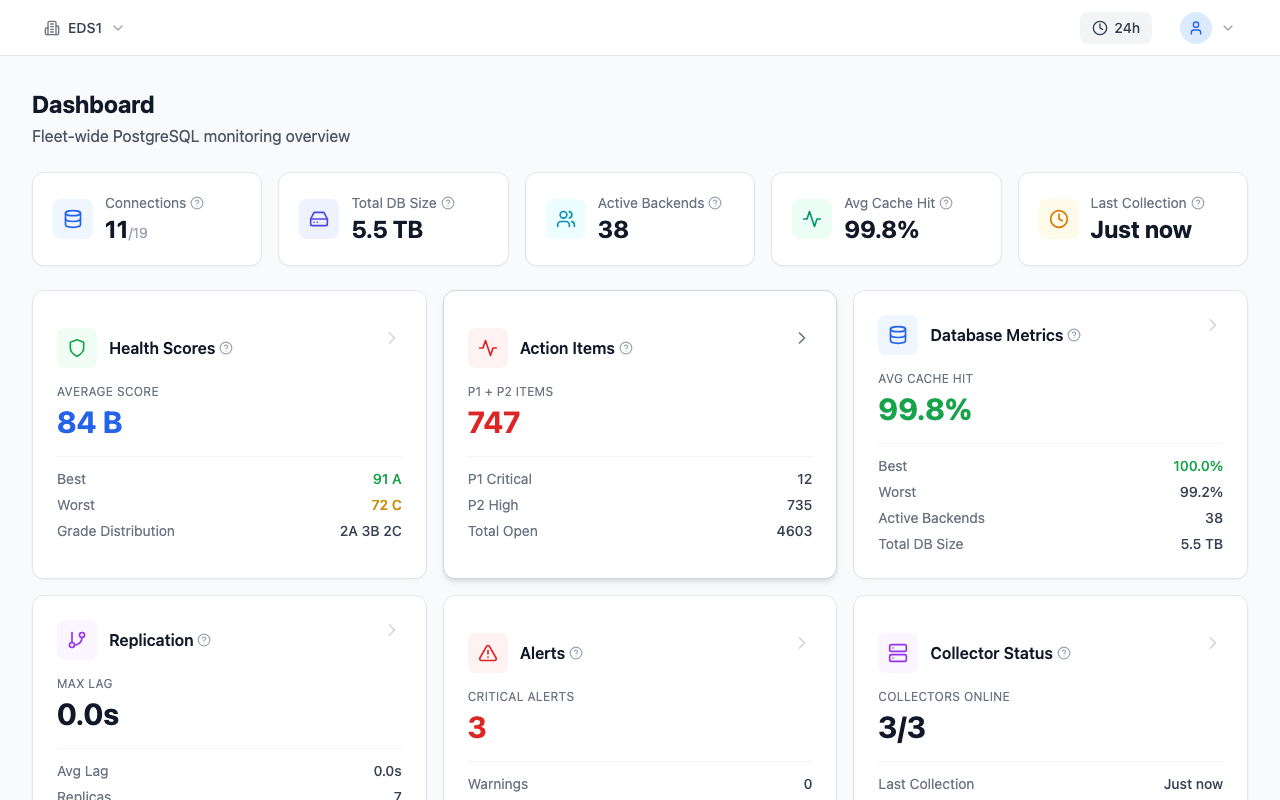
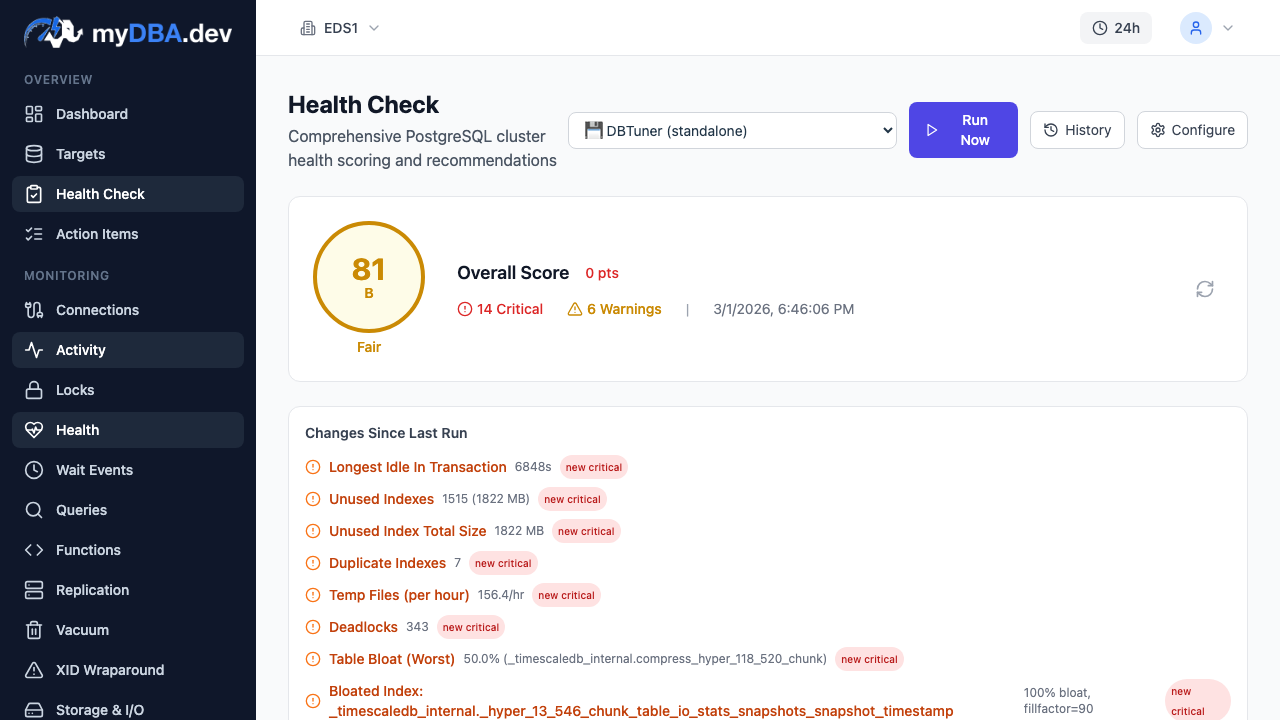
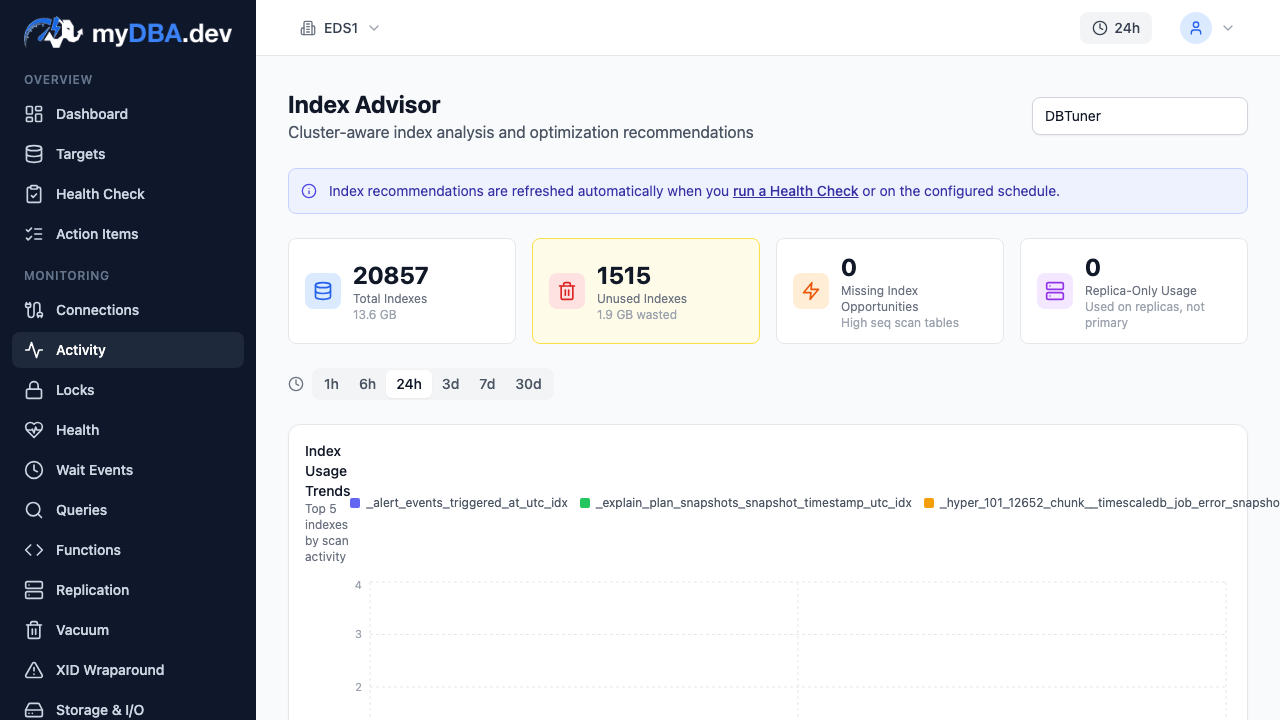
myDBA.dev fills this gap for any PostgreSQL hosting provider. It connects to your database via a lightweight collector, analyzes query performance, runs automated health checks across 70+ PostgreSQL-specific rules, detects index opportunities, monitors extension health (pgvector, PostGIS, TimescaleDB), and tracks vacuum and WAL metrics. It works identically whether your PostgreSQL runs on RDS, Supabase, Neon, DigitalOcean, or a Hetzner VPS.
Pricing Comparison Table
Here is a consolidated view of monthly costs across three common deployment sizes. All prices are approximate and based on US/EU regions as of early 2026.
| Provider | Development (2 vCPU, 4 GB, 20 GB) | Production (4 vCPU, 32 GB, 100 GB) | Scale (16 vCPU, 128 GB, 500 GB) | |---|---|---|---| | AWS RDS | ~$60 | ~$580 (Multi-AZ) | ~$2,100 (Multi-AZ) | | Supabase | $0 (free tier) | ~$75 | ~$350 | | Neon | $0 (free tier) | ~$40-80 | ~$150-400 | | DigitalOcean | ~$25 | ~$60 | ~$375 | | Google Cloud SQL | ~$10 (micro) | ~$560 (HA) | ~$2,000 (HA) | | Azure Flexible | ~$25 | ~$460 (HA) | ~$1,900 (HA) | | Render | $0 (free tier) | ~$35 | ~$200 | | Self-hosted (Hetzner) | ~$5 | ~$45 | ~$85 |
The price gap between self-hosted and managed services is striking. You are paying 5-20x more for the managed option at scale. Whether that premium is worth it depends on how you value your engineering team's time versus the hosting bill.
Decision Framework
Choosing the best PostgreSQL hosting comes down to matching your priorities with each provider's strengths.
Budget under $10/month? Start with Neon's free tier or Supabase's free tier. Both offer enough for development, prototyping, and small personal projects. Neon's scale-to-zero means you genuinely pay nothing during idle periods. If you need an always-on database and do not need the API layer, a Hetzner VPS for $5/month gives you a full PostgreSQL instance with superuser access.
Early-stage startup building an MVP? Supabase is hard to beat. The combination of instant APIs, built-in auth, and a real PostgreSQL database eliminates weeks of backend development. When you outgrow the free tier, the Pro plan at $25/month plus compute add-ons is reasonable. Neon is a strong alternative if you value database branching for your CI/CD pipeline over the BaaS features.
Mid-size production workload (thousands of daily active users)? DigitalOcean offers the best balance of simplicity and affordability. Predictable pricing, easy management, and solid performance for most workloads. If you need more advanced features (read replicas, extensive extension support, fine-grained instance sizing), RDS is the step up.
Enterprise with compliance requirements? AWS RDS or Google Cloud SQL, depending on your existing cloud provider. Both offer the compliance certifications (SOC 2, HIPAA, PCI DSS), encryption options, audit logging, and HA configurations that enterprise security teams require. Azure Flexible Server if you are already in the Microsoft ecosystem, especially if you need Citus for distributed workloads.
Maximum performance per dollar, and your team can operate PostgreSQL? Self-hosted. A Hetzner dedicated server delivers roughly 10x the compute per dollar compared to any managed service. You get superuser access, all extensions, and full control. Pair it with Patroni for HA, pgBackRest for backups, and myDBA.dev for monitoring, and you have an enterprise-grade PostgreSQL deployment at a fraction of the cost.
Full Comparison Table
| Criteria | AWS RDS | Supabase | Neon | DigitalOcean | Cloud SQL | Azure Flexible | Render | Self-hosted | |---|---|---|---|---|---|---|---|---| | PG 17 support | Yes | Yes | Yes | Yes | Yes | Yes | Yes | Yes | | Free tier | No | Yes (500 MB) | Yes (0.5 GB) | No | No | No | Yes (1 GB) | N/A | | Scale-to-zero | No | No | Yes | No | No | Stop/Start | No | No | | HA / Failover | Multi-AZ | Limited | N/A | Standby nodes | Regional HA | Zone-redundant | Pro+ only | DIY (Patroni) | | Read replicas | Up to 15 | Higher tiers | Read-only compute | HA plans | Up to 10 | Up to 5 | No | DIY | | Connection pooling | No (add PgBouncer) | Supavisor built-in | PgBouncer built-in | Built-in | No (add PgBouncer) | PgBouncer built-in | Limited | DIY | | PITR | Up to 35 days | Pro plan | Free plan (6h) | HA plans | 7 days default | Up to 35 days | Higher tiers | DIY (pgBackRest) | | Extension support | Good | Good | Moderate | Limited | Good | Good | Limited | Complete | | pgvector | Yes | Yes | Yes | Yes | Yes | Yes | Limited | Yes | | PostGIS | Yes | Yes | Yes | Yes | Yes | Yes | Limited | Yes | | TimescaleDB | Limited | Yes | No | No | No | No | No | Yes | | pg_cron | Yes | Yes | Paid plans | No | Yes | Yes | No | Yes | | Superuser access | No | No | No | No | No | No | No | Yes | | Regions | 30+ | 12 | 10+ | 12 | 35+ | 60+ | 4 | Anywhere | | Monitoring depth | Performance Insights | Basic dashboard | Basic metrics | System metrics | Cloud Monitoring | Azure Monitor | Minimal | DIY + tools |
The Honest Answer
There is no single best PostgreSQL hosting provider. There is the best provider for your situation.
If you are prototyping, use a free tier — Supabase, Neon, or Render all work. If you are building a startup, Supabase's developer experience is unmatched. If you need predictable pricing and simplicity, DigitalOcean delivers. If you need enterprise features and your organization is on AWS, RDS is the default for a reason. And if you want maximum control and minimum cost, self-hosted PostgreSQL on affordable hardware remains the most powerful option.
What matters more than the hosting choice is how you monitor and maintain what you build. A well-monitored PostgreSQL instance on a $15/month DigitalOcean droplet will outperform a neglected RDS instance on a $500/month r6g.xlarge. The hosting provider gives you the infrastructure. What you build on top of it — the indexes, the queries, the vacuum configuration, the connection management — determines whether your application is fast or slow.
Choose the provider that fits your constraints today, and invest the difference in understanding what your database is actually doing.