Preventing XID Wraparound on TimescaleDB Hypertables
Preventing XID Wraparound on TimescaleDB Hypertables
PostgreSQL's autovacuum daemon handles XID wraparound automatically -- until you have 3,000 chunks and autovacuum can't keep up, forcing a shutdown-preventing aggressive vacuum that blocks writes for hours.
XID wraparound is the most catastrophic failure mode in PostgreSQL. It doesn't corrupt data, but it will shut your database down to prevent corruption -- and on TimescaleDB hypertables with hundreds or thousands of chunks, the conditions that trigger it are reached far more easily than on regular tables.
The 32-Bit Transaction ID Problem
PostgreSQL assigns a 32-bit transaction ID (XID) to every write transaction. That gives you roughly 4.2 billion XIDs before the counter wraps around. When it wraps, old transactions would suddenly appear to be in the future, making committed data invisible. PostgreSQL prevents this by refusing to accept new transactions when the oldest unfrozen XID approaches the wraparound boundary.
To keep the counter from ever reaching that point, autovacuum periodically "freezes" old XIDs -- marking rows as visible to all future transactions so their original XIDs can be safely reused. The relevant settings control when this happens:
-- Check your current freeze settings
SELECT
    current_setting('autovacuum_freeze_max_age')::bigint AS freeze_max_age,
    current_setting('vacuum_freeze_min_age')::bigint AS freeze_min_age,
    current_setting('vacuum_freeze_table_age')::bigint AS freeze_table_age;
The critical threshold is autovacuum_freeze_max_age, which defaults to 200 million XIDs. When any relation's XID age exceeds this value, autovacuum switches to aggressive mode -- a more thorough vacuum that scans the entire table to freeze all old XIDs. On a regular table, this is a brief inconvenience. On a hypertable, it's a different story.
Why Hypertables Make This Worse
Every hypertable chunk is a separate PostgreSQL table with its own relfrozenxid -- the XID below which all rows are guaranteed frozen. Autovacuum tracks and vacuums each chunk independently. A hypertable with 365 daily chunks means autovacuum has 365 separate relations to monitor, schedule, and vacuum.
The problem is throughput. Autovacuum has a limited number of worker slots (autovacuum_max_workers, default 3). When hundreds of chunks simultaneously approach the 200 million XID age threshold, three workers cannot process them fast enough. The queue backs up, chunks continue aging, and eventually one of them crosses the emergency threshold at 1.2 billion XIDs -- at which point PostgreSQL logs warnings and starts refusing writes if the situation isn't corrected.
You can check per-chunk XID age directly:
SELECT
    c.chunk_name,
    c.range_start::date AS chunk_start,
    c.range_end::date AS chunk_end,
    age(pg_class.relfrozenxid) AS xid_age,
    CASE
        WHEN age(pg_class.relfrozenxid) > 150000000 THEN 'NEEDS VACUUM FREEZE'
        WHEN age(pg_class.relfrozenxid) > 100000000 THEN 'AGING - vacuum soon'
        ELSE 'OK'
    END AS xid_health
FROM timescaledb_information.chunks c
JOIN pg_class ON pg_class.relname = c.chunk_name
JOIN pg_namespace ON pg_namespace.oid = pg_class.relnamespace
    AND pg_namespace.nspname = c.chunk_schema
WHERE c.hypertable_name = 'your_hypertable'
ORDER BY c.range_start;
If you see multiple chunks with XID ages above 150 million, autovacuum is falling behind and intervention is needed.
Compressed Chunks Get Frozen for Free
This is the single most important fact about XID management on TimescaleDB: compressed chunks have frozen XIDs. When TimescaleDB compresses a chunk, the compression process rewrites the data into a new internal format. The resulting compressed chunk starts with a fresh, frozen XID -- it will never trigger anti-wraparound vacuum because there are no old XIDs to freeze.
You can verify this yourself:
SELECT
    c.chunk_name,
    c.is_compressed,
    age(pg_class.relfrozenxid) AS xid_age,
    CASE
        WHEN c.is_compressed THEN 'Compressed - XID frozen'
        ELSE 'Uncompressed - needs vacuum'
    END AS note
FROM timescaledb_information.chunks c
JOIN pg_class ON pg_class.relname = c.chunk_name
JOIN pg_namespace ON pg_namespace.oid = pg_class.relnamespace
    AND pg_namespace.nspname = c.chunk_schema
WHERE c.hypertable_name = 'your_hypertable'
ORDER BY c.range_start;
This means that in a well-configured TimescaleDB deployment -- where compression kicks in after an hour or a day -- only the most recent uncompressed chunks accumulate XID debt. The hundreds of older compressed chunks are effectively invisible to the XID wraparound system. This is the opposite of a plain PostgreSQL table, where the entire table's XID age grows monotonically and must be vacuumed as a single unit.
The Danger Zone
The danger zone is straightforward: when any single relation's XID age exceeds autovacuum_freeze_max_age (200 million by default), autovacuum launches an aggressive vacuum on that relation. Aggressive vacuums scan the entire table, not just pages with dead tuples, and they compete for the same worker slots as regular vacuums.
With thousands of uncompressed chunks, the math works against you. A high-write workload consuming 10 million XIDs per day means every chunk reaches the 200 million threshold within 20 days if not vacuumed. If autovacuum can't cycle through all chunks within that window, multiple chunks enter aggressive mode simultaneously, saturating your autovacuum workers and creating a cascading backlog.
Monitor your overall database XID consumption to gauge how much headroom you have:
SELECT
    age(datfrozenxid) AS xids_consumed,
    2147483647 - age(datfrozenxid) AS xids_until_wraparound,
    round(100.0 * age(datfrozenxid) / 2147483647, 2) AS percent_consumed
FROM pg_database
WHERE datname = current_database();
Fixes and Prevention
Enable compression with a short delay. This is the highest-leverage fix. Compressing chunks after 1 hour (or 1 day for lower-write tables) freezes their XIDs and removes them from autovacuum's workload entirely. If you're running TimescaleDB without compression, you're paying the XID cost of every chunk indefinitely.
-- Enable compression and compress chunks older than 1 hour
ALTER TABLE sensor_readings SET (
    timescaledb.compress,
    timescaledb.compress_segmentby = 'device_id',
    timescaledb.compress_orderby = 'recorded_at DESC'
);
SELECT add_compression_policy('sensor_readings', compress_after => INTERVAL '1 hour');
Add retention policies to drop old chunks. Dropped chunks instantly release their XIDs -- no vacuum required. A retention policy caps your total chunk count and ensures old, potentially high-XID-age chunks are removed before they become a problem.
SELECT add_retention_policy('sensor_readings', drop_after => INTERVAL '30 days');Tune autovacuum for high-write hypertables. If you cannot compress quickly enough, adjust the freeze thresholds and vacuum speed on the hypertable itself:
ALTER TABLE sensor_readings SET (
    autovacuum_freeze_max_age = 100000000,   -- trigger freeze sooner (100M vs 200M)
    autovacuum_vacuum_cost_delay = 2          -- vacuum faster (less throttling)
);
Lowering autovacuum_freeze_max_age per-table means autovacuum starts freezing earlier, spreading the work over a longer window instead of hitting the 200 million cliff all at once.
How myDBA.dev Monitors XID Wraparound
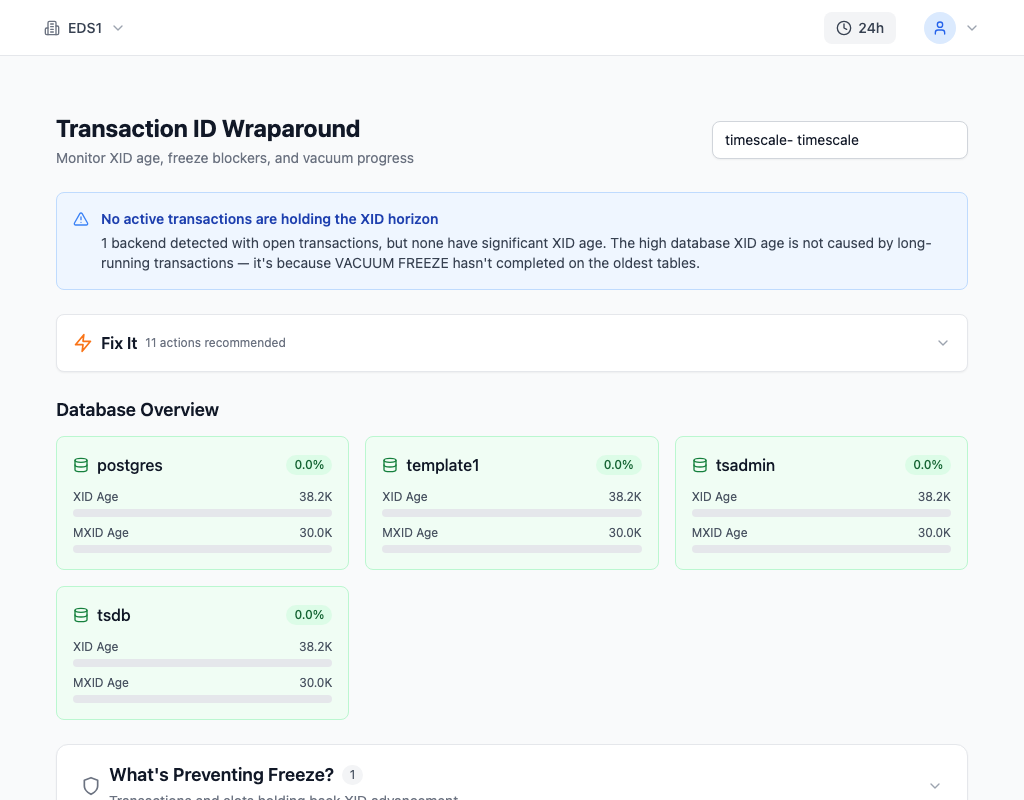
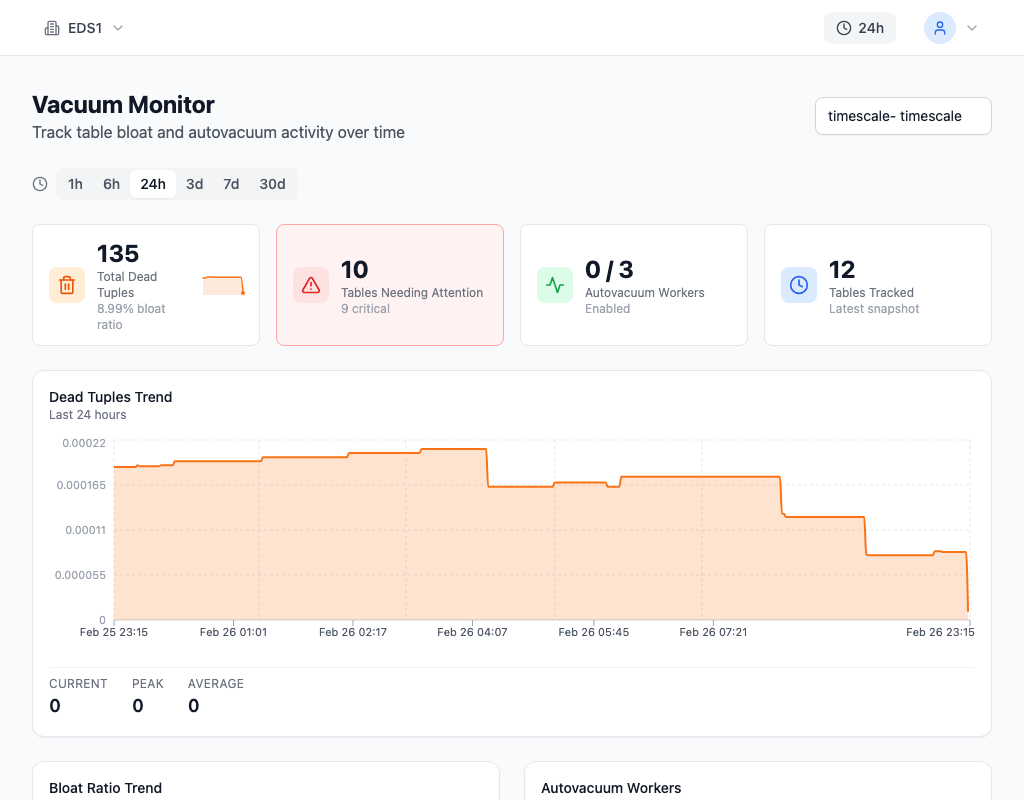
myDBA.dev's XID Wraparound page shows per-table and per-chunk XID age in real time, flagging any relation approaching the aggressive vacuum threshold. Combined with the Vacuum monitoring page -- which tracks per-chunk vacuum frequency, dead tuple counts, and autovacuum lag -- you get early warning before XID buildup becomes an emergency.
The TimescaleDB Advantage
Here's the counterintuitive takeaway: a well-configured TimescaleDB hypertable is actually better at handling XID wraparound than a regular PostgreSQL table. The chunk lifecycle -- active chunk receives writes, compression freezes XIDs, retention drops old chunks -- naturally manages XID age without relying on autovacuum to freeze an ever-growing table.
The problems only appear when that lifecycle is broken: no compression (so chunks accumulate unfrozen XIDs indefinitely), no retention (so chunk count grows without bound), or chunk intervals so small that autovacuum can't keep pace. Fix those three things, and XID wraparound on TimescaleDB becomes a non-issue.