Understanding TimescaleDB Background Workers and Jobs
Understanding TimescaleDB Background Workers and Jobs
You set up compression, retention, and continuous aggregates months ago, and everything worked. Then one morning your dashboard shows uncompressed chunks piling up, your continuous aggregates are hours stale, and retention hasn't dropped a chunk in days. Nothing changed in your application code. No errors in the PostgreSQL log that explain it. The culprit is almost always the same: background worker exhaustion.
TimescaleDB automates its core maintenance through scheduled jobs that compete for a fixed pool of PostgreSQL background workers. When the number of jobs outgrows that pool, tasks silently queue, fall behind, and eventually stop running altogether. Understanding this system is the difference between automation that works and automation that quietly degrades.
How Background Workers Manage Jobs
Every TimescaleDB automation policy creates a scheduled job. When you call add_compression_policy(), add_retention_policy(), or add_continuous_aggregate_policy(), TimescaleDB registers a job in its internal scheduler. The scheduler assigns each job to a background worker -- a PostgreSQL process that runs independently of any client connection.
Each job type performs a specific operation:
- Compression jobs convert uncompressed chunks from row format to columnstore, reducing storage by 10-20x.
- Retention jobs drop chunks older than the configured threshold, reclaiming disk space instantly.
- Continuous aggregate refresh jobs materialize new data into pre-computed summary tables.
Jobs run on their configured schedule (e.g., every 12 hours for compression, every 15 minutes for aggregate refresh). Each running job occupies one background worker for its entire duration.
-- List all scheduled jobs with their type and schedule
SELECT
    job_id,
    proc_name,
    hypertable_name,
    schedule_interval,
    scheduled AS is_active
FROM timescaledb_information.jobs
WHERE scheduled = true
ORDER BY proc_name, hypertable_name;
The max_background_workers Limit
The maximum number of concurrent TimescaleDB jobs is controlled by two PostgreSQL settings:
-- Check current worker configuration
SELECT name, setting, unit
FROM pg_settings
WHERE name IN (
    'timescaledb.max_background_workers',
    'max_worker_processes',
    'max_parallel_workers'
)
ORDER BY name;
timescaledb.max_background_workers sets the ceiling for TimescaleDB's scheduler. The default is typically 8 or 16 depending on version and platform. max_worker_processes is PostgreSQL's global limit for all background workers -- TimescaleDB, logical replication, parallel queries, and other extensions all share this pool.
The default of 16 seems generous until you count your actual jobs.
Worker Exhaustion: What Happens When Jobs Outgrow Workers
Worker exhaustion is a silent failure mode. Jobs don't throw errors -- they queue. The scheduler waits for a free worker, and if one never opens within the schedule interval, the next invocation stacks behind the current one. Over hours, a backlog forms that compounds with every cycle.
In a controlled experiment, we created 8 hypertables, each with a compression policy, a retention policy, and a continuous aggregate refresh policy. That alone produced 24 new jobs. Combined with the existing system jobs, the total reached 172 scheduled jobs: 79 compression, 83 retention, 8 continuous aggregate refreshes, and 2 internal maintenance tasks. A default max_background_workers of 16 is nowhere near sufficient for that workload.
-- Count total jobs by type
SELECT
    proc_name,
    count(*) AS job_count
FROM timescaledb_information.jobs
WHERE scheduled = true
GROUP BY proc_name
ORDER BY job_count DESC;
The real danger emerges when a job's duration exceeds its schedule interval. If a compression job takes 15 minutes but is scheduled every 10, it permanently occupies a worker slot and can never catch up. Each cycle adds another queued invocation, starving other job types of workers.
Diagnosing Worker Saturation
Start by comparing your job count to your worker limit:
-- Worker utilization check
WITH worker_config AS (
    SELECT current_setting('timescaledb.max_background_workers')::int AS max_workers
),
active_jobs AS (
    SELECT count(*) AS total_scheduled_jobs
    FROM timescaledb_information.jobs
    WHERE scheduled = true
)
SELECT
    wc.max_workers,
    aj.total_scheduled_jobs,
    CASE
        WHEN aj.total_scheduled_jobs <= wc.max_workers THEN 'OK'
        WHEN aj.total_scheduled_jobs <= wc.max_workers * 1.5 THEN 'WARNING -- approaching saturation'
        ELSE 'CRITICAL -- worker exhaustion likely'
    END AS worker_status
FROM worker_config wc, active_jobs aj;
Then check for jobs that are failing or have never run:
-- Identify failing or stalled jobs
SELECT
    j.job_id,
    j.proc_name,
    j.hypertable_name,
    js.total_failures,
    js.consecutive_failures,
    js.last_run_status,
    js.last_run_duration,
    CASE
        WHEN js.total_failures > 0 THEN 'FAILING'
        WHEN js.total_runs = 0 THEN 'NEVER RUN -- likely queued'
        ELSE 'OK'
    END AS health_status
FROM timescaledb_information.jobs j
JOIN timescaledb_information.job_stats js ON j.job_id = js.job_id
ORDER BY js.total_failures DESC, j.proc_name;
Common failure signatures:
- Jobs with
total_runs = 0: Never acquired a worker. Pure queue starvation. - Rising
consecutive_failures: Worker acquired but failed -- often lock contention or out-of-memory during compression. last_run_durationexceedingschedule_interval: The job can never complete before its next invocation. This permanently consumes a worker slot.- "cache lookup failed for function": On PostgreSQL 18 with TimescaleDB 2.24, custom functions registered via
add_job()fail because background workers cannot resolve public schema functions. Use system cron for custom jobs instead.
Sizing Workers: The Formula
The calculation is straightforward:
total_policies + 2 (TimescaleDB internal jobs) = minimum max_background_workersUse this query to compute the exact number:
-- Calculate recommended worker count
WITH policy_count AS (
    SELECT
        count(*) FILTER (WHERE proc_name = 'policy_compression') AS compression_jobs,
        count(*) FILTER (WHERE proc_name = 'policy_retention') AS retention_jobs,
        count(*) FILTER (WHERE proc_name = 'policy_refresh_continuous_aggregate') AS cagg_jobs,
        count(*) FILTER (WHERE proc_name NOT IN (
            'policy_compression', 'policy_retention',
            'policy_refresh_continuous_aggregate'
        )) AS other_jobs
    FROM timescaledb_information.jobs
    WHERE scheduled = true
)
SELECT
    compression_jobs + retention_jobs + cagg_jobs + other_jobs AS total_policies,
    compression_jobs + retention_jobs + cagg_jobs + other_jobs + 2 AS recommended_workers,
    'ALTER SYSTEM SET timescaledb.max_background_workers = ' ||
        (compression_jobs + retention_jobs + cagg_jobs + other_jobs + 2) AS sql_to_run
FROM policy_count;
Apply the change:
ALTER SYSTEM SET timescaledb.max_background_workers = 28;
ALTER SYSTEM SET max_worker_processes = 32;
-- Requires a full PostgreSQL restart -- pg_reload_conf() is NOT sufficient
Over-provisioning is cheap. Each idle worker consumes roughly 5-10 MB of memory and zero CPU. Setting max_background_workers to 32 or 64 on a server running 20 jobs carries no measurable performance penalty.
How myDBA.dev Catches Worker Exhaustion Early
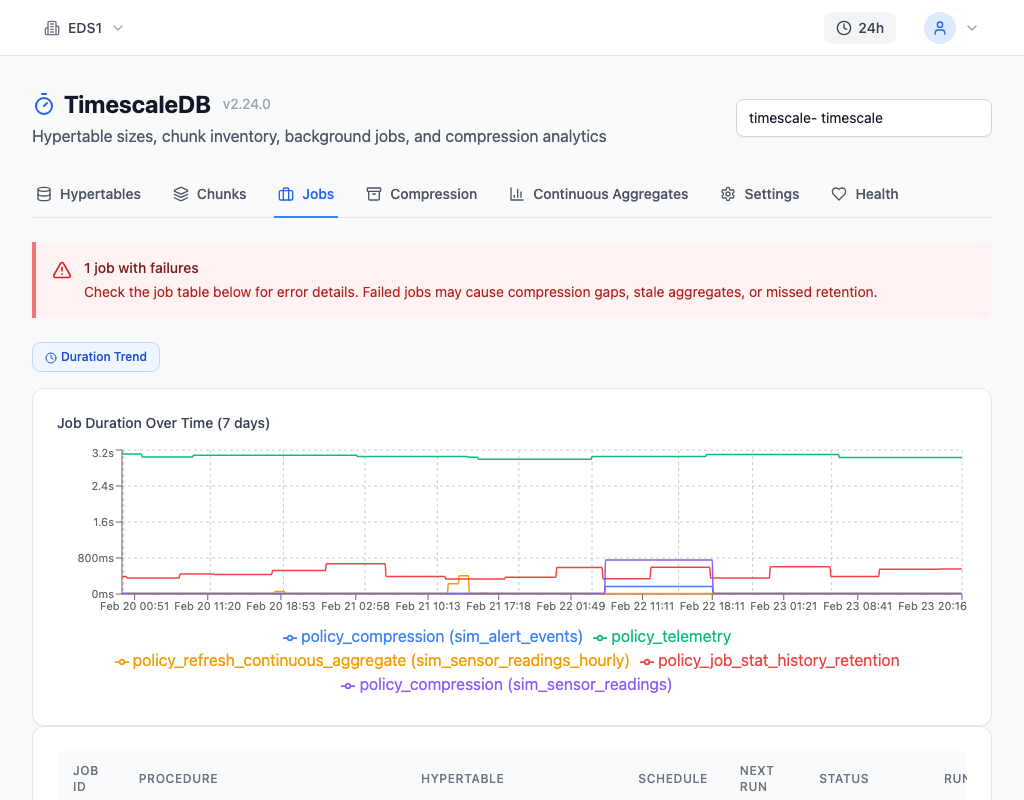
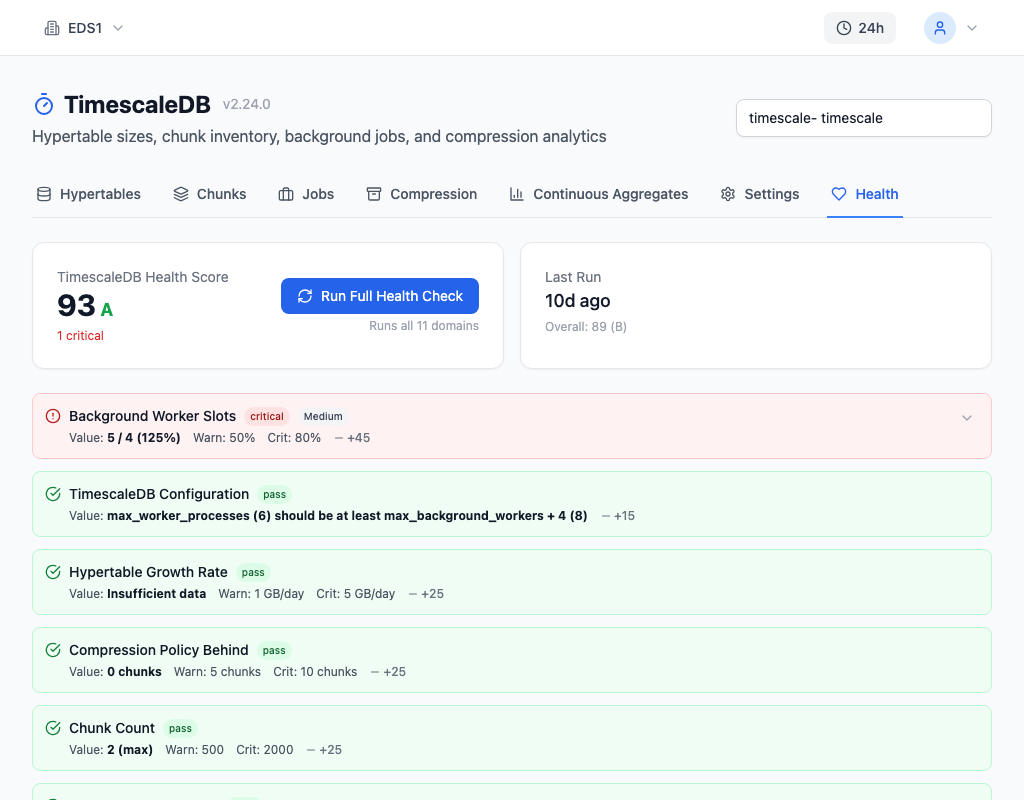
Worker saturation develops gradually and rarely produces obvious errors in PostgreSQL logs. myDBA.dev's TimescaleDB Jobs tab tracks every scheduled job with its last run duration, failure count, and next scheduled start -- surfacing the queue depth that is invisible from standard views. Health Check T4 fires when any job accumulates failures, and T7 warns when active job count approaches the configured worker limit, catching saturation before jobs start falling behind.
Prevention Checklist
- Count jobs after every new hypertable. Each hypertable with compression, retention, and a continuous aggregate adds 3 jobs. Update
max_background_workersbefore the restart. - Monitor
total_failuresandconsecutive_failures. A rising failure count is the earliest signal of worker starvation. Querytimescaledb_information.job_statsweekly or set up automated checks. - Verify job duration stays below schedule interval. If
last_run_durationapproachesschedule_interval, either increase the interval, reduce chunk size, or add workers. - Set
max_worker_processeshigher thanmax_background_workers. PostgreSQL's global limit must leave room for parallel queries and logical replication alongside TimescaleDB workers. - Restart after changes. Both
timescaledb.max_background_workersandmax_worker_processesrequire a full PostgreSQL restart. Plan changes during a maintenance window. - Treat worker sizing as part of hypertable setup. Add a policy, add a worker. Never treat it as an afterthought.