Why Your TimescaleDB Compression Ratio Is Bad (And How to Fix It)
Why Your TimescaleDB Compression Ratio Is Bad (And How to Fix It)
You enabled TimescaleDB compression expecting 10x+ storage reduction, but your hypertable shows a 2x ratio — or worse, the compressed data is larger than the original. This is almost always caused by one thing: the wrong segmentby column.
How segmentby Determines Compression Quality
TimescaleDB compression groups rows into segments based on the segmentby column. Each unique value gets its own segment within a compressed chunk. The column encoders (gorilla, delta-of-delta, dictionary) then compress the data within each segment.
The critical insight: compression effectiveness scales with the number of rows per segment. More rows per segment means more data for the encoders to find patterns in.
| segmentby cardinality | Rows per segment (1M row chunk) | Expected ratio | |---|---|---| | 1,000 unique values | 1,000 rows/segment | 10–20x | | 50 unique values | 20,000 rows/segment | 8–15x | | 1,000,000 unique values | 1 row/segment | 0.2x (worse!) |
When every row has a unique segmentby value, each segment contains a single row. There's nothing to compress — and the segment metadata overhead actually increases total storage.
Detecting Bad Compression
Run this query to check your compression ratios and identify problematic tables:
SELECT
    hypertable_schema || '.' || hypertable_name AS hypertable,
    pg_size_pretty(before_compression_total_bytes) AS before_size,
    pg_size_pretty(after_compression_total_bytes) AS after_size,
    round(
        before_compression_total_bytes::numeric
        / NULLIF(after_compression_total_bytes, 0), 1
    ) AS compression_ratio,
    CASE
        WHEN before_compression_total_bytes::numeric
             / NULLIF(after_compression_total_bytes, 1) < 2
        THEN 'POOR — review segmentby'
        ELSE 'OK'
    END AS verdict
FROM hypertable_compression_stats('your_hypertable');
Any ratio below 3x warrants investigation. Below 2x is actively wasteful — the compression overhead is consuming nearly as much space as it saves.
Next, check the cardinality of your segmentby column:
-- Check what your segmentby column is
SELECT attname, segmentby_column_index
FROM timescaledb_information.compression_settings
WHERE hypertable_name = 'your_table'
  AND segmentby_column_index IS NOT NULL;

-- Check its cardinality
SELECT COUNT(DISTINCT your_segmentby_column) AS unique_values
FROM your_table
WHERE time_column >= now() - INTERVAL '1 day';  -- one chunk's worth
If unique values per chunk exceed 10,000, your segmentby is too high-cardinality.
The Three Compression Killers
1. Unique IDs as segmentby
The worst choice: using a UUID, auto-increment ID, or any column that's unique per row.
-- BAD: reading_id is unique per row = 1 row per segment
ALTER TABLE readings SET (
    timescaledb.compress,
    timescaledb.compress_segmentby = 'reading_id'  -- WRONG!
);
TimescaleDB 2.24+ actually warns you about this during compression:
WARNING: poor compression ratio detected for chunk "_hyper_173_14755_chunk"
DETAIL:  compression ratio: 0.18. Size before: 133 MB. After: 723 MB
HINT:  Changing compression settings can improve compression rate
A ratio of 0.18 means compressed data is 5.4x larger than uncompressed.
2. High-cardinality natural keys
Less obvious but equally damaging: using a column with moderate-to-high cardinality that seems reasonable but isn't.
-- MEDIOCRE: user_id with 100K+ unique users
-- Creates too many small segments
ALTER TABLE events SET (
    timescaledb.compress,
    timescaledb.compress_segmentby = 'user_id'
);
If you have 100K users and 1M rows per chunk, each segment holds only 10 rows — not enough for effective compression.
3. No segmentby at all
Omitting segmentby creates one giant segment per chunk. The compression ratio may be acceptable, but queries that filter on any column must decompress the entire chunk. This defeats one of compression's key benefits: selective decompression.
How to Fix It
Step 1: Choose the right segmentby
Pick a column with 100–10,000 unique values per chunk. Common good choices:
device_idorsensor_id(IoT)host_idorserver_id(infrastructure monitoring)tenant_id(multi-tenant SaaS)regionordatacenter(geographic partitioning)
Step 2: Decompress, reconfigure, recompress
-- 1. Decompress all chunks
SELECT decompress_chunk(chunk_schema || '.' || chunk_name)
FROM timescaledb_information.chunks
WHERE hypertable_name = 'your_table' AND is_compressed;

-- 2. Change compression settings
ALTER TABLE your_table SET (
    timescaledb.compress,
    timescaledb.compress_segmentby = 'device_id',       -- better choice
    timescaledb.compress_orderby = 'timestamp DESC'
);

-- 3. Recompress all chunks
SELECT compress_chunk(chunk_schema || '.' || chunk_name)
FROM timescaledb_information.chunks
WHERE hypertable_name = 'your_table' AND NOT is_compressed;
Warning: Decompression requires enough disk space to hold the uncompressed data temporarily. For large tables, do this in batches (one chunk at a time).
Step 3: Verify the improvement
After recompression, check the new ratio. You should see a dramatic improvement — our test with identical data showed:
| Configuration | Ratio | Verdict | |---|---|---| | segmentby = reading_id (unique) | 0.18x | 5x LARGER | | segmentby = signal_strength (~50 values) | 3–5x | Mediocre | | segmentby = device_id (1,000 values) | 10–20x | Excellent |
Monitoring Compression Quality with myDBA.dev
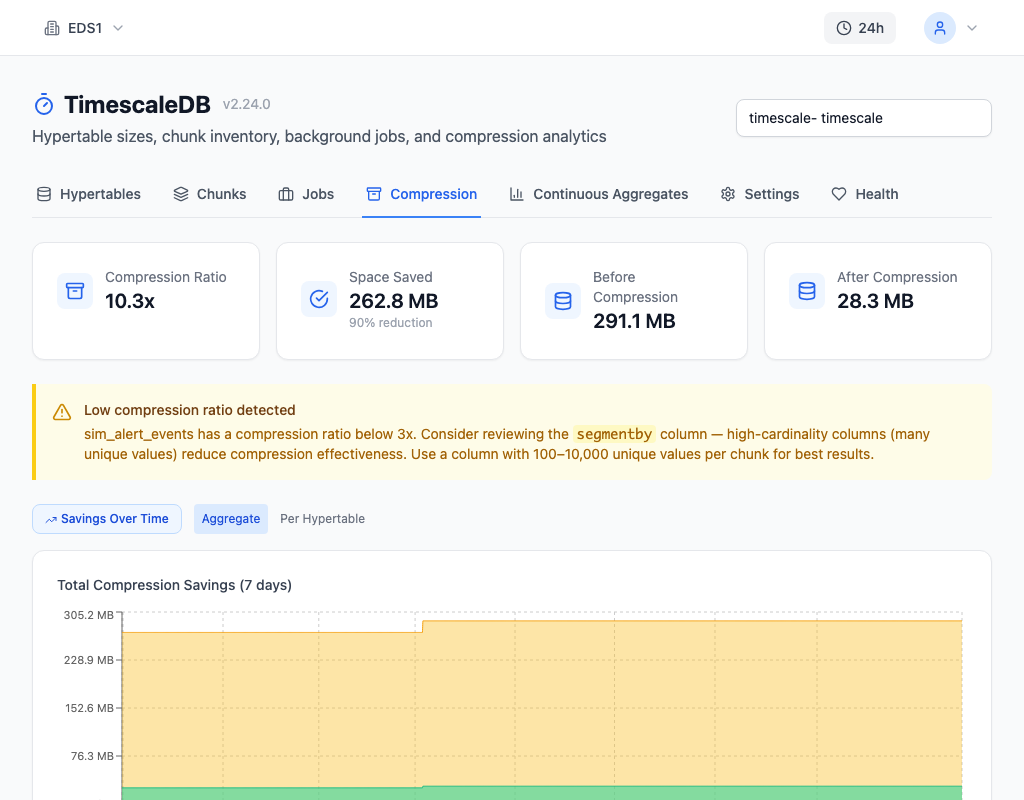
The Compression tab in myDBA.dev shows per-hypertable compression ratios alongside the segmentby and orderby configuration. When any table falls below 3x, a warning recommends reviewing the segmentby column's cardinality. The Health tab's T5 check scores compression quality and flags tables that need attention.
Prevention
Before enabling compression on a new hypertable, always check the cardinality of your candidate segmentby column:
SELECT COUNT(DISTINCT candidate_column) AS cardinality
FROM your_table
WHERE time_column >= now() - INTERVAL '1 day';
Target 100–10,000 unique values. If your natural partition key has too many values, consider a derived column — for example, user_id % 1000 creates 1,000 buckets from millions of users.
Continuous monitoring catches ratio degradation over time. A table that compressed well at launch may degrade as data patterns change or new columns are added. myDBA.dev's health check T5 tracks this automatically and alerts before storage costs spiral.