Data Retention Policies: Automating Cleanup in TimescaleDB
Data Retention Policies: Automating Cleanup in TimescaleDB
Your time-series database has grown to 500 GB. You only need 30 days of data. Without retention policies, old data sits there consuming disk, slowing backups, and inflating chunk counts.
TimescaleDB solves this with drop_chunks -- a function that removes entire chunks as physical table files rather than deleting rows one at a time. Pair it with add_retention_policy() and cleanup becomes fully automatic. No cron scripts. No manual maintenance windows.
How Retention Policies Work
A retention policy is a background job that periodically calls drop_chunks() for you. When you add one, TimescaleDB creates a scheduled job that scans for chunks whose time range falls entirely before the retention threshold and drops them.
-- Keep 30 days of data, drop everything older
SELECT add_retention_policy('sensor_readings',
    drop_after => INTERVAL '30 days');
This creates a job that runs on a default schedule (typically every 24 hours, configurable). On each run, it identifies chunks where range_end < now() - drop_after and drops them.
The critical insight: dropping a chunk is a metadata operation. TimescaleDB removes the physical table file from disk instantly. There are no dead tuples, no bloat accumulation, and no need for VACUUM afterward. This is fundamentally different from a DELETE FROM sensor_readings WHERE timestamp < now() - INTERVAL '30 days', which would create millions of dead rows, trigger autovacuum, and potentially cause table bloat while it catches up.
A DELETE on a table with 100 million expired rows might take hours and generate massive WAL traffic. drop_chunks on the same data finishes in milliseconds.
Manual Retention with drop_chunks
You don't need a policy to use retention. Call drop_chunks() directly for immediate cleanup:
-- Drop all chunks older than 7 days right now
SELECT drop_chunks('sensor_readings', older_than => INTERVAL '7 days');
This is useful for one-time cleanups, emergency disk reclamation, or testing retention behavior before committing to a policy. The function returns a list of dropped chunk names so you can verify exactly what was removed.
Retention on Compressed Chunks
Compressed chunks drop just as instantly as uncompressed ones. There is no decompression step. TimescaleDB removes the compressed chunk's physical files directly.
This means you can safely run a pipeline where data is compressed early and retained for a fixed window:
-- Pipeline: compress after 1 hour, drop after 30 days
ALTER TABLE sensor_readings SET (
    timescaledb.compress,
    timescaledb.compress_segmentby = 'device_id',
    timescaledb.compress_orderby = 'event_timestamp_utc DESC'
);

SELECT add_compression_policy('sensor_readings',
    compress_after => INTERVAL '1 hour');

SELECT add_retention_policy('sensor_readings',
    drop_after => INTERVAL '30 days');
Data flows in, gets compressed within an hour, lives on disk in a compact format for 30 days, and then vanishes. The entire lifecycle is automated.
Per-Tier Retention Patterns
SaaS platforms typically need different retention windows per pricing tier:
| Tier | Retention | Implementation | |------------|-----------|---------------------------------------------| | Free | 7 days | add_retention_policy(drop_after => '7d') | | Pro | 30 days | add_retention_policy(drop_after => '30d') | | Enterprise | 90 days | add_retention_policy(drop_after => '90d') |
When all tiers share the same hypertable (multi-tenant with org-scoped rows), a single chunk-level retention policy cannot distinguish between tenants. The practical approach is two-level retention:
1. Global chunk retention at the longest tier (e.g., 30 days) using add_retention_policy() -- fast, instant chunk drops 2. Per-tenant enforcement via a scheduled function that runs DELETE against rows for lower tiers (e.g., free tier rows older than 7 days)
The row-level DELETE for per-tenant enforcement is slower, but it only targets a subset of data. On compressed chunks, these deletes require a special setting:
SET LOCAL timescaledb.max_tuples_decompressed_per_dml_transaction = 0;
DELETE FROM sensor_readings
WHERE organization_id = 'free-tier-org'
  AND event_timestamp_utc < now() - INTERVAL '7 days';
Without that SET LOCAL, TimescaleDB limits how many rows can be decompressed in a single DML statement, which causes bulk deletes to fail.
Interaction with Continuous Aggregates
Retention on the source hypertable does not affect continuous aggregate (CAGG) materializations. When you drop chunks from sensor_readings, the hourly or daily rollups in any CAGG built on that table survive.
This is by design and extremely useful. You can keep 30 days of raw data but retain aggregated summaries for months or years. The CAGG acts as a long-term summary layer while the source data is aggressively pruned.
If you want to trim the CAGG itself, add a separate retention policy on it:
-- Keep raw data for 30 days, hourly summaries for 1 year
SELECT add_retention_policy('sensor_readings', drop_after => INTERVAL '30 days');
SELECT add_retention_policy('sensor_readings_hourly', drop_after => INTERVAL '365 days');
Monitoring Retention Health
A retention policy is a background job. Like any background job, it can fail silently. Check its status:
SELECT
    j.job_id,
    j.config->>'drop_after' AS drop_after,
    j.schedule_interval,
    js.total_runs,
    js.total_failures,
    js.last_successful_finish::timestamp(0) AS last_success,
    CASE
        WHEN js.total_failures > 0 THEN 'FAILING'
        WHEN js.total_runs = 0 THEN 'NEVER RUN'
        WHEN (now() - js.last_successful_finish) > j.schedule_interval * 2
            THEN 'OVERDUE'
        ELSE 'Healthy'
    END AS health_status
FROM timescaledb_information.jobs j
JOIN timescaledb_information.job_stats js USING (job_id)
WHERE j.proc_name = 'policy_retention';
To find chunks that should have been dropped but are still present:
SELECT
    c.hypertable_name,
    c.chunk_name,
    c.range_end::timestamp(0) AS chunk_end,
    now() - c.range_end AS age
FROM timescaledb_information.chunks c
JOIN timescaledb_information.jobs j
    ON j.hypertable_schema = c.hypertable_schema
    AND j.hypertable_name = c.hypertable_name
    AND j.proc_name = 'policy_retention'
WHERE c.range_end < now() - (j.config->>'drop_after')::interval
ORDER BY c.range_start;
Any rows returned mean chunks are lingering past their retention window. One chunk is normal if the policy is mid-cycle. More than that indicates a stalled or failing job.
How myDBA.dev Surfaces Retention Problems
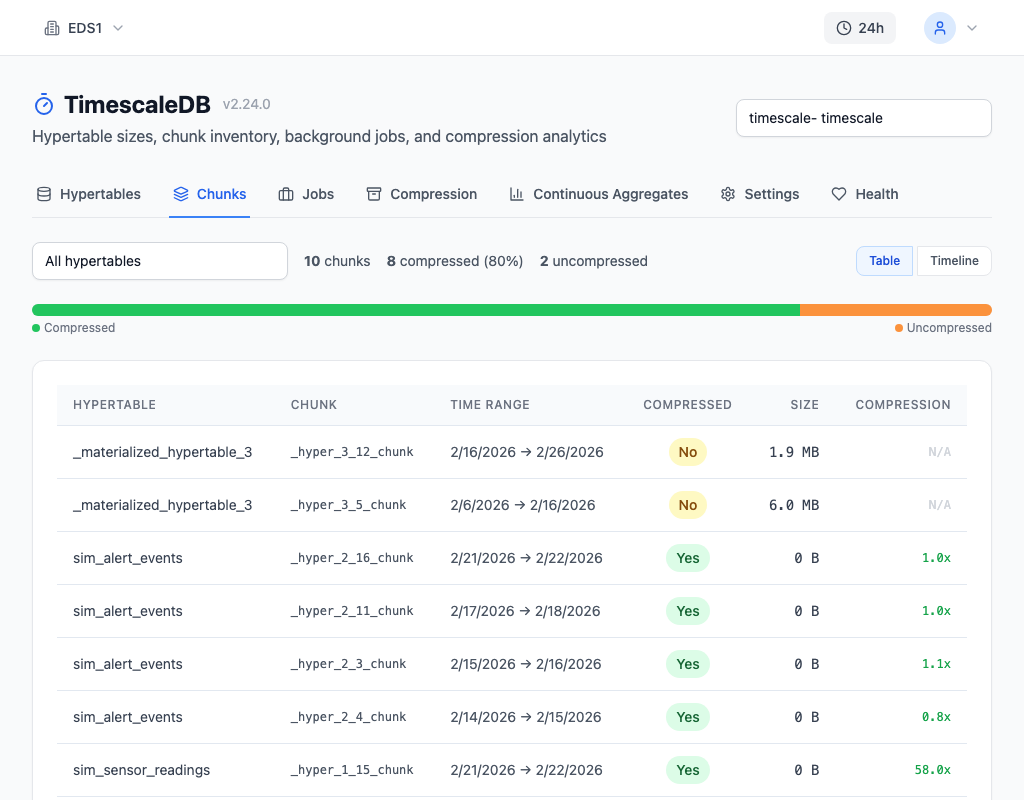
The TimescaleDB Health tab runs check T8 specifically for retention overdue -- it flags hypertables where chunks exist beyond their configured drop_after window. The Chunks tab provides a visual timeline where old chunks that should have been dropped are immediately obvious, making it easy to spot retention policy failures at a glance.
Best Practices
Always pair retention with compression. Compress early (1 hour), retain longer (30 days). This minimizes disk usage throughout the data lifecycle and ensures that when chunks are finally dropped, they are already compact.
Set retention longer than compress_after. If you compress after 1 hour and drop after 1 hour, there is a race condition where the retention job might drop a chunk before compression finishes. Keep a comfortable gap between the two thresholds.
Monitor the retention job. A paused or failing retention job is invisible until disk fills up. Check total_failures and last_successful_finish regularly. The job competes for timescaledb.max_background_workers slots with compression and CAGG refresh jobs -- ensure you have enough workers allocated.
Use manual drop_chunks for emergencies. If disk is critically low, do not wait for the scheduled policy. Run SELECT drop_chunks('table', older_than => INTERVAL '7 days'); directly. It is instant and safe, even on compressed chunks.
Match chunk_time_interval to retention granularity. With 1-day chunks and a 30-day retention, you drop one chunk per day. With 1-week chunks and a 30-day retention, chunks linger up to 6 extra days before becoming eligible. Smaller chunks give finer-grained retention at the cost of more chunk overhead.