Choosing the Right chunk_time_interval for Your Workload
Choosing the Right chunk_time_interval for Your Workload
The chunk_time_interval parameter is the single most impactful configuration choice you make when creating a TimescaleDB hypertable. It controls how much time each chunk covers, which in turn determines chunk count, chunk size, compression granularity, and retention resolution. TimescaleDB defaults to 7 days, but this default is wrong for most workloads. Getting the interval right requires understanding your ingest rate, query patterns, and retention requirements.
Why Interval Matters
Every chunk is a separate PostgreSQL table. Too many chunks means the query planner spends hundreds of milliseconds evaluating constraints before a single row is read. Too few chunks means each one grows into a multi-gigabyte table that's slow to compress, slow to decompress, and impossible to drop at fine-grained retention boundaries.
The interval creates a direct tradeoff:
- Too small (e.g., 1 hour for low-ingest tables): Thousands of tiny chunks. Planning overhead dominates query time. Metadata tables grow large. Compression has less data per chunk to find patterns in.
- Too large (e.g., 30 days for high-ingest tables): Each chunk contains billions of rows. Compression and decompression take longer. Retention can only drop data in 30-day blocks. Memory pressure increases because each chunk must fit in
work_memduring operations.
The sweet spot depends entirely on your data velocity. There is no universal best interval — a 1-hour interval is perfect for a high-frequency IoT pipeline and catastrophic for a low-volume audit log.
The Formula
TimescaleDB's documentation recommends targeting approximately 25 million rows per chunk. This size gives compression enough data to achieve good ratios while keeping individual chunks manageable for maintenance operations.
The calculation is straightforward:
chunk_interval = target_rows_per_chunk / rows_per_secondHere are worked examples for different ingest rates:
| Ingest Rate | Rows/Day | Target 25M Rows | Recommended Interval | |-------------|----------|-----------------|---------------------| | 10 rows/sec | 864,000 | 29 days | 30 days | | 100 rows/sec | 8,640,000 | 2.9 days | 3 days | | 1,000 rows/sec | 86,400,000 | 6.9 hours | 6 hours | | 10,000 rows/sec | 864,000,000 | 42 minutes | 1 hour |
To measure your actual ingest rate on an existing table:
-- Measure ingest rate over the last 24 hours
SELECT
    count(*) AS total_rows,
    round(count(*) / 86400.0, 1) AS rows_per_second,
    round(count(*) / 86400.0 * 25000000 / 3600, 0) AS recommended_interval_hours
FROM sensor_readings
WHERE recorded_at >= now() - INTERVAL '1 day';
Comparing Intervals: Same Data, Different Results
To illustrate the impact, consider a table ingesting 100 rows per second over 30 days — about 259 million rows. The same data partitioned at three different intervals produces dramatically different characteristics:
| Interval | Chunks/Month | Avg Chunk Size | Planning Overhead | Retention Granularity | |----------|-------------|----------------|-------------------|-----------------------| | 1 hour | 720 | ~2 MB | High (~200ms+) | Drop any single hour | | 1 day | 30 | ~50 MB | Low (~8ms) | Drop any single day | | 7 days | ~4 | ~350 MB | Minimal (~3ms) | Drop in 7-day blocks |
The 1-hour interval creates 720 chunks in a single month. After a year without retention, that's 8,640 chunks — well into the range where planning time dominates every query. The query planner must evaluate every chunk's CHECK constraint, even for simple point-in-time queries that only touch a single chunk.
The 1-day interval hits the sweet spot for this ingest rate: chunks are large enough for effective compression but small enough for daily retention granularity. At 30 chunks per month and a 90-day retention policy, you're looking at around 90 chunks total — a number the planner handles in under 10 ms.
The 7-day interval produces the fewest chunks and fastest planning, but retention becomes coarse: you can only drop data in weekly blocks. If your compliance requirements mandate 90-day retention but you want to avoid paying for 97 days of storage, you're stuck with the extra week.
-- Check current planning overhead on your hypertable
EXPLAIN ANALYZE
SELECT count(*) FROM sensor_readings
WHERE recorded_at >= now() - INTERVAL '1 hour';

-- Look at "Planning Time" in the output
-- Under 10ms is healthy; over 50ms signals too many chunks
How Interval Affects Compression
Different intervals produce different compression behavior. Smaller chunks compress faster individually — a 2 MB chunk compresses in milliseconds — but the compression background worker must process more chunks per cycle, adding scheduling overhead. Larger chunks take longer to compress but produce better per-chunk ratios because the column encoders have more data to find patterns in.
The decompression side matters more for query performance. When a query touches a compressed chunk, TimescaleDB must decompress the relevant segments. With a 1-hour interval, a 24-hour range query decompresses 24 chunks. With a 1-day interval, it decompresses 1 chunk. The per-segment decompression cost is similar, but the chunk-level overhead (opening tables, reading metadata, building scan plans) multiplies with chunk count.
For compression policies, the compress_after interval should be at least 1-2x your chunk_time_interval. Compressing a chunk while it's still receiving writes forces repeated decompress-modify-recompress cycles that waste I/O.
-- Good: compress_after is 2x the chunk interval
SELECT set_chunk_time_interval('sensor_readings', INTERVAL '1 day');
SELECT add_compression_policy('sensor_readings', compress_after => INTERVAL '2 days');
Changing Interval on Existing Tables
set_chunk_time_interval() only affects chunks created after the change. Existing chunks retain their original interval indefinitely.
-- Change interval for future chunks only
SELECT set_chunk_time_interval('sensor_readings', INTERVAL '3 days');
After a change, you'll have a mixed-interval hypertable: old 7-day chunks alongside new 3-day chunks. This is functionally harmless — the planner handles mixed intervals correctly — but it means the chunk count reduction happens gradually as old chunks age out through your retention policy.
For a complete migration to a new interval (necessary when old chunks cause planning overhead), the process requires creating a new hypertable:
-- Full interval migration
-- 1. Create new hypertable with desired interval
CREATE TABLE sensor_readings_new (LIKE sensor_readings INCLUDING ALL);
SELECT create_hypertable('sensor_readings_new', 'recorded_at',
    chunk_time_interval => INTERVAL '3 days');

-- 2. Copy data in time-ordered batches to avoid memory pressure
INSERT INTO sensor_readings_new
SELECT * FROM sensor_readings
WHERE recorded_at >= now() - INTERVAL '30 days'
ORDER BY recorded_at;

-- 3. Swap tables within a transaction
BEGIN;
ALTER TABLE sensor_readings RENAME TO sensor_readings_old;
ALTER TABLE sensor_readings_new RENAME TO sensor_readings;
COMMIT;

-- 4. Drop old table after verifying
DROP TABLE sensor_readings_old;
This approach resets the chunk layout completely. Schedule it during a maintenance window because the INSERT...SELECT can be I/O-intensive for large tables. For very large datasets (100M+ rows), consider batching the copy in time-bounded chunks to keep transaction sizes manageable and avoid running out of WAL disk space.
Monitoring Interval Health with myDBA.dev
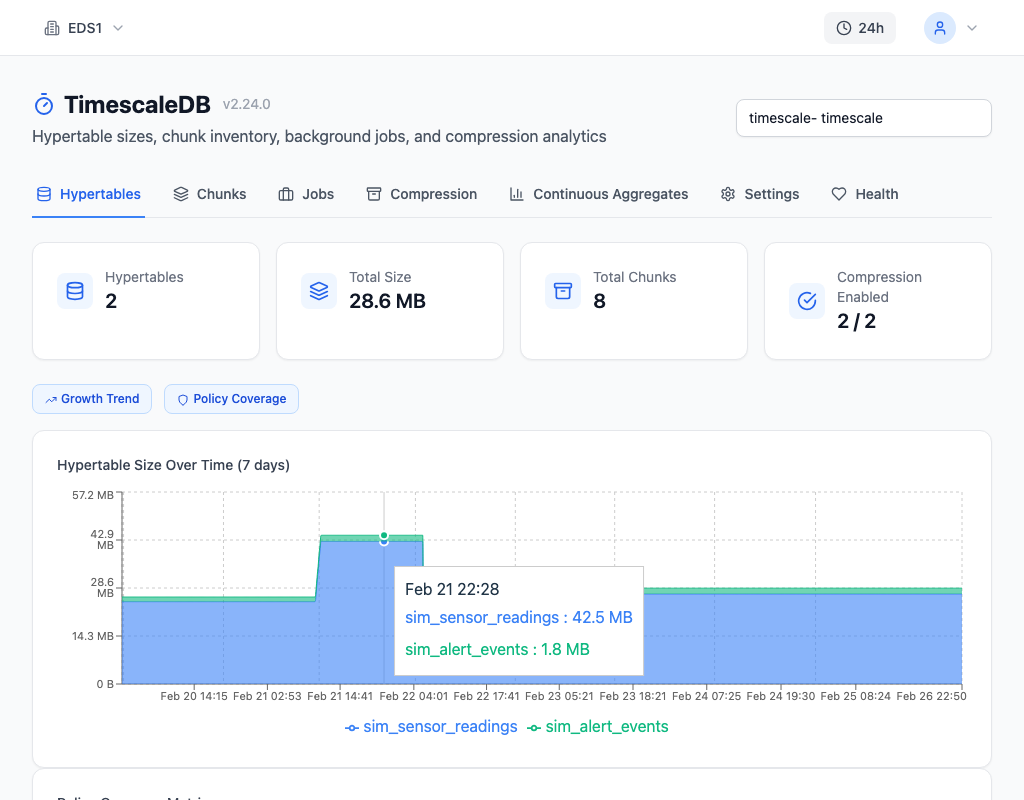
Detecting an interval mismatch requires knowing both your ingest rate and your current chunk layout. myDBA.dev's Hypertables tab shows chunk counts and average chunk sizes per hypertable, making it immediately visible when a table has accumulated too many undersized chunks. The chunk interval recommendation compares actual ingest rates against configured intervals and flags misalignments before planning overhead becomes a problem.
Getting It Right
Calculate your interval from your ingest rate, not from intuition. Measure rows_per_second on production data, target 25M rows per chunk, and round to a clean interval. Pair the interval with a retention policy that caps total chunk count — even at the correct interval, unbounded retention eventually creates too many chunks. Review the interval when your ingest rate changes significantly: a 10x traffic increase means your interval should shrink by roughly 10x to maintain the same chunk size.
The default 7-day interval works for tables ingesting 40-50 rows per second. For everything else, do the math.