The psql password prompt and pg_hba.conf
The psql password prompt and pg_hba.conf
You’ve just installed PostgreSQL. apt install postgresql-16, brew install postgresql@16, or you grabbed the installer from the website. You open a terminal, type psql, and hit Enter. Instead of a welcoming prompt, you get this:
<div style="position:relative;padding-bottom:56.25%;height:0;overflow:hidden;border-radius:0.75rem;margin:2rem 0;"> <iframe src="https://www.youtube.com/embed/GdeFOe9lmV0" title="Why psql Asks for a Password You Never Set" style="position:absolute;top:0;left:0;width:100%;height:100%;border:0;" allow="accelerometer; autoplay; clipboard-write; encrypted-media; gyroscope; picture-in-picture; web-share" allowfullscreen></iframe> </div>
▶ Watch on YouTube: Why psql Asks for a Password You Never Set
$ psql
Password for user alice:
You never set a password. You might even try postgres or alice or just hit Enter — nothing works. Sometimes you don’t even get a password prompt; you get a terse rejection:
$ psql -U postgres
psql: error: connection to server on socket "/var/run/postgresql/.s.PGSQL.5432" failed: FATAL:  Peer authentication failed for user "postgres"
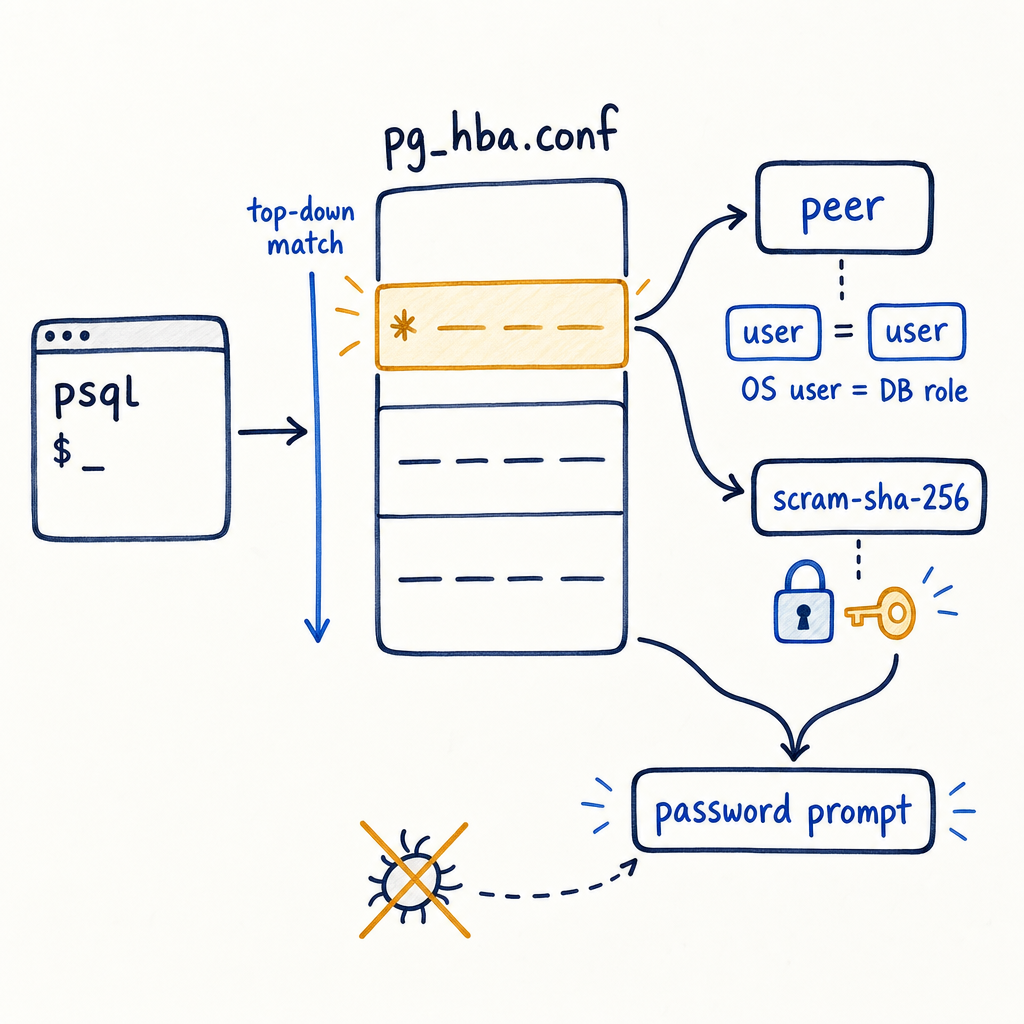
Just about every engineer who’s touched Postgres locally has hit this wall. It’s a rite of passage, and it’s not a bug, a forgotten password, or a broken install. It’s pg_hba.conf doing exactly what it was told to do. Once you understand the top‑down rule matching in that file, the password prompt stops being a wall and becomes a two‑minute adjustment.
---
pg_hba.conf: the file that decides who gets in and how
The HBA in pg_hba.conf stands for Host‑Based Authentication. The file lives in the data directory of your cluster, and its location differs by platform:
- Debian/Ubuntu (apt):
/etc/postgresql/16/main/pg_hba.conf - Homebrew on macOS:
/opt/homebrew/var/postgresql@16/pg_hba.conf - Red Hat / Rocky Linux (dnf):
/var/lib/pgsql/16/data/pg_hba.conf - Official Linux packages from the PostgreSQL yum/apt repos: often
/var/lib/pgsql/16/data/pg_hba.conf - Managed services like RDS or Cloud SQL: you don’t touch the file directly, but the principles are the same, just abstracted behind IAM or password policies.
If you can get into a psql session, you can find the exact path with:
SHOW hba_file;If you’re locked out, ask the OS user that owns the cluster:
sudo -u postgres psql -c 'SHOW hba_file;'The file is a list of records, one per line (blank lines and # comments ignored). Each record has five columns:
TYPE DATABASE USER ADDRESS METHODWhen a connection request arrives, PostgreSQL evaluates this file top‑to‑bottom. The first matching record is used and the decision is final. There is no fall‑through: if that record’s authentication method fails, the connection is rejected immediately, even if a later rule would have allowed it. This first‑match behaviour is the single most important thing to understand—put a broad permissive rule at the top, and you’ll never reach the more specific, secure rules below.
A typical fresh install looks something like this (Debian/Ubuntu example, trimmed):
# TYPE  DATABASE        USER            ADDRESS                 METHOD
local   all             postgres                                peer
local   all             all                                     peer
host    all             all             127.0.0.1/32            scram-sha-256
host all all ::1/128 scram-sha-256- Line 1: local sockets, database
all, userpostgres→ peer auth. - Line 2: all other local sockets → peer.
- Lines 3 & 4: TCP connections from localhost (IPv4/IPv6) → scram‑sha‑256.
If you’re logged in as OS user postgres and run psql, you match the first line and get straight in. If you’re alice and run psql, you hit line 2 (peer) and are rejected because role alice doesn’t exist. If you connect with -h 127.0.0.1, you’ll hit the host line and be asked for a password—and if no password is set, you’re rejected.
---
The four authentication methods you’ll actually meet
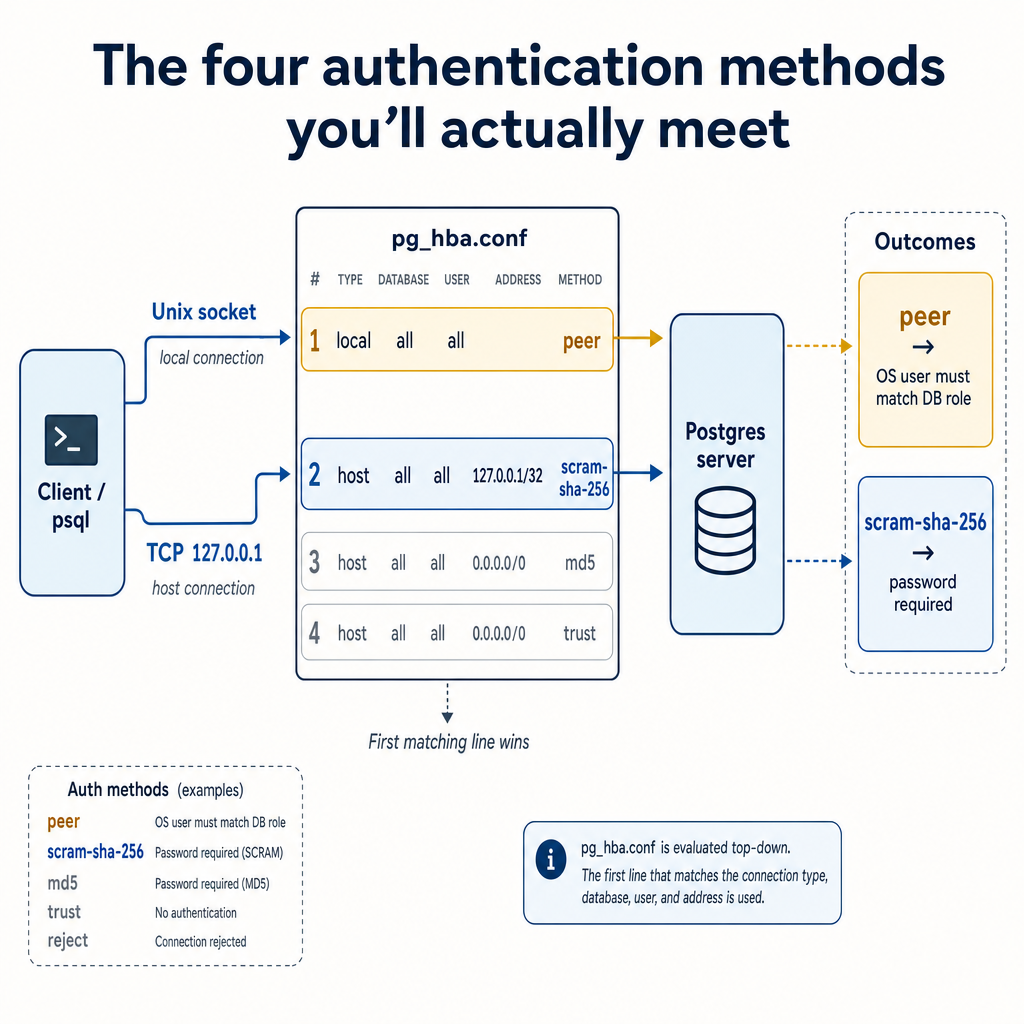
| Method | Mechanism | Scope | Security notes | |---------------|---------------------------------------------------------------------------|----------------------|--------------------------------------------------------------------------------------------------------| | peer | OS kernel provides the peer’s UID; server maps it to a role name | Unix socket only | Strong for local services and cron jobs if you trust the OS, but useless over TCP and breaks when OS/role names differ. | | scram‑sha‑256 | Salted challenge‑response with SCRAM and SHA‑256 | TCP and socket | The modern standard for password authentication (default since PG14). Use for any network‑facing connection. | | md5 | Password hashed with MD5, sent over the wire | TCP and socket | Legacy. Weak against brute‑force if hashes are exposed. Only for pre‑PG14 clients that can’t do SCRAM. | | trust | No authentication — anyone who can connect is allowed | TCP and socket | Dangerous. A trust rule for 0.0.0.0/0 is a self‑inflicted compromise. Acceptable only in ephemeral throwaway containers. |
Trust is a loaded gun. I’ve seen production configs where someone copy‑pasted a CI environment’s pg_hba.conf with trust everywhere. Don’t do that. If you must use it for a quick disposable test, make sure that container is isolated and destroyed immediately afterwards.
---
Why peer feels like magic (and why it breaks)
Peer authentication works because the PostgreSQL server asks the operating system, “Who is on the other end of this Unix socket?” and the kernel answers truthfully. The database then takes that OS username and expects a matching database role. No password is ever exchanged—if the kernel says you’re alice, you’re alice. This feels seamless when your OS user and database role names align, but it falls apart the moment they don’t. The classic example: you’re logged in as root but trying to connect as postgres. The OS kernel reports root, PostgreSQL looks for a database role named root, doesn’t find one, and rejects the connection. Peer can also break in containers where UID namespaces differ, or on macOS where the peer method itself isn’t supported—Homebrew’s default configuration uses trust for local sockets instead.
When peer authentication blocks you, you’ve got three straightforward options:
1. Switch to the matching OS user: sudo -u postgres psql gets you in as the postgres role. 2. Create a database role matching your OS user: inside a postgres-privileged session, run CREATE ROLE alice LOGIN;. 3. Change the authentication method in pg_hba.conf: swap peer to scram-sha-256 or md5, then reload with pg_ctl reload or SELECT pg_reload_conf();.
---
The password prompt: why it appears and when it’s unexpected
That Password for user alice: prompt surfaces whenever the matched pg_hba.conf rule demands a password (scram-sha-256 or md5). If you’ve never set a password for that role, the prompt is a dead end—every attempt will fail until you actually set one. You can set a password inside psql (if you can get in via another method, like peer as the postgres user) with \password alice, or outside it using ALTER ROLE alice PASSWORD 'strong-password';.
The prompt can also appear unexpectedly when your connection parameters unintentionally target a host line instead of a local line. If you run psql -h localhost, you’re forcing a TCP connection, which matches a host rule. That rule likely demands a password even though the local rule right above it uses peer. The fix is simple: drop the -h flag for Unix socket connections, and if you genuinely need TCP, make peace with passwords.
---
Common pg_hba.conf patterns and what they mean
Beyond the defaults, you’ll encounter patterns tuned for specific workflows:
- Development boxes with multiple developers: a
hostrule for192.168.1.0/24usingscram-sha-256lets anyone on the local network connect with a password, while keeping the outside world locked out. - Docker Compose stacks: an initialisation script creates roles, and the
pg_hba.confin the custom image or bind-mount includes ahostrule for the Docker network (172.16.0.0/12) withmd5orscram-sha-256, plus alocalrule withtrustfor fast container-internal connections. This is a case wheretruston a Unix socket is genuinely useful—the container’s own services are the only ones hitting it, but it should never be paired with an open TCPtrustrule. - Cloud VMs: often you’ll see
hostsslrules that enforce TLS in addition to a password, typically combined with client certificate requirements inpostgresql.conf. If you’re transitioning from a local setup to a cloud VM, you’ll need to generate certificates and adjust bothpg_hba.confandpostgresql.conftogether.
If you’re struggling to figure out exactly which rule a connection attempt is hitting, enable log_connections = on and set log_line_prefix to include %h and %u. The PostgreSQL log will then show you the exact IP, user, and database matched by the incoming connection, letting you trace it directly back to a specific line in pg_hba.conf.
---
Troubleshooting checklist: five minutes to diagnosis

Next time you see that password prompt or a peer authentication failure, run through these steps in order:
1. Check how you’re connecting. psql alone uses a Unix socket. psql -h 127.0.0.1 forces TCP. Know which one you’re using. 2. Find your pg_hba.conf. SHOW hba_file; if you’re inside psql; otherwise, the paths listed earlier. 3. Read the file top‑to‑bottom. Find the first line that matches your connection type (local vs host), your database, your user, and (for host rules) your IP address. 4. Understand the method on that line. peer? You need matching OS and database usernames. scram-sha-256 or md5? You need a password set. trust? You’re in (and maybe you shouldn’t be). reject? No connection allowed—add a higher‑top rule or change the method. 5. Check the log. Enable connection logging to see the matched rule when you’re unsure.
Almost every local connection puzzle resolves by changing either the connection string (e.g., dropping the -h flag) or tweaking a single line in pg_hba.conf and running pg_ctl reload.
---
When the wall becomes a door
Understanding pg_hba.conf’s first-match logic transforms a weird, frustrating rejection into a predictable, configurable behaviour. You’re no longer guessing at hidden passwords or reinstalling Postgres in desperation. You’re reading a short, plain‑text file, finding the rule that’s catching your connection, and deciding deliberately whether to keep it, change it, or route around it. That shift from “why won’t this work” to “which line do I want to change” turns the pg_hba.conf file from an obstacle into the precise access‑control tool it was always meant to be. If you’re looking to move beyond local configuration puzzles and into designing secure, scalable database access patterns across your team’s entire development lifecycle, MyDBA helps automate and centralise exactly these kinds of configuration decisions. For further exploration, the official PostgreSQL documentation on pg_hba.conf provides exhaustive detail on every available authentication method and the full range of connection‑type options you might need in specialised setups.