Postgres Row-Level Security: Policies That Actually Work
Postgres Row-Level Security: Policies That Actually Work
Row-level security is the only mechanism in Postgres that makes row visibility a property of the data itself instead of something your application has to remember to check on every query. That's the appeal. It's also the trap. RLS feels like it should just work once you flip it on, and then it either shows nobody any rows or it quietly does nothing at all.
The mental model is simpler than the documentation makes it sound: every policy expression you write gets appended to the query as an extra predicate. A SELECT against a table with an active USING clause becomes, from the planner's point of view, a SELECT ... WHERE (your original conditions) AND (the policy expression). That's it. No magic, no separate execution path. The policy qual rides along with everything else the planner has to satisfy, which is exactly why it matters for performance and not just for security.
I recorded the 10-minute version of this on video if you want the short walkthrough. This post goes further: the exact SQL for five production-shaped policies, the bypass matrix you have to memorize before you trust any of this, EXPLAIN output showing what a policy does to a plan, and the connection-pooler edge case that has bitten more teams than any RLS bug I've seen.
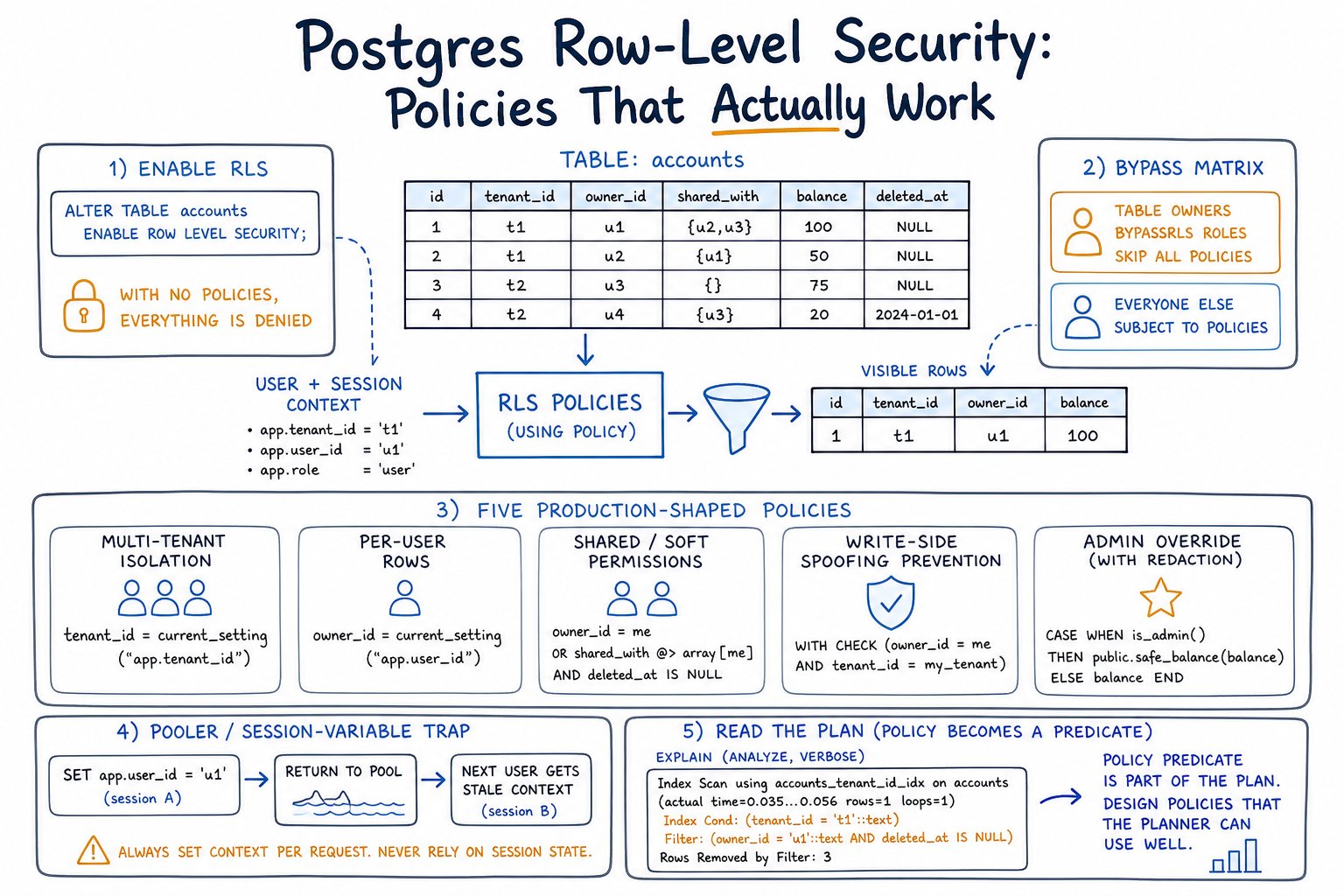
Enabling RLS: turn it on, then grant back
ALTER TABLE orders ENABLE ROW LEVEL SECURITY;That single line changes the table's default from "visible to anyone with SELECT privilege" to "visible to no one, subject to RLS, until you write a policy." If you enable RLS and stop there, every role that isn't a superuser and doesn't own the table gets zero rows. I've watched this take down a staging environment in under a minute: someone enables RLS ahead of a migration, runs out to a meeting, and the app starts returning empty result sets everywhere. Nothing errors. It just quietly stops showing data. That silence is the whole danger of RLS. A misconfiguration doesn't look like a bug; it looks like an empty table.
RLS does not replace GRANT. It sits downstream of it. A role still needs SELECT, INSERT, UPDATE, or DELETE privilege on the table through the ordinary privilege system, and RLS policies only filter which rows those privileges reach. Revoke SELECT and it doesn't matter how permissive your policy is; the role never gets past the privilege check to have the policy evaluated at all.
BYPASSRLS, ownership, and FORCE ROW LEVEL SECURITY
This is the part that actually gets teams into trouble, more than any policy syntax mistake.
| Role type | Bypasses RLS? | Can this be changed? | |---|---|---| | Superuser | Always | No | | Role with BYPASSRLS attribute | Always | Only by revoking the attribute | | Table owner (no FORCE) | Yes, by default | Yes, apply FORCE ROW LEVEL SECURITY | | Table owner (with FORCE ROW LEVEL SECURITY) | No | — | | Ordinary role (not owner, no BYPASSRLS) | No | Subject to policies as written |
The rule I give every client: your app role should never own the table. This is the single most common reason RLS silently does nothing. Someone runs their migrations as the app role because it's convenient, that role ends up owning the tables it creates, and every policy you write afterward is decoration — the owner sails past all of it. Keep a separate migration/owner role, have it create and own the schema, and have the app connect as a distinct role that owns nothing and has no BYPASSRLS.
Audit both conditions with these two queries, run them after any onboarding, any role change, and on a schedule after that:
-- Roles that bypass RLS entirely
SELECT rolname FROM pg_roles WHERE rolbypassrls OR rolsuper;

-- RLS-enabled tables with zero policies defined
SELECT c.relname,
       c.relrowsecurity,
       c.relforcerowsecurity,
       count(p.polname) AS policy_count
FROM pg_class c
LEFT JOIN pg_policies p ON p.tablename = c.relname
WHERE c.relrowsecurity
GROUP BY c.relname, c.relrowsecurity, c.relforcerowsecurity
HAVING count(p.polname) = 0;
That second query catches the "enabled RLS, forgot to write a policy" case before your team finds it in production.
Demo schema
Everything below runs as written against a stock Postgres 14+ instance.
CREATE ROLE app_owner NOLOGIN;
CREATE ROLE app_user LOGIN PASSWORD 'demo' NOBYPASSRLS;

CREATE TABLE orders (
    id          bigserial PRIMARY KEY,
    tenant_id   bigint NOT NULL,
    amount      numeric NOT NULL,
    created_at  timestamptz NOT NULL DEFAULT now()
);
CREATE INDEX orders_tenant_created_idx ON orders (tenant_id, created_at);

CREATE TABLE documents (
    id      bigserial PRIMARY KEY,
    owner   name NOT NULL,
    title   text NOT NULL,
    legal_hold boolean NOT NULL DEFAULT false
);

CREATE TABLE document_acl (
    document_id bigint REFERENCES documents(id),
    grantee     name NOT NULL,
    PRIMARY KEY (document_id, grantee)
);

ALTER TABLE orders OWNER TO app_owner;
ALTER TABLE documents OWNER TO app_owner;
ALTER TABLE document_acl OWNER TO app_owner;

GRANT SELECT, INSERT, UPDATE, DELETE ON orders, documents, document_acl TO app_user;
CREATE POLICY in practice: five production scenarios
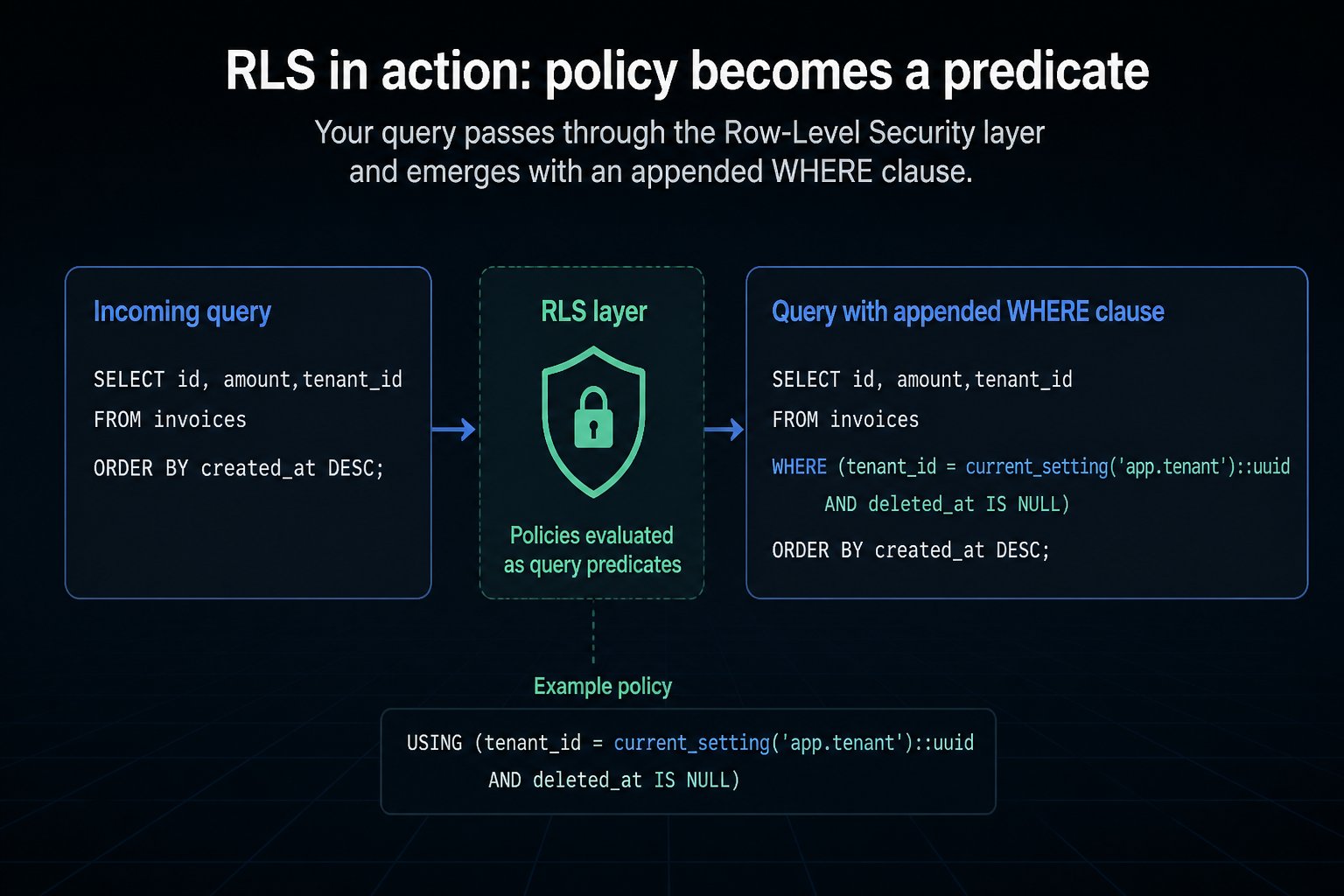
1. Multi-tenant isolation with current_setting('app.tenant_id')
ALTER TABLE orders ENABLE ROW LEVEL SECURITY;
ALTER TABLE orders FORCE ROW LEVEL SECURITY;

CREATE POLICY tenant_isolation ON orders
    FOR ALL
    TO app_user
    USING (tenant_id = current_setting('app.tenant_id', true)::bigint)
    WITH CHECK (tenant_id = current_setting('app.tenant_id', true)::bigint);
The second argument to current_setting is missing_ok. Pass true and an unset variable returns NULL instead of raising an error. That matters more than it looks like it does. If you skip it and app.tenant_id is never set, the whole request errors out, which is loud, but not always the failure mode you want mid-transaction. With true, an unset tenant produces tenant_id = NULL, which is never true, so the policy fails closed: zero rows, not an exception. I default to failing closed with true because a silent empty result is safer for a web request than a stack trace leaking into logs — but if you'd rather surface the misconfiguration loudly, drop the second argument.
Transcript proving isolation:
$ psql -U app_user demo

demo=> SET app.tenant_id = '1';
SET
demo=> INSERT INTO orders (tenant_id, amount) VALUES (1, 100), (2, 200);
INSERT 0 2
demo=> SELECT * FROM orders;
 id | tenant_id | amount |          created_at
----+-----------+--------+-------------------------------
  1 |         1 |    100 | 2026-08-06 10:04:01.221+00
(1 row)
One row inserted as tenant 2 exists in the table, but tenant 1's session never sees it. That's the policy doing its job, on both the INSERT and the subsequent SELECT.
Setting the tenant safely: SET vs SET LOCAL under a pooler
SET app.tenant_id = '1' persists for the entire session. Under a direct connection that's fine. Under PgBouncer in transaction pooling mode, it's dangerous: the server connection goes back into the pool at COMMIT, carrying whatever session variables were left set, and the next client to grab that connection inherits them. I've seen this produce cross-tenant data leaks that looked like RLS bugs but were actually pooling bugs. The policy worked exactly as written — it just evaluated against the wrong tenant because a previous client's SET never got cleared.
Two fixes, pick one:
BEGIN;
SET LOCAL app.tenant_id = '1';
SELECT * FROM orders;
COMMIT;
SET LOCAL values are discarded at COMMIT or ROLLBACK, so they can't leak into the next transaction on a shared connection. Alternatively, run DISCARD ALL on checkout before handing a pooled connection back to a new client. PgBouncer supports this via server_reset_query.
Be honest with yourself about what this scheme actually defends against. Any client that can execute arbitrary SQL can also execute SET app.tenant_id = 99 and read someone else's tenant. Session-variable RLS is a convenience boundary for a trusted application tier that only ever runs queries you wrote. It is not a defense against an attacker who has raw SQL access to the app role. If that's your threat model, use one database role per tenant with role-based policies instead, or push tenant scoping into a connection-pooling layer that authenticates per tenant.
2. Per-user rows without a session variable
When every human maps to a real Postgres role — less common outside internal tools, but it happens — you can skip session variables entirely:
ALTER TABLE documents ENABLE ROW LEVEL SECURITY;

CREATE POLICY own_documents ON documents
    FOR ALL
    TO app_user
    USING (owner = current_user)
    WITH CHECK (owner = current_user);
current_user reflects the role currently in effect for privilege checks, which changes under SET ROLE and inside SECURITY DEFINER functions. session_user is the role that actually authenticated and never changes for the life of the session. If your policy needs to know who logged in regardless of role switching, use session_user; if it needs to know whose privileges are active right now, use current_user. Mixing them up is a quiet bug: a SECURITY DEFINER function that changes current_user to its owner will make an owner = current_user policy evaluate against the function owner, not the caller.
For hierarchies — a manager who should see their team's documents — pg_has_role() checks role membership inside the policy:
CREATE POLICY manager_visibility ON documents
    FOR SELECT
    TO app_user
    USING (pg_has_role(current_user, owner, 'MEMBER'));
3. Soft permissions via a membership table (and why the naive version is slow)
CREATE POLICY shared_access ON documents
    FOR SELECT
    TO app_user
    USING (
        EXISTS (
            SELECT 1 FROM document_acl a
            WHERE a.document_id = documents.id
              AND a.grantee = current_user
        )
    );
This works, but it's the naive version. The EXISTS subquery correlates on documents.id, so the planner has no choice but to re-run it per candidate row. On a test box with 500k documents and a 200k-row document_acl, EXPLAIN (ANALYZE, BUFFERS) for a query hitting a few thousand candidate rows showed a nested loop re-evaluating the ACL check per row, at roughly 340ms.
The fix is to decorrelate the lookup: wrap it as a scalar subquery keyed only on current_user, or push it into a STABLE function, so the planner can evaluate it once as an InitPlan instead of once per row:
CREATE POLICY shared_access ON documents
    FOR SELECT
    TO app_user
    USING (
        id IN (
            SELECT document_id FROM document_acl
            WHERE grantee = current_user
        )
    );
On the same test box and data, that version dropped to roughly 40ms. The ACL rows for the current user get pulled once into a hashed set, and the join against documents becomes a straightforward hash semi-join instead of a per-row correlated lookup. Your numbers will differ with your data distribution and indexes; the point is to check EXPLAIN (ANALYZE, BUFFERS) after writing any policy with a subquery, because the difference between correlated and decorrelated forms is often an order of magnitude — this is the core of row level security performance work.
Any helper function you call from inside a policy should be marked STABLE. Confirm the planner is treating it as such by looking for an InitPlan line in EXPLAIN output rather than a filter condition repeated once per row. If you see the latter, the function (or its volatility marking) is wrong.
4. Stopping cross-tenant writes: the WITH CHECK gap
This is the bug I see most often in RLS reviews: a working SELECT policy and no write-side check.
USING governs which existing rows a command can see or act on — it applies to SELECT, and to the read side of UPDATE and DELETE. WITH CHECK governs new row values; it applies to INSERT and the write side of UPDATE. INSERT policies accept only WITH CHECK (there's no existing row to check USING against). SELECT and DELETE policies accept only USING. If an UPDATE policy defines USING but no WITH CHECK, Postgres reuses the USING expression for the check, which is often not what you want, because it means the row can be updated to any tenant_id the USING clause would have let it read as, not necessarily the tenant you're currently scoped to.
| Command | Uses USING | Uses WITH CHECK | |---|---|---| | SELECT | Yes | — | | INSERT | — | Yes | | UPDATE | Yes (to find target rows) | Yes (checks new values; falls back to USING if omitted) | | DELETE | Yes | — | | ALL | Yes | Yes |
Without an explicit WITH CHECK, a SELECT-only policy on orders that reads correctly can still let app_user INSERT a row with tenant_id = 99. The insert has no USING to consult and no WITH CHECK to stop it, so it just succeeds and silently writes into another tenant's data. With the WITH CHECK clause from scenario 1 in place:
demo=> SET app.tenant_id = '1';
demo=> INSERT INTO orders (tenant_id, amount) VALUES (2, 50);
ERROR:  new row violates row-level security policy for table "orders"
That's the check doing its job, loudly, at write time. A filtered SELECT failing silently is fine; a write landing in the wrong tenant silently is not.
Watch ON CONFLICT DO UPDATE specifically: it exercises both the INSERT path's WITH CHECK and the UPDATE path's USING/WITH CHECK, so a policy that only covers one command type will let the conflict branch through unchecked.
5. Admin override with a permissive vs restrictive policy combo
Policies are PERMISSIVE by default, and multiple permissive policies for the same command combine with OR — any one of them passing is enough. RESTRICTIVE policies combine with AND on top of that, and are enforced regardless of what the permissive policies allowed. A restrictive policy on its own grants nothing. It only narrows what permissive policies already granted.
CREATE POLICY tenant_read ON documents
    AS PERMISSIVE FOR SELECT TO app_user
    USING (owner = current_user);

CREATE POLICY support_read ON documents
    AS PERMISSIVE FOR SELECT TO app_user
    USING (pg_has_role(current_user, 'support_team', 'MEMBER'));

CREATE POLICY no_legal_hold ON documents
    AS RESTRICTIVE FOR SELECT TO app_user
    USING (NOT legal_hold);
A support role sees a document if tenant_read OR support_read passes, but no_legal_hold is AND'd on afterward, so even support members are blocked from anything flagged legal_hold, regardless of which permissive policy would have let them in. AS PERMISSIVE/AS RESTRICTIVE syntax landed in Postgres 10; RLS itself shipped in 9.5.
Inspect what you've inherited before trusting it:
demo=> \d+ documents
demo=> SELECT policyname, permissive, roles, cmd, qual, with_check
       FROM pg_policies WHERE tablename = 'documents';
permissive reads PERMISSIVE or RESTRICTIVE. That column is the first thing to check when someone hands you a table full of policies and says "figure out why nobody can see anything."
What RLS does to your query plans
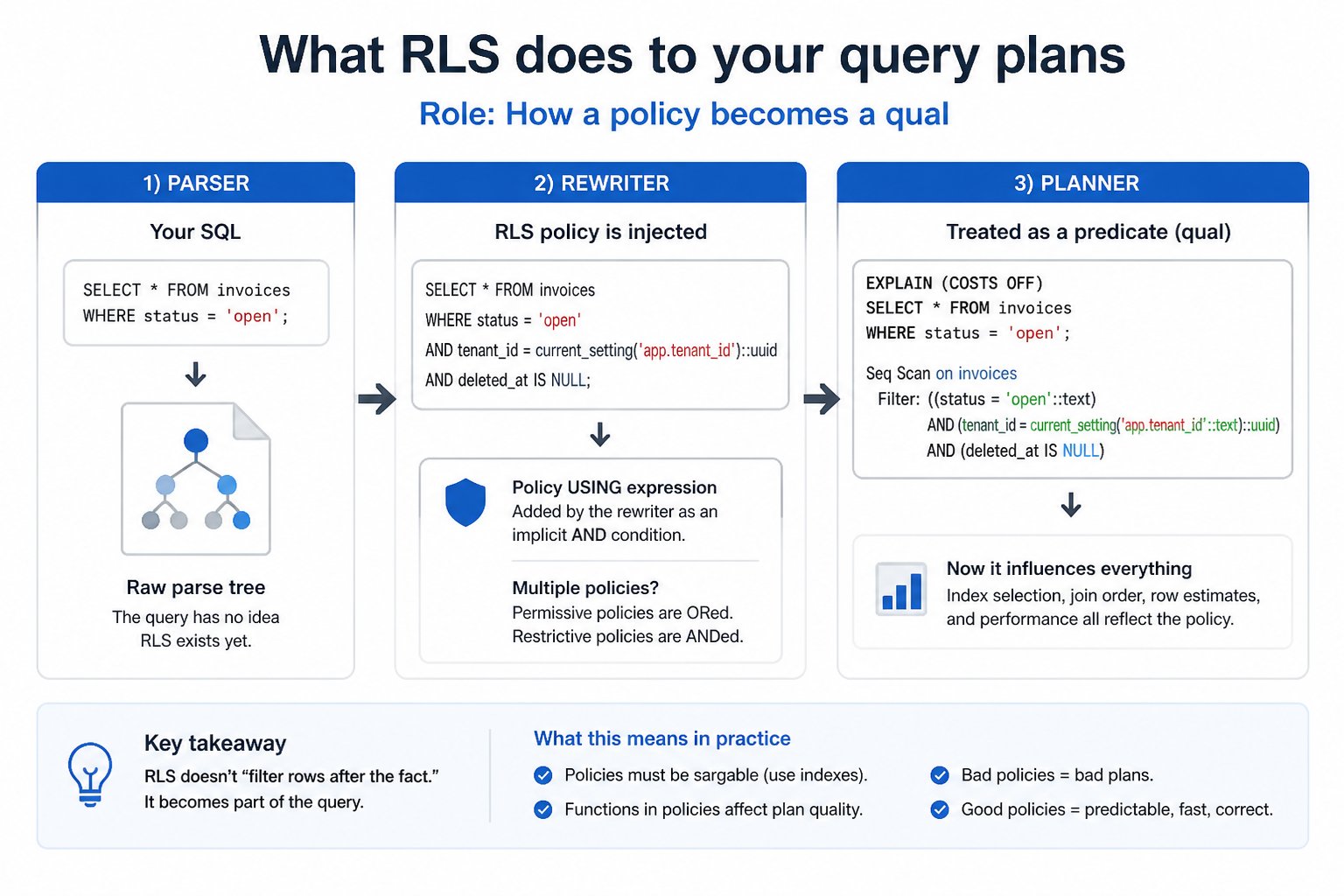
Policy quals become ordinary predicates, and the planner treats them like any other WHERE clause, which means they need the same indexing attention. A bare index on tenant_id is fine for the isolation check alone, but a paginated query filtering on tenant_id and ordering by created_at wants the composite index from the demo schema, (tenant_id, created_at), or every page scan re-sorts a filtered set instead of walking an index in order. Index the policy column the way real queries actually filter and sort, usually as a composite with the ordering column, not as a standalone index that only serves the policy check in isolation.
current_setting() is marked STABLE, so its value is fixed for the duration of a statement and the planner can use it directly as an index scan key rather than re-evaluating it per row. That's part of why the tenant isolation policy in scenario 1 stays cheap even on large tables.
The one genuinely surprising behavior is around leakproof functions. Postgres enforces RLS quals before non-LEAKPROOF user-supplied conditions, because a non-leakproof function could otherwise leak information about filtered-out rows through timing or error behavior before the security check runs. In practice this means the planner sometimes can't push your own selective WHERE clause ahead of the policy check the way it would on a table without RLS. A LIKE pattern match or a custom operator that isn't marked leakproof can end up evaluated after a less selective policy predicate instead of before it, which shows up as a slower plan than an identical query on a non-RLS table. Always check EXPLAIN (ANALYZE, BUFFERS) connected as the actual app role, not as postgres. The plan you get as a superuser bypasses RLS entirely and tells you nothing about what your application actually runs.
Edge cases that bite in production
A handful of behaviors are easy to miss until they cost someone an afternoon:
- Foreign keys and unique constraints bypass RLS entirely. A duplicate-key or FK-violation error can reveal that a row exists even to a role that can't select it. RLS filters read results, not constraint checks.
pg_dumpdefaults torow_security = offand errors if the dumping role can't bypass RLS. Pass--enable-row-securityto get a filtered, partial dump instead, and know that's what you're getting. Rehearse this with aBYPASSRLSrole before you need it for real.COPY FROMisn't supported on RLS-protected tables. UseINSERTstatements instead.COPY TOdoes applySELECTpolicies.- Views run as their owner by default, so RLS on the underlying table is checked against the view owner, not the querying user, until Postgres 15's
security_invokeroption, which makes the check run as the actual caller. - Partitioned tables inherit the parent's policies when queried through the parent; a policy on an individual partition only applies when that partition is queried directly.
row_security = offmakes queries error, not silently return unfiltered or over-filtered results, when RLS would otherwise apply.TRUNCATEisn't governed by RLS at all. It's controlled purely by theTRUNCATEprivilege, so a role with that grant can empty a table regardless of any policy.INSERT ... RETURNINGalso requires aSELECTpolicy permitting the row to be read back, separate from theWITH CHECKthat allowed the insert.
Operating RLS: what to monitor
RLS configuration drifts. Someone adds a table to a multi-tenant schema without a policy, a role picks up BYPASSRLS during an incident and nobody revokes it afterward, an owner role starts logging in directly because it was convenient during a migration. None of these announce themselves. They show up as an empty result set, or worse, as a data leak someone else notices first.
Worth checking on a schedule, not just at review time:
- RLS-enabled tables with zero policies (the query earlier in this post)
- App roles that have gained
BYPASSRLSor ownership of a table they shouldn't own - RLS-enabled tables missing
FORCEwhere the connecting role is also the owner - New tables added to a schema that's supposed to be fully RLS-covered, with no policy yet attached
- Query plans compared as the application role before and after any rollout, with
pg_stat_statementswatched for regressions over the following week — drift shows up as latency before it shows up as an incident
We built this kind of drift detection into MyDBA's estate health checks because writing and re-running these queries by hand across every schema gets tedious fast, and it's exactly the sort of thing that's easy to skip after the third week. If you'd rather cron the SQL yourself, the queries above are the starting point. MyDBA is there for when you'd rather have it watched continuously alongside vacuum and bloat monitoring instead.
Pre-flight checklist before you ship RLS
- [ ] App role is distinct from the table owner/migration role, and owns nothing
- [ ] App role does not have
BYPASSRLS - [ ]
FORCE ROW LEVEL SECURITYapplied wherever the app connects as owner (or ownership is fixed instead) - [ ] Every write path —
INSERT,UPDATE, and anyON CONFLICT DO UPDATE— has an explicitWITH CHECK - [ ] The policy column is indexed the way real queries filter and sort, usually as a composite with the ordering column
- [ ] Session/tenant variables are set with
SET LOCALinside the request transaction, or reset withDISCARD ALLon checkout, under any transaction-pooling proxy - [ ] Helper functions used in policies are marked
STABLE, confirmed by anInitPlanline inEXPLAINrather than a per-row filter - [ ] A negative test runs in CI: connect as the application role with tenant A's context, assert that tenant B's rows are invisible on read and rejected on write
- [ ]
pg_dump/restore rehearsed with aBYPASSRLSrole and--enable-row-security, and anyCOPY FROMin the load path replaced withINSERT - [ ]
EXPLAIN (ANALYZE, BUFFERS)checked as the app role on your hottest RLS-protected queries, before and after rollout, withpg_stat_statementswatched for regressions in the following week - [ ] Drift monitoring scheduled: policy-less tables,
BYPASSRLSgrants, and ownership changes — not run once at go-live and forgotten
The bottom line
What RLS actually buys you is that row visibility stops being a property of your code and becomes a property of the data. Every ORM, every reporting job, every ad-hoc psql session by a developer with the app role, every future service written by someone who has never read your authorization module — all of them get the same filter, because the filter lives in the table.
What it does not buy you is freedom from thinking about authorization. Policies express coarse boundaries well (this tenant, this owner, this ACL membership). They express business rules badly, and they express them in a place where the only debugging tool is EXPLAIN. Keep the policies simple enough that you can read the pg_policies output and predict the behavior without running it.
Keep the two failure modes in mind, because they are opposites and you will meet both. RLS that does nothing, because the app role owns the table, looks like everything working perfectly right up until an audit. RLS that does too much, because a variable went unset or a restrictive policy landed, looks like data loss. The first is silent. The second wakes you up. Build the monitoring for the silent one, treat RLS as a database-side guardrail rather than a replacement for application-level authorization, and check the plan every time you touch a policy.