Five Postgres Schema Decisions You’ll Regret at 2am
Five Postgres Schema Decisions You’ll Regret at 2am
If you want the 5‑minute version, there’s a companion video that gives you the shape of the problem. This article goes deeper — exact SQL, edge cases, and the retrofitting commands I’ve actually run on production databases while the on‑call phone buzzed.
<div style="position:relative;padding-bottom:56.25%;height:0;overflow:hidden;border-radius:0.75rem;margin:2rem 0;"> <iframe src="https://www.youtube.com/embed/i0FvxZVs3TU" title="5 Postgres Schema Mistakes That Quietly Kill Performance" style="position:absolute;top:0;left:0;width:100%;height:100%;border:0;" allow="accelerometer; autoplay; clipboard-write; encrypted-media; gyroscope; picture-in-picture; web-share" allowfullscreen></iframe> </div>
▶ Watch on YouTube: 5 Postgres Schema Mistakes That Quietly Kill Performance
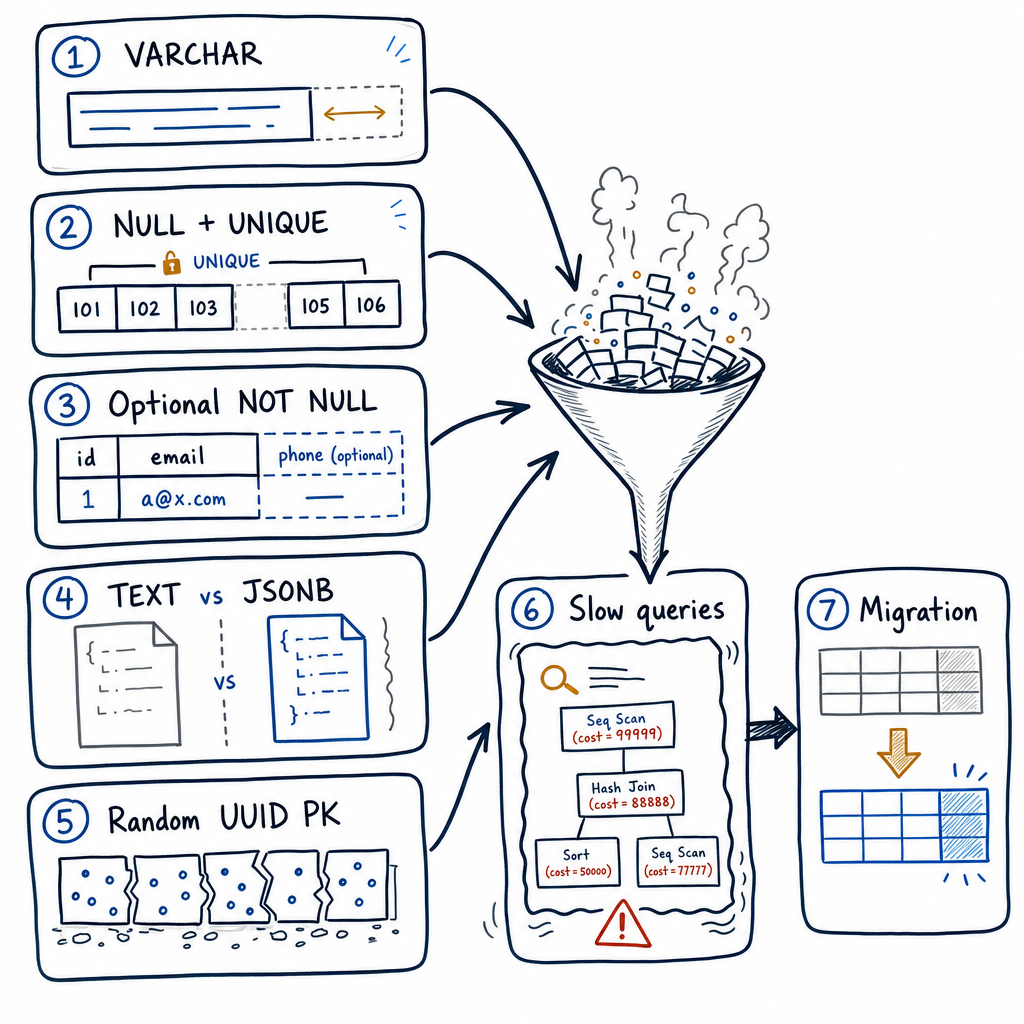
I’ve cleaned up each of these five messes more than once. They all passed code review. They all worked perfectly in staging with a few thousand rows. The cost is silent until you’re storing tens of millions of rows, and then it shows up as a slow‑query log entry at the worst possible hour. The cruel part: the fix is a one‑line DDL statement when the table is small. On a large table, you’re scheduling a maintenance window and explaining to the rest of the team why the database is read‑only for the next hour.
Let’s walk through them with numbers, real examples, and zero hedging.
---
Why schema mistakes are quiet, not loud
A schema mistake that screamed on day one would get caught in staging. These don’t scream. They degrade storage efficiency, inflate indexes, and starve the query planner of information — all proportionally to data volume. By the time you notice, the table has 200 million rows and the “fix” is a migration you can’t afford to run online.
The following five decisions are the ones I keep seeing. They’re so common that I can spot them in a database I’ve never seen before in under five minutes. None of them require a major architectural rethink. Each one can be fixed with a handful of commands — provided you catch it early.
---
Mistake 1: Unbounded VARCHAR (and the TOAST tax nobody budgets for)
What happens: A developer writes column_name VARCHAR. There’s no length limit, which means PostgreSQL will accept up to 1 GB of data in that single field. It’s the same underlying storage as TEXT, and the same varlena structure. The only difference between VARCHAR, VARCHAR(n), and TEXT is the optional length check — no performance advantage, no storage advantage. But the VARCHAR keyword misleads people into thinking they’ve constrained it.
When it bites: A bot POSTs a 4 MB blob of garbage into a VARCHAR column that should have held a short description. The application writes it fine because the schema allowed it. Every subsequent query that touches that row now has to navigate TOAST out‑of‑line storage. The row swells past the ~2 KB threshold, PostgreSQL compresses the value and stores it in a separate TOAST table, and every read has to follow a pointer to fetch those chunks.
What you actually pay:
- Extra I/O on every read.
- Cache eviction — that 4 MB row shoves out dozens of normal cache entries.
- Write amplification from TOAST chunks.
- And it all started because nobody put a length ceiling on a column that in reality never held more than 255 characters.
The safe retrofit: Add a length check without rewriting the table. Use the two‑step NOT VALID dance:
-- Step 1: Add the check constraint as NOT VALID.
-- This does not validate existing rows, making the change instant.
ALTER TABLE users
  ADD CONSTRAINT check_username_length
  CHECK (octet_length(username) <= 255) NOT VALID;

-- Step 2: Validate the constraint.
-- This scans the table but only requires a SHARE UPDATE EXCLUSIVE lock
-- (concurrent reads and writes are allowed).
ALTER TABLE users VALIDATE CONSTRAINT check_username_length;
---
Mistake 2: Nullable columns in unique constraints
What happens: A unique constraint on (email, tenant_id) is meant to enforce “one email per tenant,” with tenant_id nullable for global/system records. In SQL, NULL ≠ NULL, so rows with a NULL tenant never collide.
INSERT INTO accounts (email, tenant_id) VALUES ('admin@company.com', NULL);
INSERT INTO accounts (email, tenant_id) VALUES ('admin@company.com', NULL); -- Succeeds!
You now have duplicate emails. The “unique” constraint silently fails.
The safe retrofit: Use a pair of partial unique indexes (any PostgreSQL) or the newer NULLS NOT DISTINCT (PostgreSQL 15+). Partial indexes are widely supported and give you exact control:
-- Enforce uniqueness when tenant_id is present
CREATE UNIQUE INDEX CONCURRENTLY unique_email_per_tenant
ON accounts (email, tenant_id)
WHERE tenant_id IS NOT NULL;

-- Ensure at most one global (NULL) row per email
CREATE UNIQUE INDEX CONCURRENTLY unique_global_email
ON accounts (email)
WHERE tenant_id IS NULL;
On PostgreSQL 15+, a single constraint with NULLS NOT DISTINCT replaces both:
ALTER TABLE accounts
  ADD CONSTRAINT unique_email_tenant_unified
  UNIQUE NULLS NOT DISTINCT (email, tenant_id);
---
Mistake 3: Columns that are NULL‑able but never actually NULL
Every row header carries a null bitmap. If a column is declared NULL‑able, the query planner cannot assume a value always exists — it must prepare for missing data. This limits index-only scans, join optimisations, and other shortcuts. And physically, that bitmap wastes space.
The trap: adding NOT NULL with a plain ALTER TABLE … SET NOT NULL locks the table for a full scan. On a live table with millions of rows, that’s a recipe for downtime.
The safe retrofit (PostgreSQL 12+):
-- 1. Add a fast, non-validated CHECK constraint
ALTER TABLE orders
  ADD CONSTRAINT orders_created_at_not_null
  CHECK (created_at IS NOT NULL) NOT VALID;

-- 2. Validate it without blocking writes
ALTER TABLE orders VALIDATE CONSTRAINT orders_created_at_not_null;

-- 3. Now SET NOT NULL skips the scan (Postgres knows no NULLs exist)
ALTER TABLE orders ALTER COLUMN created_at SET NOT NULL;

-- 4. Drop the now‑redundant CHECK
ALTER TABLE orders DROP CONSTRAINT orders_created_at_not_null;
---
Mistake 4: JSONB for rigid structured data
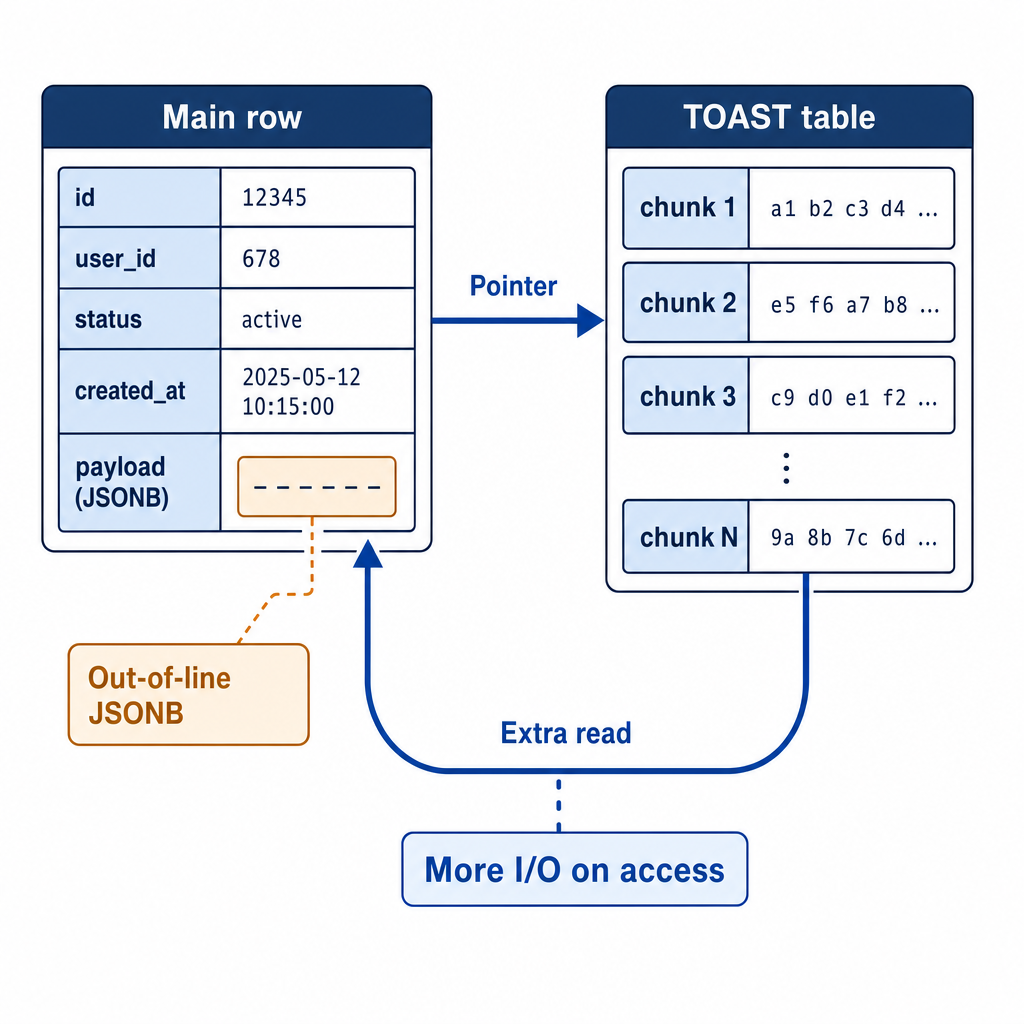
Using a single JSONB column for fixed‑schema data (user_id, event_type, timestamp) is a double‑edged sword.
- Write overhead: Every insert parses, de‑duplicates, and sorts JSON keys, and stores the key names (
"event_type","timestamp") on every row. 100 million rows storing"event_type"100 million times wastes storage and churns the buffer cache. - Read patterns: Queries that need specific keys often end up with full‑table scans unless a GIN index is added, which itself has maintenance cost.
What to do:
| Data Structure | PostgreSQL Type | Index Strategy | |--------------------------------|--------------------------------------|-------------------| | Strict, predictable keys | Real columns (INT, TIMESTAMP) | Standard B‑Tree | | Volatile semi‑structured keys | JSONB | GIN index | | Write‑once, rarely queried blobs | TEXT or BYTEA | No index |
If you must stay with JSONB, at least index it properly:
CREATE INDEX idx_events_payload ON events USING GIN (payload);
-- or a more compact path‑aware index:
CREATE INDEX idx_events_payload_path
  ON events USING GIN (payload jsonb_path_ops);
---
Mistake 5: Random UUIDv4 primary keys
UUIDv4 is great for distributed uniqueness, but its randomness is poison for a B‑Tree index. Every insert picks a random spot in the tree; when the index no longer fits in shared_buffers, every insert forces a random page read, a page split, and a write back. The result: heavy write amplification and index fragmentation.
The fix — UUIDv7: UUIDv7 prepends a millisecond‑precision timestamp, so new keys are naturally ordered. The index sees strictly ascending inserts. The index stays compact, writes stay fast.
- PostgreSQL 18+ has native UUIDv7 generation.
- On earlier versions, generate UUIDv7 in your application code (every major language has a library). If you absolutely must generate them inside PostgreSQL, a PL/pgSQL helper can assemble the bits, but application‑side generation is cleaner.
For low‑write tables where the index never outgrows RAM, UUIDv4 is fine. For any high‑write transactional table, UUIDv7 is a drop‑in replacement that prevents the inevitable B‑Tree meltdown.
---
How to find these mistakes before 2am
You don’t need a production outage to spot them. Run these queries against your database right now.
1. Unbounded VARCHAR columns
SELECT table_schema, table_name, column_name
FROM information_schema.columns
WHERE data_type = 'character varying'
  AND character_maximum_length IS NULL
  AND table_schema NOT IN ('pg_catalog', 'information_schema');
2. Unique indexes covering nullable columns
SELECT
    c.relname AS table_name,
    i.relname AS index_name,
    a.attname AS column_name
FROM pg_index idx
JOIN pg_class c ON c.oid = idx.indrelid
JOIN pg_class i ON i.oid = idx.indexrelid
JOIN pg_attribute a ON a.attrelid = c.oid AND a.attnum = ANY(idx.indkey)
WHERE idx.indisunique = true
  AND a.attnotnull = false
  AND c.relnamespace::regnamespace::text NOT IN ('pg_catalog', 'information_schema');
3. Columns that are nullable but contain zero NULLs
SELECT schemaname, tablename, attname AS column_name, null_frac
FROM pg_stats
WHERE null_frac = 0.0
  AND schemaname NOT IN ('pg_catalog', 'information_schema', 'pg_toast');
For each of these candidates, step through the safe NOT VALID pattern to lock in the NOT NULL without a maintenance window.
---
In short: cheap to fix early, painful at scale
- Unbounded VARCHARs silently bloat your TOAST storage and I/O.
- Nullable unique columns break the very rule you thought you had enforced.
- Missing
NOT NULLstarves the query planner and wastes space. - JSONB for rigid schemas burns write throughput and storage.
- Random UUIDv4 keys fragment the most important index in your table.
Each mistake is invisible until your data outgrows staging, and then the fix is a multi‑step migration on a live table. Run the detection queries today, lock down the constraints with the NOT VALID pattern, and you’ll never have to explain to the rest of the team why the database went read‑only at 2am.
Don’t wait for 2am — automate the audit
All five mistakes are accidents of omission, not malice. Nobody deliberately writes a nullable unique constraint; they just trust the ORM’s default. The tragedy is that a one‑off manual review — like the queries above — catches them in minutes. But what about next month’s migration, or the new service your team shipped last week? Schema drift is continuous, and you can’t live your life in pg_stat_user_tables.
That’s why I built MyDBA to run these exact checks (and dozens more) continuously against your staging and production databases. It flags anti‑patterns like TOAST‑prone columns, missing not‑nulls, and index bloat before they graduate to a 2am alert — giving you a safe path to fix them while the table is still small. If you want the peace of mind that comes from automated guardrails, give it a try.