15 Best PostgreSQL Extensions in 2026: pgvector, PostGIS, TimescaleDB and More
15 PostgreSQL Extensions You Should Know in 2026
PostgreSQL's extension system is the single feature that separates it from every other database. It lets you add vector search, time-series, geospatial, and machine learning capabilities without leaving PostgreSQL. No other database comes close.
MySQL has plugins. SQL Server has CLR integration. MongoDB has nothing comparable. But PostgreSQL extensions are not bolt-on plugins -- they define entirely new data types, operators, index access methods, and procedural languages at the deepest level of the database engine. This is why PostgreSQL has become the default for AI applications, geospatial workloads, time-series analytics, and full-text search -- all without needing a separate specialized database for each use case.
Here are the 15 extensions that matter most in 2026, organized by category, with working code examples for each one.
---
Data Type Extensions
These extensions add new data types and operators -- the reason PostgreSQL can replace multiple specialized databases.
1. PostGIS — Geospatial Queries
PostGIS turns PostgreSQL into a full-featured geographic information system. It adds geometry and geography types, spatial indexing (GiST and SP-GiST), and over 300 functions for spatial analysis.
-- Find all coffee shops within 500 meters of a location
SELECT shop_name, address,
    ST_Distance(
        location::geography,
        ST_SetSRID(ST_MakePoint(-73.9857, 40.7484), 4326)::geography
    ) AS distance_meters
FROM coffee_shops
WHERE ST_DWithin(
    location::geography,
    ST_SetSRID(ST_MakePoint(-73.9857, 40.7484), 4326)::geography,
    500
)
ORDER BY distance_meters;
When to use it: Any application that deals with locations, boundaries, routes, or spatial relationships. Ride-sharing, real estate, logistics, and delivery services all rely on PostGIS. It is the industry standard for geospatial databases.
PostGIS adds monitoring complexity -- spatial indexes can bloat, invalid geometries silently break queries, and SRID mismatches cause incorrect distance calculations. myDBA.dev monitors PostGIS spatial index health, geometry quality, and configuration settings automatically.
2. pgvector — Vector Similarity Search for AI/ML
pgvector adds a vector data type and three index types (IVFFlat, HNSW, and the new streaming disk ANN) for approximate nearest-neighbor search. It is what makes PostgreSQL a viable vector database for AI applications.
-- Create a table for document embeddings
CREATE TABLE documents (
    document_id SERIAL PRIMARY KEY,
    title TEXT,
    content TEXT,
    embedding vector(1536)  -- OpenAI ada-002 dimensions
);

-- Create an HNSW index for fast similarity search
CREATE INDEX ON documents
    USING hnsw (embedding vector_cosine_ops)
    WITH (m = 16, ef_construction = 200);

-- Find the 5 most semantically similar documents
SELECT title, content,
    1 - (embedding <=> '[0.021, -0.003, ...]'::vector) AS similarity_score
FROM documents
ORDER BY embedding <=> '[0.021, -0.003, ...]'::vector
LIMIT 5;
When to use it: Semantic search, RAG pipelines, recommendation systems, image similarity. pgvector means you do not need Pinecone or Weaviate -- your vectors live alongside your relational data with full ACID guarantees.
HNSW indexes with wrong parameters can give 60% recall when you expected 95%. myDBA.dev runs 13 automated pgvector health checks covering index configuration, recall estimation, and dimension sizing.
3. hstore — Key-Value Pairs
hstore predates JSONB and provides a simple key-value store within a single column. It is lighter weight than JSONB when you only need flat string-to-string mappings.
CREATE EXTENSION hstore;

-- Store product attributes as key-value pairs
ALTER TABLE products ADD COLUMN attributes hstore;

UPDATE products
SET attributes = 'color => "red", size => "large", material => "cotton"'
WHERE product_id = 1;

-- Query by key
SELECT product_name FROM products
WHERE attributes -> 'color' = 'red';

-- Check if a key exists
SELECT product_name FROM products
WHERE attributes ? 'material';
When to use it: Simple metadata, tag systems, feature flags. For nested structures, use JSONB instead -- but hstore is faster for flat lookups and uses less storage.
---
Time-Series and Analytics
These extensions add time-series and distributed analytics capabilities.
4. TimescaleDB — Time-Series Data
TimescaleDB adds hypertables (automatic time-based partitioning), continuous aggregates (materialized views that update incrementally), and native compression that typically achieves 90-95% storage reduction.
-- Create a hypertable for IoT sensor data
CREATE TABLE sensor_readings (
    reading_timestamp TIMESTAMPTZ NOT NULL,
    sensor_id INTEGER NOT NULL,
    temperature DOUBLE PRECISION,
    humidity DOUBLE PRECISION
);

SELECT create_hypertable('sensor_readings', by_range('reading_timestamp'));

-- Add compression (typically 90%+ reduction)
ALTER TABLE sensor_readings SET (
    timescaledb.compress,
    timescaledb.compress_segmentby = 'sensor_id',
    timescaledb.compress_orderby = 'reading_timestamp DESC'
);

SELECT add_compression_policy('sensor_readings', INTERVAL '1 hour');

-- Create a continuous aggregate for hourly summaries
CREATE MATERIALIZED VIEW sensor_hourly
WITH (timescaledb.continuous) AS
SELECT sensor_id,
    time_bucket('1 hour', reading_timestamp) AS bucket,
    avg(temperature) AS avg_temperature,
    min(temperature) AS min_temperature,
    max(temperature) AS max_temperature,
    count(*) AS reading_count
FROM sensor_readings
GROUP BY sensor_id, bucket;
When to use it: IoT metrics, application monitoring, financial tick data, event logging -- any workload with time-stamped data at scale.
TimescaleDB adds operational surface area. Chunks can grow too large, compression ratios can degrade, and continuous aggregates can fall behind. myDBA.dev monitors chunk sizes, compression ratios, aggregate freshness, and background job health.
5. pg_partman — Automated Table Partitioning
pg_partman automates the creation and maintenance of PostgreSQL's native table partitioning. It handles time-based and serial-based partition management, including pre-creating future partitions and dropping old ones.
CREATE EXTENSION pg_partman;

-- Create a partitioned table
CREATE TABLE audit_log (
    log_id BIGINT GENERATED ALWAYS AS IDENTITY,
    created_at TIMESTAMPTZ NOT NULL DEFAULT now(),
    action TEXT NOT NULL,
    details JSONB
) PARTITION BY RANGE (created_at);

-- Let pg_partman manage partitions automatically
SELECT partman.create_parent(
    p_parent_table := 'public.audit_log',
    p_control := 'created_at',
    p_interval := '1 month',
    p_premake := 3
);

-- Set up automatic retention (drop partitions older than 1 year)
UPDATE partman.part_config
SET retention = '1 year', retention_keep_table = false
WHERE parent_table = 'public.audit_log';
When to use it: Any table growing beyond tens of millions of rows. Partitioning improves time-filtered query performance, makes VACUUM and reindex faster, and enables efficient data retention by dropping entire partitions instead of deleting rows.
6. Citus — Distributed PostgreSQL
Citus adds horizontal scaling by distributing tables across multiple nodes, turning PostgreSQL into a distributed system for multi-tenant SaaS and real-time analytics.
CREATE EXTENSION citus;

-- Distribute a table by tenant_id
SELECT create_distributed_table('orders', 'tenant_id');

-- Queries filtering by tenant_id route to a single shard
SELECT order_id, total_amount
FROM orders
WHERE tenant_id = 42 AND created_at > now() - INTERVAL '7 days';

-- Cross-shard aggregations work transparently
SELECT tenant_id, sum(total_amount) AS revenue
FROM orders
WHERE created_at > now() - INTERVAL '30 days'
GROUP BY tenant_id;
When to use it: Multi-tenant SaaS applications with a natural distribution key. Real-time analytics across billions of rows. Citus is now part of Microsoft (Azure Cosmos DB for PostgreSQL) but remains open-source.
---
Performance and Monitoring
These extensions help you understand and optimize database performance.
7. pg_stat_statements — Query Performance Statistics
pg_stat_statements is the single most important extension for any production PostgreSQL database. It tracks execution statistics for every distinct query: call counts, execution times, rows returned, buffer usage, and I/O timing.
-- shared_preload_libraries = 'pg_stat_statements'
CREATE EXTENSION pg_stat_statements;

-- Find your slowest queries by total time
SELECT substring(query, 1, 100) AS query_preview,
    calls,
    round(total_exec_time::numeric, 1) AS total_ms,
    round(mean_exec_time::numeric, 1) AS avg_ms,
    rows
FROM pg_stat_statements
ORDER BY total_exec_time DESC
LIMIT 10;
When to use it: Every production PostgreSQL database, no exceptions. The overhead is under 1%, and the visibility is irreplaceable. Every monitoring tool, including myDBA.dev, depends on pg_stat_statements as its primary data source.
8. auto_explain — Automatic EXPLAIN Plan Logging
auto_explain logs the execution plan for any query exceeding a configurable duration threshold, capturing plans automatically in production instead of requiring manual EXPLAIN.
-- shared_preload_libraries = 'pg_stat_statements, auto_explain'
ALTER SYSTEM SET auto_explain.log_min_duration = '100ms';
ALTER SYSTEM SET auto_explain.log_analyze = on;
ALTER SYSTEM SET auto_explain.log_buffers = on;
ALTER SYSTEM SET auto_explain.log_format = 'json';
SELECT pg_reload_conf();
When to use it: Production databases where you need to understand why specific queries are slow. auto_explain captures the actual execution plan at the moment the slow query runs, including row estimates versus actuals -- invaluable for diagnosing plan regressions.
9. pg_hint_plan — Query Plan Hints
pg_hint_plan lets you override PostgreSQL's query planner decisions with explicit hints when the planner makes suboptimal choices.
CREATE EXTENSION pg_hint_plan;

-- Force a hash join instead of nested loop
SELECT /*+ HashJoin(orders customers) */
    o.order_id, c.customer_name
FROM orders o
JOIN customers c ON o.customer_id = c.customer_id
WHERE o.created_at > now() - INTERVAL '7 days';

-- Force an index scan when the planner chooses sequential
SELECT /*+ IndexScan(orders orders_created_at_idx) */
    order_id, total_amount
FROM orders
WHERE created_at BETWEEN '2026-01-01' AND '2026-01-31';
When to use it: Sparingly. pg_hint_plan is a scalpel, not a hammer. Use it only when you have confirmed the planner is making a wrong choice that cannot be fixed through better statistics or query rewriting.
10. pg_cron — Scheduled Jobs Inside PostgreSQL
pg_cron brings cron-style job scheduling directly into PostgreSQL. No external scheduler needed -- jobs run as background workers inside the database process.
CREATE EXTENSION pg_cron;

-- Run VACUUM ANALYZE on a large table every night at 3 AM
SELECT cron.schedule(
    'nightly-vacuum',
    '0 3 * * *',
    $VACUUM ANALYZE large_transactions$
);

-- Purge old sessions every hour
SELECT cron.schedule(
    'cleanup-sessions',
    '0 * * * *',
    $DELETE FROM user_sessions
      WHERE expires_at < now() - INTERVAL '24 hours'$
);

-- Refresh a materialized view every 15 minutes
SELECT cron.schedule(
    'refresh-dashboard-stats',
    '*/15 * * * *',
    $REFRESH MATERIALIZED VIEW CONCURRENTLY dashboard_summary$
);

-- List all scheduled jobs
SELECT jobid, schedule, command, active FROM cron.job;
When to use it: Routine maintenance (purging old data, refreshing materialized views, running aggregations) and any scheduled SQL operation without needing an external scheduler.
---
Search and Text
These extensions improve text search beyond PostgreSQL's built-in full-text search.
11. pg_trgm — Trigram-Based Fuzzy Matching
pg_trgm (trigram) enables similarity search and fuzzy matching by breaking strings into three-character sequences. It makes LIKE, ILIKE, and regular expression queries use indexes instead of sequential scans.
CREATE EXTENSION pg_trgm;

-- Create a GIN trigram index for fast LIKE queries
CREATE INDEX idx_products_name_trgm ON products
    USING gin (product_name gin_trgm_ops);

-- Now LIKE queries use the index instead of sequential scan
SELECT product_name FROM products
WHERE product_name ILIKE '%bluetooth%headphone%';

-- Fuzzy matching -- find similar names (typo tolerance)
SELECT product_name,
    similarity(product_name, 'blutooth hedphones') AS match_score
FROM products
WHERE similarity(product_name, 'blutooth hedphones') > 0.3
ORDER BY match_score DESC;

-- Find the closest matches using the distance operator
SELECT product_name
FROM products
ORDER BY product_name <-> 'wireless earbuds'
LIMIT 5;
When to use it: Search boxes that need typo tolerance, autocomplete, and any LIKE '%term%' query doing sequential scans. pg_trgm turns those O(n) scans into indexed lookups.
12. unaccent — Search Normalization
unaccent removes diacritical marks from text, making search work correctly across languages. Without it, searching for "cafe" will not find "cafe" and vice versa.
CREATE EXTENSION unaccent;

-- Create an immutable wrapper for use in indexes
CREATE OR REPLACE FUNCTION immutable_unaccent(text)
RETURNS text AS $
    SELECT unaccent('unaccent', $1);
$ LANGUAGE sql IMMUTABLE STRICT PARALLEL SAFE;

-- Functional index for accent-insensitive search
CREATE INDEX idx_customers_name_unaccent
ON customers (immutable_unaccent(lower(customer_name)));

-- Query using the same function
SELECT customer_name FROM customers
WHERE immutable_unaccent(lower(customer_name)) = immutable_unaccent(lower('Jose'));
When to use it: Any application serving multilingual users or handling accented names. Combine with pg_trgm for fuzzy, accent-insensitive search -- that combination covers most search requirements without Elasticsearch.
---
Security and Utilities
These extensions handle encryption, maintenance, and compliance.
13. pgcrypto — Encryption Functions
pgcrypto provides cryptographic functions for hashing, symmetric encryption (AES), and asymmetric encryption (RSA) directly inside PostgreSQL. It keeps sensitive data encrypted at the column level, not just at rest on disk.
CREATE EXTENSION pgcrypto;

-- Hash a password with bcrypt (adaptive work factor)
INSERT INTO user_accounts (username, password_hash)
VALUES ('alice', crypt('my_secret_password', gen_salt('bf', 12)));

-- Verify a password
SELECT username FROM user_accounts
WHERE username = 'alice'
AND password_hash = crypt('my_secret_password', password_hash);

-- Symmetric encryption (AES-256) for sensitive data
INSERT INTO customer_records (customer_name, encrypted_ssn)
VALUES (
    'Bob Smith',
    pgp_sym_encrypt('123-45-6789', 'encryption_key_from_app')
);

-- Decrypt when needed
SELECT customer_name,
    pgp_sym_decrypt(encrypted_ssn, 'encryption_key_from_app') AS ssn
FROM customer_records
WHERE customer_id = 1;
When to use it: Column-level encryption for PII, credentials, and API keys. Password hashing for applications managing their own authentication. pgcrypto's bcrypt is battle-tested and handles salting automatically.
14. pg_repack — Online Table Repacking
pg_repack removes table and index bloat without holding exclusive locks. Unlike VACUUM FULL, which locks the entire table, pg_repack uses trigger-based replication to rebuild the table while it remains fully accessible.
CREATE EXTENSION pg_repack;

-- Repack a bloated table (run from command line)
-- pg_repack -d mydb -t bloated_table

-- Repack only indexes
-- pg_repack -d mydb --only-indexes -t large_orders
When to use it: When tables have significant bloat that VACUUM cannot reclaim and you cannot afford the downtime of VACUUM FULL. pg_repack is the standard solution for zero-downtime bloat removal in production.
15. pgAudit — Detailed Audit Logging
pgAudit provides detailed session and object audit logging that satisfies SOC 2, HIPAA, PCI-DSS, and GDPR compliance requirements.
-- shared_preload_libraries = 'pgaudit'
CREATE EXTENSION pgaudit;

-- Log all DDL and write operations
ALTER SYSTEM SET pgaudit.log = 'ddl, write, role';

-- Object-level auditing: only audit sensitive tables
CREATE ROLE auditor;
ALTER SYSTEM SET pgaudit.role = 'auditor';
GRANT SELECT, INSERT, UPDATE, DELETE
ON customer_records, financial_transactions TO auditor;
When to use it: Any environment with compliance requirements -- financial services, healthcare, government. pgAudit's object-level auditing lets you selectively audit sensitive tables without logging every query.
---
The Extension Advantage
PostgreSQL's extension system is architecturally unique. Extensions integrate at the engine level through well-defined C APIs:
- New data types — pgvector's
vector, PostGIS'sgeometry, and hstore'shstoreare first-class types with their own storage, operators, and casting rules. - New index methods — HNSW, GiST, SP-GiST, and GIN are all extension-defined access methods.
- New operators — The
<=>cosine distance operator, the&&spatial overlap operator, the?existence operator -- all extension-defined. - New procedural languages — PL/Python, PL/V8, PL/Rust are all extensions.
- Background workers — TimescaleDB compression and pg_cron scheduling use PostgreSQL's background worker infrastructure.
This is why PostgreSQL extensions are not comparable to MySQL plugins. PostGIS adds thousands of functions and several index types, all working seamlessly with the planner, MVCC, replication, and backup systems. The extension is not fighting the database -- it is part of it.
---
Monitoring Extensions in Production
Extensions add powerful capabilities, but they also add monitoring surface area that generic tools miss.
TimescaleDB chunks can grow too large, compression ratios can degrade, and continuous aggregates can fall behind. pgvector HNSW indexes with wrong parameters give poor recall -- serving incorrect search results silently. PostGIS spatial indexes bloat, invalid geometries break queries without errors, and SRID mismatches cause distance calculations to be off by orders of magnitude.
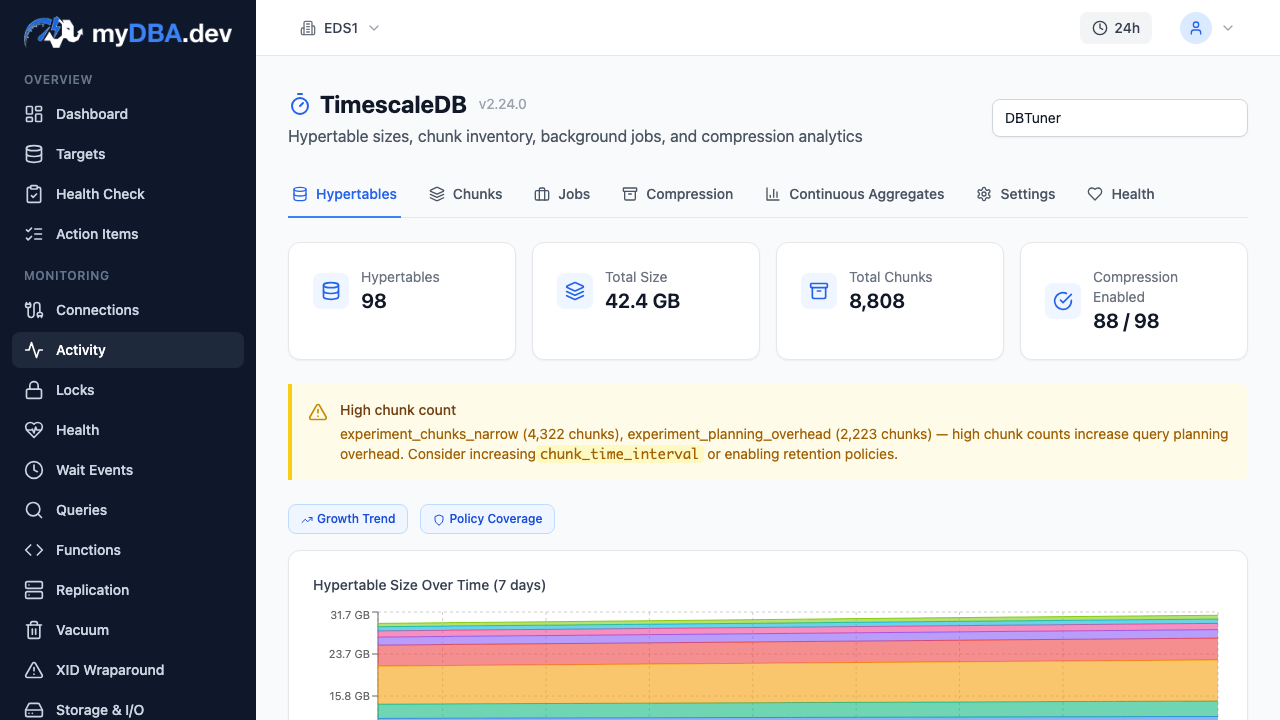
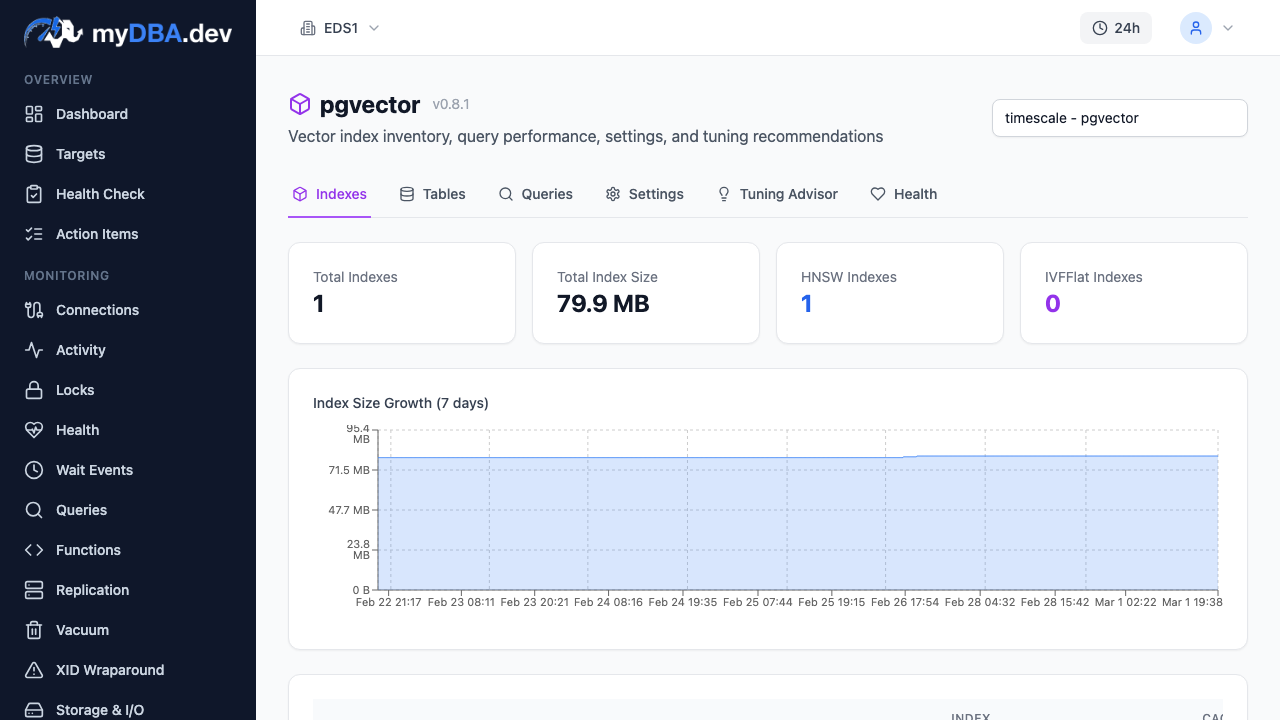
myDBA.dev provides extension-specific health checks and dashboards for all three, flagging issues before they impact production.
---
Quick Reference Table
| Extension | Category | Use Case | Contrib / External | Available on RDS | Available on Supabase | Available on Neon | |---|---|---|---|---|---|---| | PostGIS | Data Types | Geospatial queries, mapping, proximity search | External | Yes | Yes | Yes | | pgvector | Data Types | Vector similarity search, AI/ML embeddings | External | Yes | Yes | Yes | | hstore | Data Types | Simple key-value storage | Contrib | Yes | Yes | Yes | | TimescaleDB | Time-Series | Time-series data, IoT, metrics, analytics | External | No | Yes | No | | pg_partman | Analytics | Automated table partitioning, data retention | External | Yes | Yes | No | | Citus | Analytics | Distributed PostgreSQL, horizontal sharding | External | No (use Azure) | No | No | | pg_stat_statements | Performance | Query performance statistics (essential) | Contrib | Yes | Yes | Yes | | auto_explain | Performance | Automatic EXPLAIN plan logging | Contrib | Yes | Yes | Yes | | pg_hint_plan | Performance | Query planner hints and overrides | External | Yes | No | No | | pg_cron | Performance | Scheduled jobs inside PostgreSQL | External | Yes | Yes | No | | pg_trgm | Search | Fuzzy matching, trigram similarity, LIKE indexing | Contrib | Yes | Yes | Yes | | unaccent | Search | Accent-insensitive text search | Contrib | Yes | Yes | Yes | | pgcrypto | Security | Hashing, symmetric and asymmetric encryption | Contrib | Yes | Yes | Yes | | pg_repack | Utilities | Online table repacking, bloat removal | External | No | No | No | | pgAudit | Security | Compliance audit logging (SOC2, HIPAA, PCI) | External | Yes | No | No |
Contrib extensions ship with PostgreSQL and are available everywhere. External extensions must be installed separately and availability varies by provider.
---
Getting Started
If you are setting up a new PostgreSQL instance, here is the minimum set of extensions you should enable on day one:
-- The essentials (add to shared_preload_libraries first)
CREATE EXTENSION IF NOT EXISTS pg_stat_statements;

-- Useful in almost every application
CREATE EXTENSION IF NOT EXISTS pg_trgm;
CREATE EXTENSION IF NOT EXISTS pgcrypto;
CREATE EXTENSION IF NOT EXISTS unaccent;

-- Add based on your workload
CREATE EXTENSION IF NOT EXISTS postgis;          -- if you have location data
CREATE EXTENSION IF NOT EXISTS vector;           -- if you use embeddings
CREATE EXTENSION IF NOT EXISTS timescaledb;      -- if you have time-series data
The beauty of PostgreSQL's extension system is that you start with a lean database and add capabilities as your application grows. You do not pay for features you do not use, and you do not need to migrate to a different database when your requirements evolve.
That is the PostgreSQL extension advantage. No other database gives you this flexibility.