Fix "no pg_hba.conf entry for host" (Full Cause Map)
no pg_hba.conf entry for host: the complete fix map
Here is the line, copied out of a customer's log last month with the hostnames changed:
<div style="position:relative;padding-bottom:56.25%;height:0;overflow:hidden;border-radius:0.75rem;margin:2rem 0;"> <iframe src="https://www.youtube.com/embed/CD5RzhtZagI" title="FATAL: no pg_hba.conf entry for host — The Complete Fix Map" style="position:absolute;top:0;left:0;width:100%;height:100%;border:0;" allow="accelerometer; autoplay; clipboard-write; encrypted-media; gyroscope; picture-in-picture; web-share" allowfullscreen></iframe> </div>
▶ Watch on YouTube: FATAL: no pg_hba.conf entry for host — The Complete Fix Map
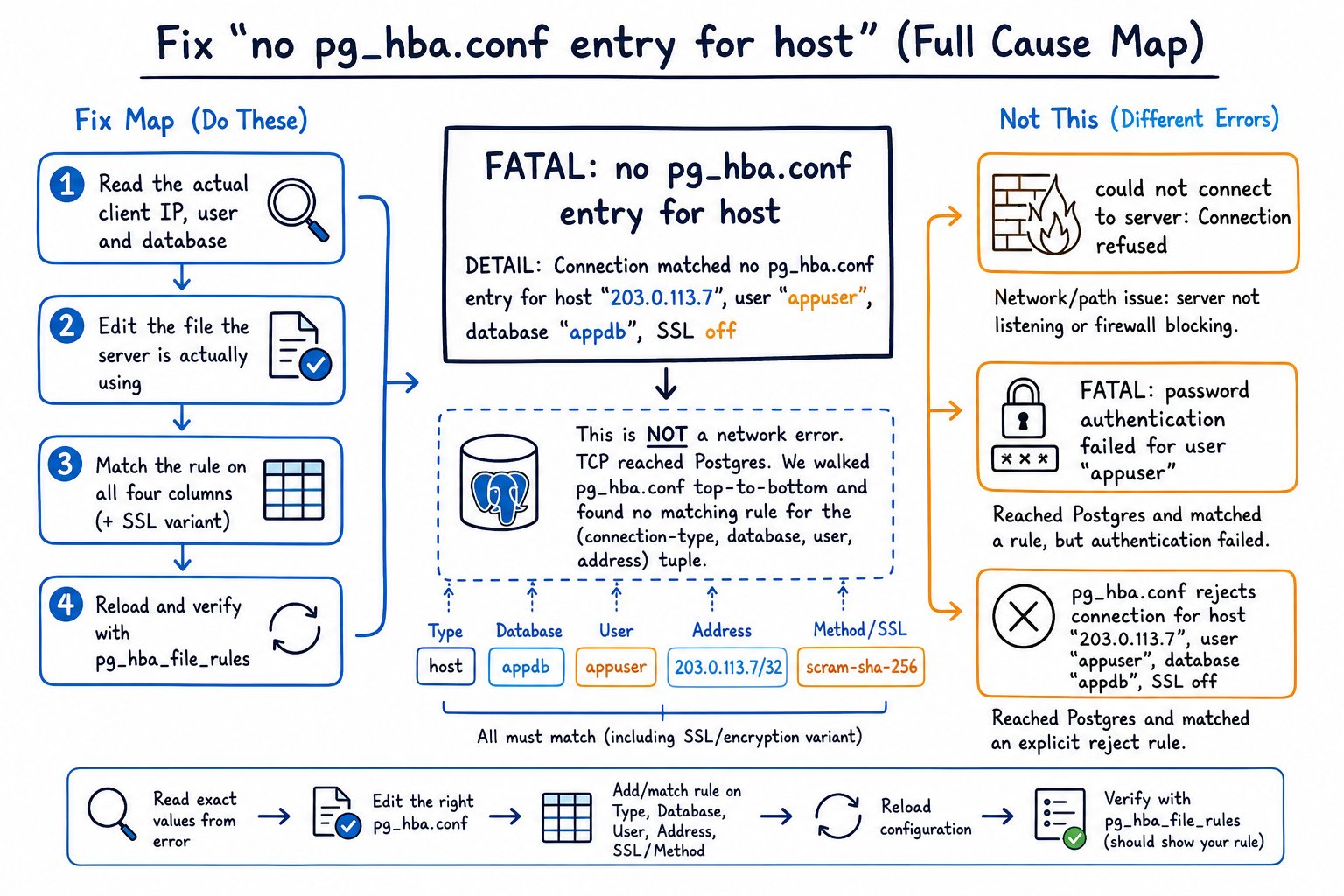
2026-07-14 09:41:22.318 UTC [21874] FATAL:  no pg_hba.conf entry for host "172.19.0.4", user "app", database "appdb", no encryption
2026-07-14 09:41:22.318 UTC [21874] DETAIL:  Client IP address resolved to "unknown", forward lookup not checked.
Before you touch anything, notice what the server just handed you. Four facts, all of them from the server's own point of view:
| Field in the message | What it tells you | |---|---| | host "172.19.0.4" | The source address as the server sees it, after any NAT, SNAT or proxy rewriting | | user "app" | The role name in the startup packet, exactly as the client sent it | | database "appdb" | The database requested, again from the startup packet | | no encryption | The connection is plaintext TCP, so hostssl records could not have matched |
The server could only print those four things because it already accepted the TCP connection, completed (or skipped) the TLS handshake, and parsed the startup packet. Everything below the transport layer worked. What failed is rule matching: Postgres walked pg_hba.conf from the top and reached the bottom without finding a record whose connection type, database, user and address all matched this tuple at once.
That is why the fix map is short and mechanical. Read the four fields out of the error, confirm you are editing the file the running server actually uses, make one record match on all four columns including the encryption variant, reload, verify with pg_hba_file_rules.
There is a companion video that whiteboards this in about ten minutes if you prefer watching; this article is the written reference with the exact commands.
Triage first: four errors people mix up
Most of the wasted time on this error comes from treating it as a networking problem. Sort the symptom properly and you have already done 80% of the work.
| What you see | What actually happened | Where the fix lives | |---|---|---| | could not connect to server: Connection refused or a TCP timeout | Nothing is listening on that address/port, or a firewall dropped the packet. Postgres never saw you. | listen_addresses, port, host firewall, security group, k8s Service/NetworkPolicy | | FATAL: no pg_hba.conf entry for host ... | Connection accepted, startup packet parsed, no matching record found | pg_hba.conf record content and ordering | | FATAL: pg_hba.conf rejects connection for host ... | A record did match, and its auth method is reject | Find the matching reject line and move or remove it | | FATAL: password authentication failed for user "app" or authentication method 10 not supported | A record matched, authentication under it failed | Password, password_encryption, driver version |
The two on the ends get conflated constantly. Half the search results for this error open with "set listen_addresses = '*' and restart Postgres." If you are literally reading no pg_hba.conf entry for host, listen_addresses is already correct for that client, because the client got far enough to be named in the log. Restarting is the wrong first move: it costs you an outage window and changes nothing.
How Postgres actually evaluates pg_hba.conf
A record is five fields plus optional options:
# TYPE   DATABASE   USER    ADDRESS            METHOD           [OPTIONS]
host     appdb      app     10.20.4.0/24       scram-sha-256
local    all        postgres                   peer
local covers Unix-domain sockets and has no address field at all. The TCP types are host, hostssl, hostnossl, hostgssenc and hostnogssenc. host matches SSL and non-SSL connections; hostssl matches only encrypted ones.
The scan is sequential, top to bottom, and first match wins. If the matched record's authentication fails, Postgres does not fall through to try later records. This is the mechanical reason that "I appended my line to the bottom of the file and nothing changed" is such a common report. If a broad record above it already matched the tuple, your new line is dead text.
Since PostgreSQL 16 you also have include, include_if_exists and include_dir in pg_hba.conf, and pg_hba_file_rules grew a file_name column so you can see which file a rule came from. Distro packages and configuration management love dropping files into an included directory, so check there before you conclude a rule doesn't exist.
Cause 1: you are editing a file the server never reads
This is the most common wasted hour, and it takes ten seconds to rule out.
SHOW hba_file;
SHOW config_file;
SHOW data_directory;
Typical answers:
| Platform | hba_file | |---|---| | Debian/Ubuntu packages | /etc/postgresql/17/main/pg_hba.conf | | RHEL/Rocky packages | /var/lib/pgsql/17/data/pg_hba.conf | | Official Docker image | /var/lib/postgresql/data/pg_hba.conf (often bind-mounted from elsewhere) | | Patroni | rendered into the data directory from the DCS; edits on disk get overwritten |
On Debian the file is not in the data directory, which is exactly where people go looking. Under Patroni, hand edits survive until the next restart and then vanish, which produces a genuinely confusing intermittent failure.
Read the live file and the parsed rules from inside a session:
-- the bytes the server is reading
SELECT pg_read_file(current_setting('hba_file'));

-- the parsed view, including lines that failed to parse
SELECT rule_number, line_number, type, database, user_name,
       address, netmask, auth_method, error
FROM pg_hba_file_rules
ORDER BY rule_number;
Two caveats on pg_hba_file_rules: it reflects the file on disk, which may differ from the rules currently in effect if nobody has reloaded, and the error column is the fastest way to find a typo that a reload silently rejected.
Cause 2: the address doesn't match
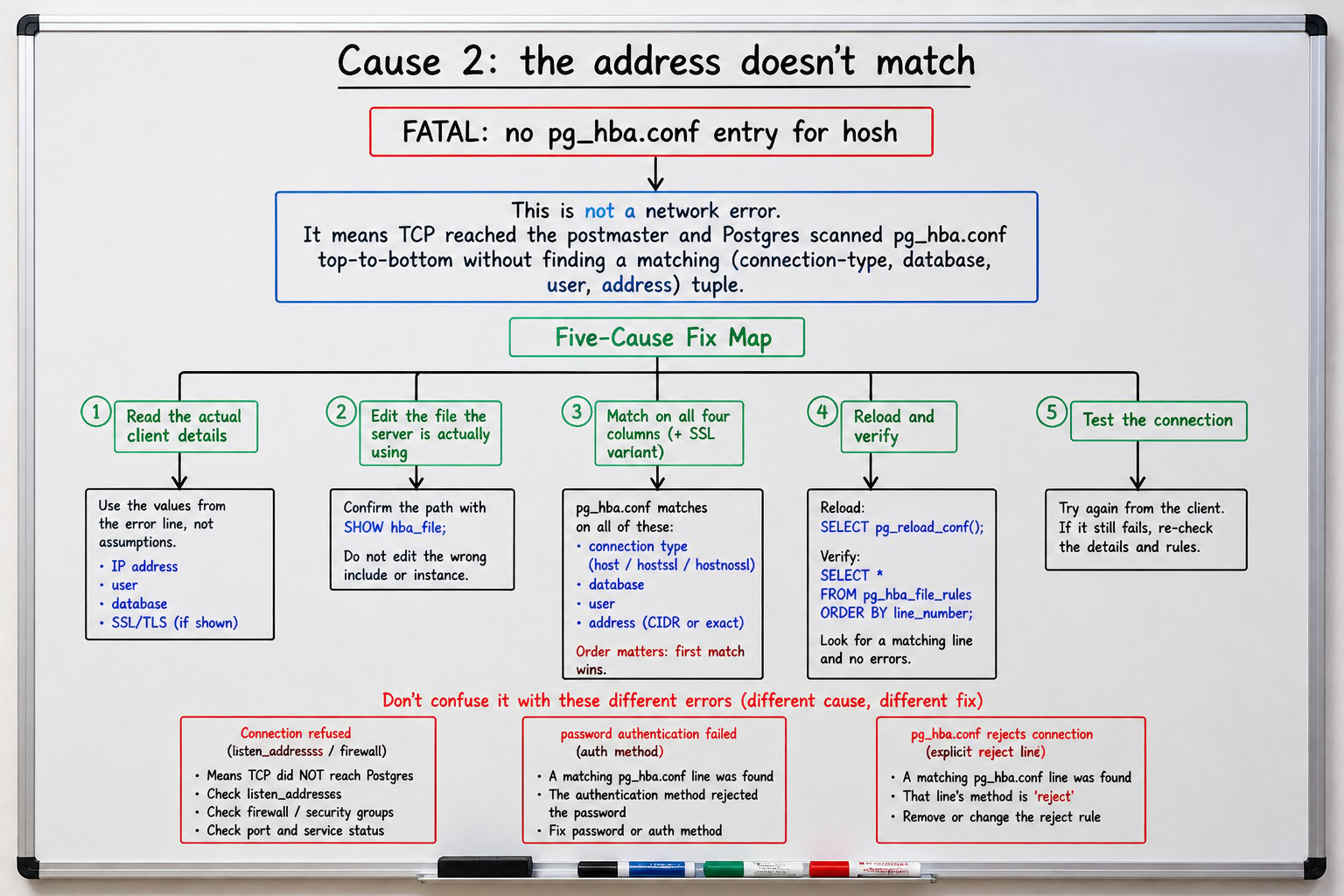
Trust the IP in the log line. Not ip addr on the client, not what the developer believes their pod's address is. The server printed the address it received the packet from, after every rewriting layer in between.
A CIDR cheat table, because the arithmetic mistakes are boringly repetitive:
| Address value | Matches | Does not match | |---|---|---| | 10.20.4.7/32 | exactly 10.20.4.7 | 10.20.4.8 | | 10.20.4.0/24 | 10.20.4.0 through 10.20.4.255 | 10.20.5.1 | | 10.20.0.0/16 | 10.20.0.0 through 10.20.255.255 | 10.21.0.1 | | 0.0.0.0/0 | every IPv4 address | every IPv6 address, including ::1 | | ::/0 | every IPv6 address | IPv4 addresses | | samehost | any IP address of this server | anything else | | samenet | any address in any subnet the server is directly attached to | routed traffic from other subnets | | .internal.example.com | any host whose name ends in that suffix | anything failing the DNS check below |
The IPv4/IPv6 split catches people weekly. A client connecting to localhost on a dual-stack box arrives as ::1, and your host all all 127.0.0.1/32 record does not cover it. You need both:
host    all    all    127.0.0.1/32    scram-sha-256
host    all    all    ::1/128         scram-sha-256
The same split bites on real traffic, not just loopback. 0.0.0.0/0 is a common attempt at "allow everyone" that quietly excludes IPv6 clients, and vice versa for ::/0. If your app connects over IPv6 and your rule is IPv4-only CIDR, you get this exact FATAL with an address that looks like an IPv4-mapped literal, ::ffff:10.0.0.12, and the rule looks "right" right up until you check the address family.
You can also write the address with a separate netmask column (10.20.4.0 255.255.255.0), which is legal and occasionally still shows up in old files.
Host-name records require the client address to reverse-resolve to a name and then that name to forward-resolve back to the same address. That is two DNS round trips per connection attempt and a hard dependency on your resolver. I avoid them on anything latency-sensitive.
Then there is the rewriting layer, which is where "but the app server is 10.20.4.7!" comes from:
- A NAT gateway presents its own address for every client behind it.
- Kubernetes SNAT can present the node IP rather than the pod IP.
- PgBouncer or HAProxy in front of Postgres means every connection arrives from the pooler's address. Postgres has no idea who is behind it.
- Docker bridge networks present a container address like
172.19.0.4, which is what the opening log line shows.
Cause 3: the database or user column doesn't match
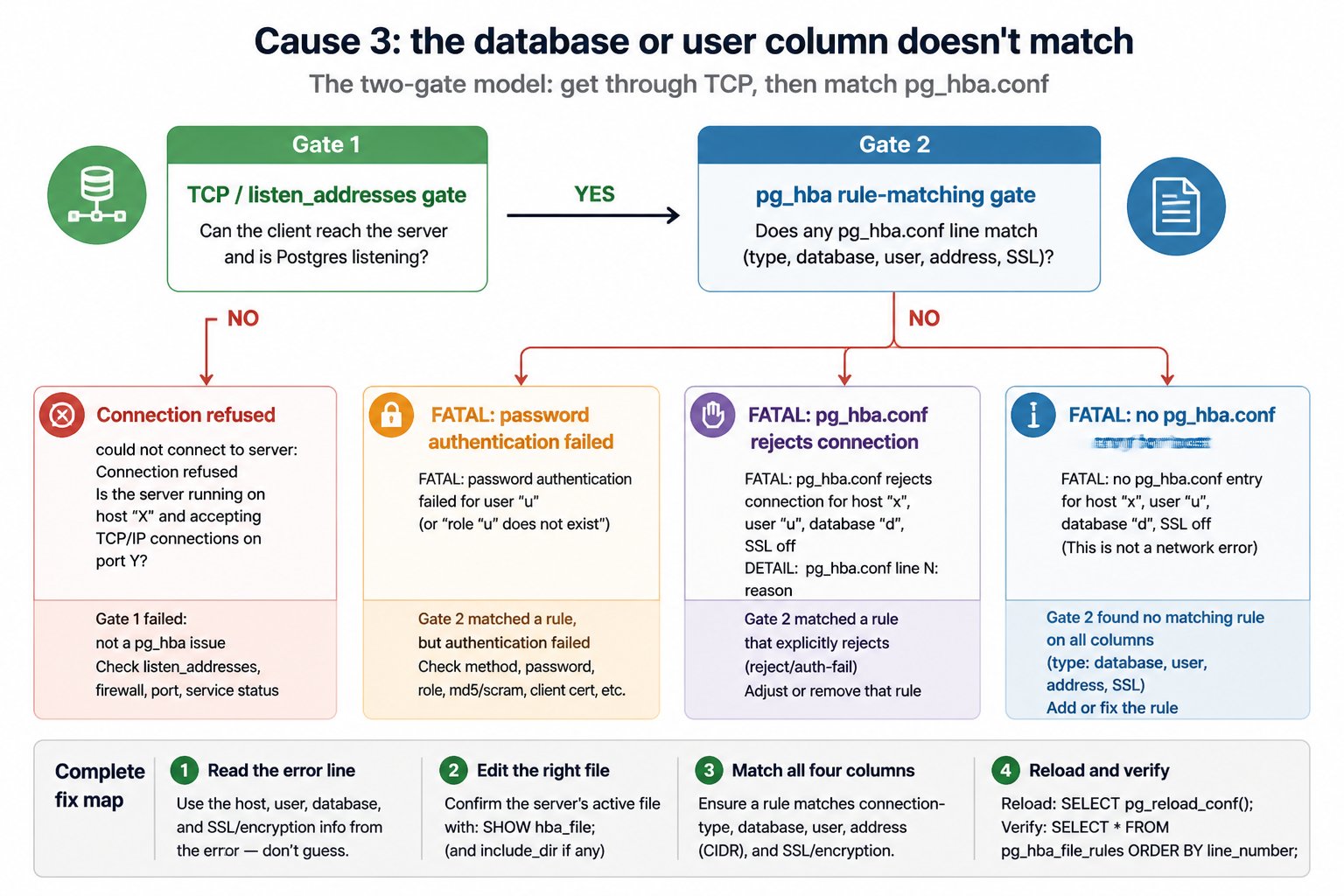
The single most surprising rule in the whole file: all in the database column does not match physical replication connections. A streaming replica, pg_basebackup, or pgBackRest fetching a backup all request the special replication pseudo-database, and only a record with replication in that column will match. You can have host all all 0.0.0.0/0 scram-sha-256 at the top of your file and still get no pg_hba.conf entry for the standby.
The line you want:
host replication replicator 10.0.0.0/24 scram-sha-256Placement matters. Put it above any broad host all all ... record. It won't be shadowed by that record (because all never matches replication), but it can be shadowed by an earlier host replication all 0.0.0.0/0 reject or a catch-all reject, and keeping the narrow rules on top is the habit that keeps you out of trouble.
Other user-column behaviour worth knowing:
+readonlymatches any member of rolereadonly, directly or indirectly. A plainreadonlymatches only the role itself.sameuserandsamerolein the database column match when the database name equals the user's name or a role they belong to.- Comma-separated lists are allowed in both database and user columns.
- PostgreSQL 16 added regex entries with a leading slash, for both user and database names. The anchoring rules are version-specific, so check the exact syntax against your version's docs before relying on it in anything you can't quickly reload your way out of.
- Role names are case-sensitive if they were created quoted.
CREATE USER "App"needs"App"in the file.
Before and after
The bug:
# pg_hba.conf (before)
local   all             postgres                                peer
host    all             all             127.0.0.1/32            scram-sha-256
host    all             all             10.0.0.0/8              scram-sha-256
host    replication     replicator      10.0.0.0/24             scram-sha-256   # appended, never reached? no:
The replication line here is fine. The classic broken version is the opposite: someone appends host appdb app 10.20.4.7/32 trust under an existing host all all 10.0.0.0/8 reject and wonders why nothing changed. Narrow above broad:
# pg_hba.conf (after)
local   all             postgres                                peer
host    replication     replicator      10.0.0.0/24             scram-sha-256
host    appdb           app             10.20.4.0/24            scram-sha-256
host    all             all             127.0.0.1/32            scram-sha-256
host    all             all             ::1/128                 scram-sha-256
host    all             all             10.0.0.0/8              reject
Cause 4: the SSL/encryption variant doesn't match
Go back to the trailing no encryption in the original log line. If your file contains only hostssl records for that subnet, a plaintext client gets no pg_hba.conf entry, not a TLS error. The client author then spends an afternoon debugging certificates that were never involved.
The inverse trap is hostnossl, which explicitly refuses TLS connections. A client with sslmode=require hitting a hostnossl-only setup gets the same class of error, now with SSL encryption appended to the trailing field instead of no encryption — same failure mode, opposite direction.
Client sslmode interacts directly with this:
| sslmode | Behaviour | |---|---| | disable | plaintext only; will never match a hostssl record | | prefer | tries TLS, silently falls back to plaintext, so failures move around | | require | TLS only; will never match a hostnossl record |
The managed-service case is worth stating plainly. On AWS RDS for PostgreSQL, setting rds.force_ssl = 1 makes non-SSL connections fail with exactly this error and an SSL off suffix. There is no pg_hba.conf you can edit on RDS. The fix is on the client: connect with sslmode=require or higher, or change the parameter group.
Cause 5: listen_addresses and the network layer
The correction from earlier deserves its own section, because listen_addresses genuinely belongs on the map even though it is not your bug today.
Default value is localhost. * means all interfaces; you may also give a comma-separated list such as 'localhost,10.20.4.9'. Which interface you bind determines the route packets take, and therefore the source address the server records, which is why VPN vs LAN routing can change the client IP that shows up in this error.
ss -lntp | grep 5432And the operational difference that keeps people honest:
> listen_addresses is a postmaster-context parameter and needs a full restart. pg_hba.conf takes effect on a reload (SIGHUP, pg_ctl reload, or SELECT pg_reload_conf()).
Docker and Compose: the same five causes in costume
Nothing new happens in containers, the addresses just look unfamiliar.
localhost inside a container is that container's own network namespace. An app container connecting to localhost:5432 is looking for Postgres inside itself. Container-to-container traffic arrives from a bridge address: 172.17.0.0/16 on the default bridge, other subnets from the 172.16.0.0/12 pool for user-defined networks. Rules written for 127.0.0.1/32 never match any of it. On Docker Desktop, host.docker.internal resolves to the host.
The official postgres image's entrypoint appends host all all all <POSTGRES_HOST_AUTH_METHOD> to pg_hba.conf during first-time initialisation and configures the server to accept TCP on all interfaces, defaulting to scram-sha-256 unless you set POSTGRES_HOST_AUTH_METHOD=trust. So a stock container almost never produces this error. When it does, it is one of three things: a bind-mounted pg_hba.conf overriding the generated one, a custom network with an address range your rules don't cover, or POSTGRES_HOST_AUTH_METHOD confusion.
services:
  db:
    image: postgres:17
    environment:
      POSTGRES_USER: app
      POSTGRES_PASSWORD: ${DB_PASSWORD}
      POSTGRES_DB: appdb
    networks: [backend]
    ports: ["127.0.0.1:5432:5432"]

  api:
    build: .
    environment:
      DATABASE_URL: postgres://app:${DB_PASSWORD}@db:5432/appdb
    depends_on: [db]
    networks: [backend]

networks:
  backend:
Test from inside the app container, which is the only test that reproduces the real source address:
docker compose exec api psql "postgres://app:$DB_PASSWORD@db:5432/appdb" -c "select inet_client_addr(), current_user, current_database();"Apply and verify without locking yourself out
The safe change ritual:
1. Confirm local all postgres peer (or an equivalent superuser path over the socket) exists and is above anything that could shadow it. This is your way back in. 2. Take a copy: cp pg_hba.conf pg_hba.conf.$(date +%F). 3. Edit, keeping narrow records above broad ones. 4. SELECT pg_reload_conf(); 5. Verify:
SELECT rule_number, line_number, type, database, user_name,
       address, auth_method, error
FROM pg_hba_file_rules
ORDER BY rule_number;
Every row should have error IS NULL. If a line fails to parse, the reload is rejected, the error is logged, and the previously loaded rules stay in effect. That is a friendly failure mode with a nasty tail: a server start with an invalid file will not come up. A broken Friday edit that a reload quietly refused becomes a Monday outage the first time someone restarts the instance. Always check the error column after the reload, not after the next restart.
Confirm from the server side with log_connections = on, then watch the log while the client retries:
tail -f /var/log/postgresql/postgresql-17-main.log | grep -E 'no pg_hba|connection authorized'Rules that are "working" and still wrong
A file with no failures in it can still be a problem waiting for an audit:
host all all 0.0.0.0/0 truston anything with a public interface. It works perfectly, which is the issue.md5records left over from an upgrade. If the stored password is in SCRAM format, the server uses SCRAM-SHA-256 anyway, so the line lies about what is happening. Since PostgreSQL 14 the defaultpassword_encryptionisscram-sha-256, and libpq/drivers older than 10 cannot do SCRAM at all: they fail with an unsupported authentication method error, which is a different symptom from a pg_hba miss.- Orphaned
/32records for app servers you decommissioned two years ago. - Duplicate broad records shadowing narrow ones, so the narrow ones give you a false sense of least privilege.
- pg_hba drift between primary and replicas. After a failover, the new primary needs the replication records too, and it often doesn't have them.
How MyDBA catches this before it locks anyone out
MyDBA's health checks read pg_hba_file_rules on every monitored instance. They flag lines with a non-null error column, records using trust, addresses broader than a configured threshold, instances with no matching replication record for a known standby's address, and differences in parsed rules between a primary and its replicas.
The connection-error view groups repeated FATAL: no pg_hba.conf entry messages by client address, user and database, so a deploy that rolls out with a new pod CIDR shows up as a spike with the offending IP attached rather than as a page from the on-call engineer.

Both views are read-only and use the same SQL shown above. If you want to see them against your own estate, MyDBA will run the checks on connect.
Related reading: reload vs restart for every GUC context, and monitoring authentication failures as a leading indicator of a bad deploy.