Understand exactly why your queries are slow
Visual plan analysis, guided walkthroughs, and plan regression detection — not just raw EXPLAIN output.
Reading EXPLAIN output is tedious and error-prone. We collect plans automatically, analyze them with 27+ rules, visualize them in 5 modes, and alert you when a plan regresses.
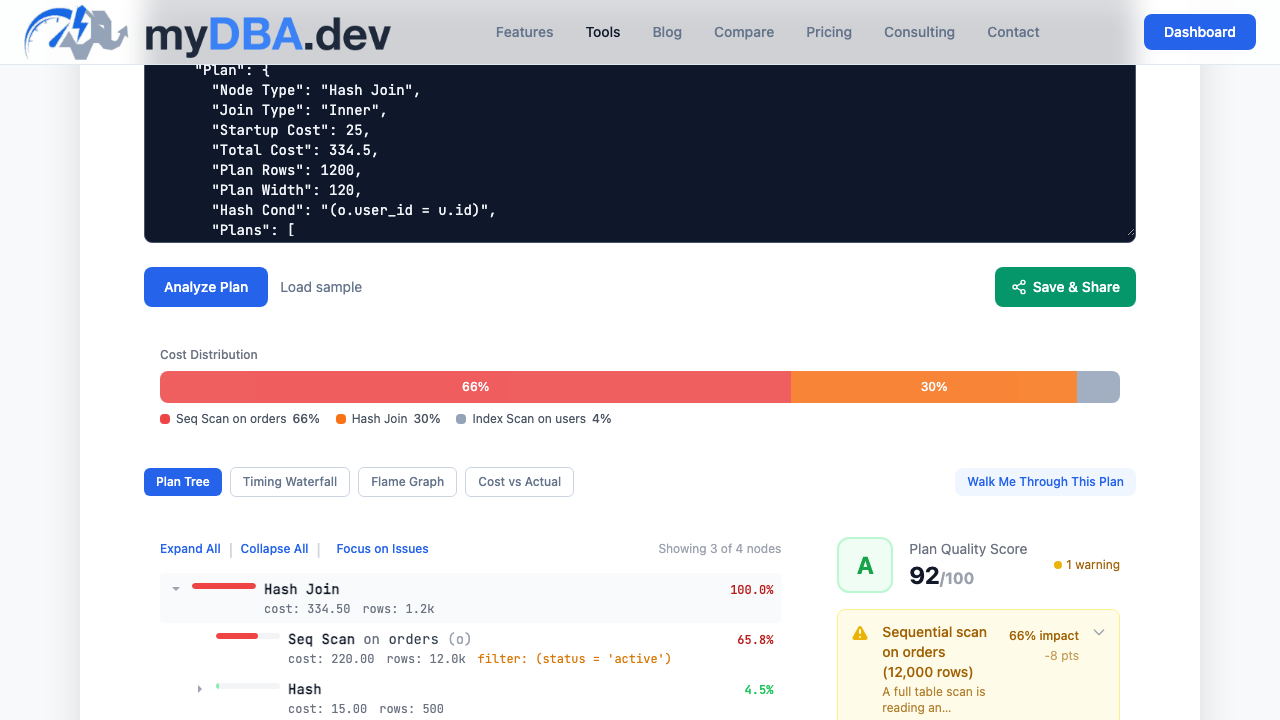
5 visualization modes
Every plan can be viewed in multiple ways. Switch between modes to find the bottleneck faster.
Tree View
Hierarchical node breakdown with cost and row estimates at every level.
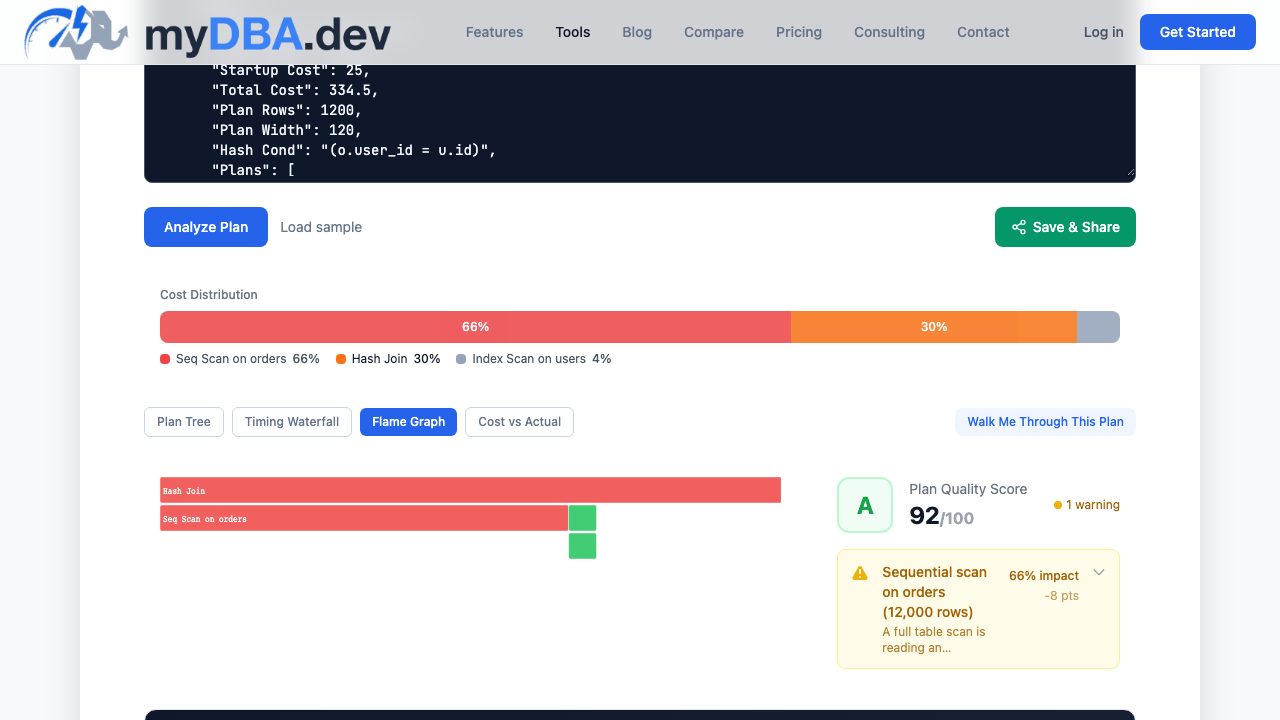
Flame Graph
Proportional time visualization — instantly see where execution time is spent.
Waterfall
Sequential timeline of each node showing parallel vs sequential execution.
Bottleneck Bar
Top-N slowest nodes ranked by actual time — jump straight to the problem.
Cost vs Actual
Side-by-side comparison of planner estimates vs actual execution — spot misestimates.
Guided walkthrough
Click "Start Walkthrough" and the plan is narrated step by step. Each node is highlighted and explained in plain language — what operation it performs, how many rows it processes, and whether the planner estimate was accurate.
- Node-by-node narration with plain-language explanations
- Highlights bottlenecks and misestimates automatically
- Actionable suggestions for each performance issue found
Automatic collection
The collector schedules EXPLAIN collection for top queries. Plans are stored, versioned and analyzed when collection succeeds. Frequency depends on plan, collection settings and available query data; Free sampling slows after day seven.
27+ insight rules
Automatic plan analysis detects sequential scans, nested loops on large tables, sort spills to disk, bitmap heap recheck overhead, and more.
EXPLAIN ANALYZE toggle
Enable per-connection to capture actual execution times and row counts — not just planner estimates. Compare planned vs actual at every node.
Plan regression detection
Fingerprint-based tracking detects when a query switches to a different plan. Get alerted when a previously-fast query starts using a sequential scan.
Guided walkthrough
Step-by-step narration walks you through the plan node by node, explaining what each operation does and highlighting the key performance factors.
Free standalone tool
Paste any EXPLAIN output into our free online visualizer at /tools/explain-plan-visualizer — no account required. Same 5 visualization modes.
Related capabilities
Health Scoring
75+ automated checks across 12 scoring domains
Cluster-Aware Index Advisor
Index analysis across primaries and replicas
XID Wraparound Protection
Blocker detection, recovery scripts, and runbooks
TimescaleDB Monitoring
The most complete TimescaleDB monitoring anywhere
pgvector Monitoring
First-class pgvector index and query monitoring
PostGIS Monitoring
Spatial data inventory, index health, and geometry checks
Incident Analysis
Manual incident reports with evidence, root cause, timeline, and remediation
Phantom Incidents
Always-on anomaly detection for problems you haven't thought to alert on
Query Tuning
Highest-impact queries, the best tuning candidates, and exactly what to do
Optional AI Analysis
Manual AI depth for incidents, query plans, tuning, and explanations
Data Collection Options
Shared managed, dedicated managed, or self-hosted collectors
Smart Alerting
Rate-of-change, compound conditions, and 11 prebuilt templates
Logical Replication
Slot, subscription, apply lag, and PG17 conflict monitoring
Setup Assistant
Extension detection, auto-install, and provider-specific guides
Collaborative Playbooks
Shared remediation plans with review workflow
Trend Insights
Priority trend analyzers with severity cards and sparklines
See it in action
Start free with one primary or standalone PostgreSQL instance and all its databases. Monitoring, alerts, query insights, index advice, team access and every non-AI feature included. No replicas. No credit card required. New Free connections get seven days of full collection, then reduced sampling. Free and Pro include 30 days of monitoring history.