PostgreSQL XID Wraparound: What It Is and How to Prevent It
PostgreSQL XID Wraparound: What It Is and How to Prevent It
The Problem
Every transaction in PostgreSQL gets a 32-bit transaction ID (XID). That gives a range of roughly 4.2 billion XIDs. PostgreSQL uses XIDs to determine row visibility — whether a given row was committed before or after the current transaction. The system compares XIDs using modular arithmetic with a window of about 2 billion transactions in each direction.
When a database consumes around 2 billion XIDs without freezing old rows, PostgreSQL faces wraparound: it can no longer safely assign new XIDs without risking data visibility corruption. To prevent this, PostgreSQL will refuse to start new transactions and shut down with a message telling you to run vacuum manually. The database becomes effectively read-only until you fix it.
This is not a theoretical risk. It happens to production databases. The mechanism is designed as a last-resort safety net — PostgreSQL would rather stop accepting writes than silently corrupt data. The problem is that XID age increases silently. Nothing fails or slows down until you approach the hard limit. Without monitoring, you may not notice until the database refuses writes — at which point you are in an emergency.
In practice, autovacuum's aggressive freeze mode prevents wraparound in most cases. When a table's XID age exceeds autovacuum_freeze_max_age (default: 200 million), autovacuum forces a freeze vacuum that rewrites tuple headers to mark them as "frozen" — visible to all future transactions regardless of XID. But if autovacuum is blocked by long-running transactions, disabled on specific tables, or starved for workers, this safety net can fail.
How to Detect It
Query pg_database to check the XID age of each database, and pg_class for per-table ages:
-- Check transaction ID age for all databases
SELECT
    datname AS database_name,
    age(datfrozenxid) AS xid_age,
    round(100.0 * age(datfrozenxid) / 2147483647, 2) AS percent_to_wraparound,
    datfrozenxid
FROM pg_database
WHERE datname NOT IN ('template0', 'template1')
ORDER BY age(datfrozenxid) DESC;

-- Find tables with the oldest unfrozen XIDs
SELECT
    schemaname,
    relname AS table_name,
    age(relfrozenxid) AS xid_age,
    pg_size_pretty(pg_relation_size(oid)) AS table_size
FROM pg_class
JOIN pg_stat_user_tables USING (relname)
WHERE relkind = 'r'
ORDER BY age(relfrozenxid) DESC
LIMIT 10;
A percent_to_wraparound below 5% is healthy. Between 5-25% deserves investigation. Above 50% is an emergency requiring immediate VACUUM FREEZE.
The per-table query is essential because the database-level XID age is determined by the table with the oldest unfrozen XIDs. If one large table has not been freeze-vacuumed, it holds back the entire database's XID age, even if all other tables are current. Identifying which specific table is the bottleneck tells you exactly where to focus your vacuum effort.
Also check for long-running transactions that hold back the XID horizon:
SELECT pid, age(backend_xmin) AS xmin_age, state, query,
       now() - xact_start AS transaction_duration
FROM pg_stat_activity
WHERE backend_xmin IS NOT NULL
ORDER BY age(backend_xmin) DESC LIMIT 5;
A single idle-in-transaction session with a large xmin_age prevents vacuum from freezing any rows created after that transaction started. This is one of the most common reasons XID age grows unexpectedly.
The limitation of these queries is that they only show the current state. Without historical tracking, you cannot tell whether XID age is growing at 1 million per day or 100 million per day — the urgency depends entirely on the rate of change.
How myDBA.dev Shows It
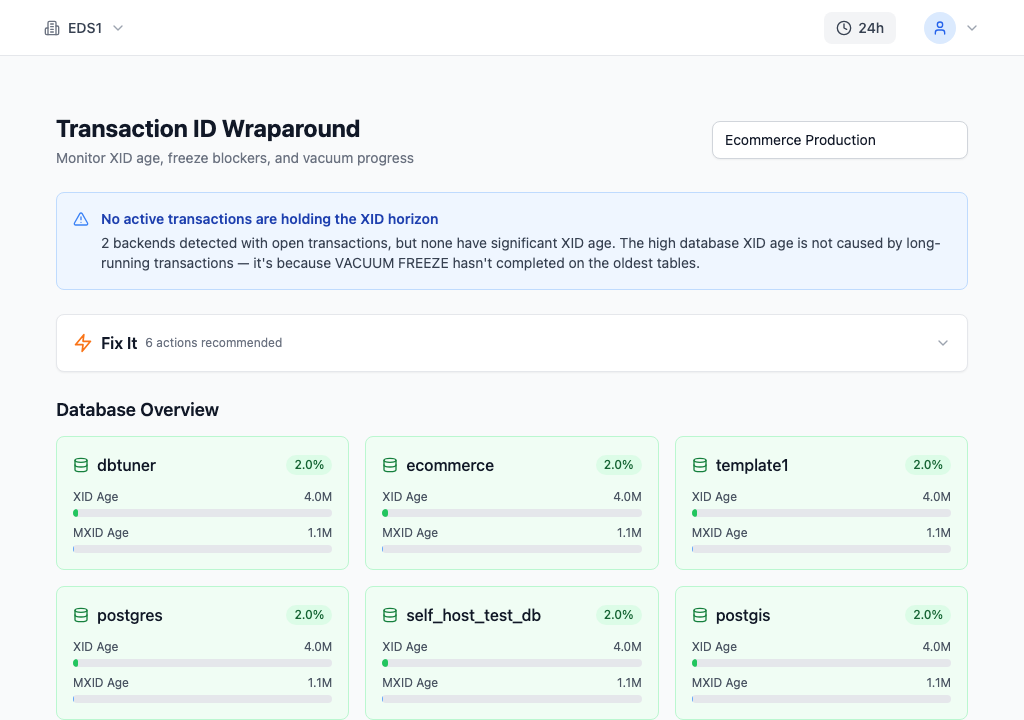
myDBA.dev's Transaction ID Wraparound page provides a comprehensive view of XID health across every database on the instance. The diagnostic banner at the top immediately explains why the current XID age exists — in this case, "No active transactions are holding the XID horizon" with an explanation that the age comes from VACUUM FREEZE not having completed on the oldest tables. This saves significant investigation time compared to running manual queries and interpreting the results yourself.
Each database card displays its XID age (4.0M) and percentage toward wraparound (2.0%), with color-coded progress bars. The ecommerce database matches dbtuner at 4.0M, while dividenddirect shows a slightly different age at 3.4M (1.7%). The "Fix It" section offers 6 specific recommended actions, providing a direct path from diagnosis to resolution.
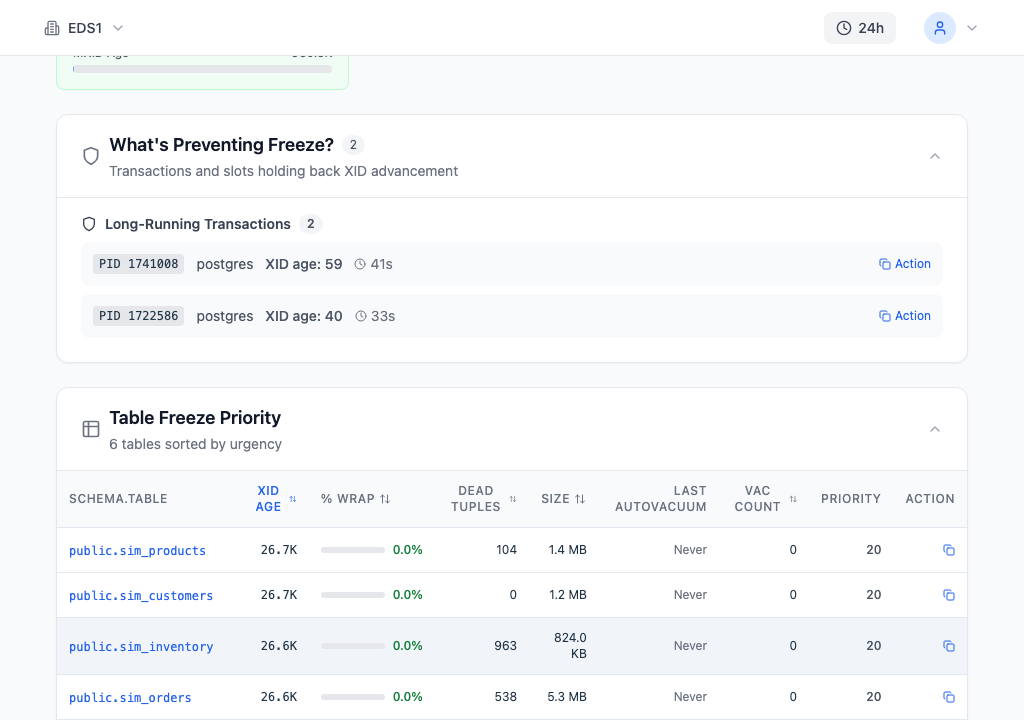
The detail sections dig deeper. "What's Preventing Freeze?" identifies 2 long-running transactions blocking XID advancement — PID 1741008 with XID age 59 running for 41 seconds, and PID 1722586 with XID age 40 running for 33 seconds. Each has an "Action" button for quick termination. This tells you exactly which sessions to investigate or kill.
The Table Freeze Priority table ranks all 6 tables by urgency: sim_products leads with XID age 26.7K and 104 dead tuples, followed by sim_customers (26.7K, 0 dead tuples), sim_inventory (26.6K, 963 dead tuples), and sim_orders (26.6K, 538 dead tuples). Each row shows the percentage toward wraparound, table size, last autovacuum timestamp ("Never" for tables that have not been freeze-vacuumed), and a computed priority score of 20. This answers the critical question: "If I can only vacuum one table right now, which one should it be?"
How to Fix It
Force a freeze vacuum on the tables with the highest XID age:
-- Freeze a specific table (the highest-priority from Table Freeze Priority)
VACUUM FREEZE sim_counters;

-- Freeze all tables in the database
VACUUM FREEZE;

-- Verify XID age decreased
SELECT datname, age(datfrozenxid) AS xid_age
FROM pg_database
WHERE datname = current_database();
VACUUM FREEZE rewrites tuple headers to mark them as "frozen" — visible to all future transactions regardless of XID. This resets the table's relfrozenxid to the current XID, reducing the database-wide age.
On large tables, VACUUM FREEZE can take hours and generates significant I/O. It reads and rewrites every page in the table. Schedule it during low-traffic periods, or adjust the I/O throttling to reduce impact on concurrent queries:
-- Make vacuum faster (more I/O budget) for an urgent freeze
SET vacuum_cost_delay = 0;  -- No throttling
VACUUM FREEZE sim_events;
RESET vacuum_cost_delay;
Setting vacuum_cost_delay = 0 removes all throttling, letting vacuum run at full speed. This is appropriate during an emergency but will compete with normal query I/O. During business hours, a compromise like vacuum_cost_delay = 2 with vacuum_cost_limit = 1000 gives vacuum more resources without completely overwhelming the system.
If long-running transactions are blocking freeze progress, terminate them:
-- Terminate the blocking session (get PID from the query above)
SELECT pg_terminate_backend(12345);
How to Prevent It
Configure autovacuum to freeze aggressively enough for your transaction rate. The default autovacuum_freeze_max_age of 200 million triggers aggressive freeze vacuum when a table exceeds this age. For high-throughput OLTP systems consuming millions of XIDs per day, consider lowering it to 100 million to trigger freezing earlier.
Monitor for long-running transactions that hold back the XID horizon. Set idle_in_transaction_session_timeout to automatically terminate forgotten sessions:
ALTER SYSTEM SET idle_in_transaction_session_timeout = '10min';
SELECT pg_reload_conf();
Track XID age trends over time — a sudden increase in the rate of XID growth means vacuum is falling behind. myDBA.dev continuously tracks XID age across all databases and tables, providing early warning days or weeks before a potential wraparound event. The Table Freeze Priority ranking ensures you always know which table needs attention most urgently, while the "What's Preventing Freeze?" section immediately surfaces the root cause when XID age starts climbing.
The key insight is that wraparound prevention is not about running VACUUM FREEZE reactively — it is about ensuring autovacuum's freeze cycle keeps up with your transaction rate continuously. Monitor the trend, not just the current value.