Why Postgres Never Overwrites a Row
Why Postgres Never Overwrites a Row
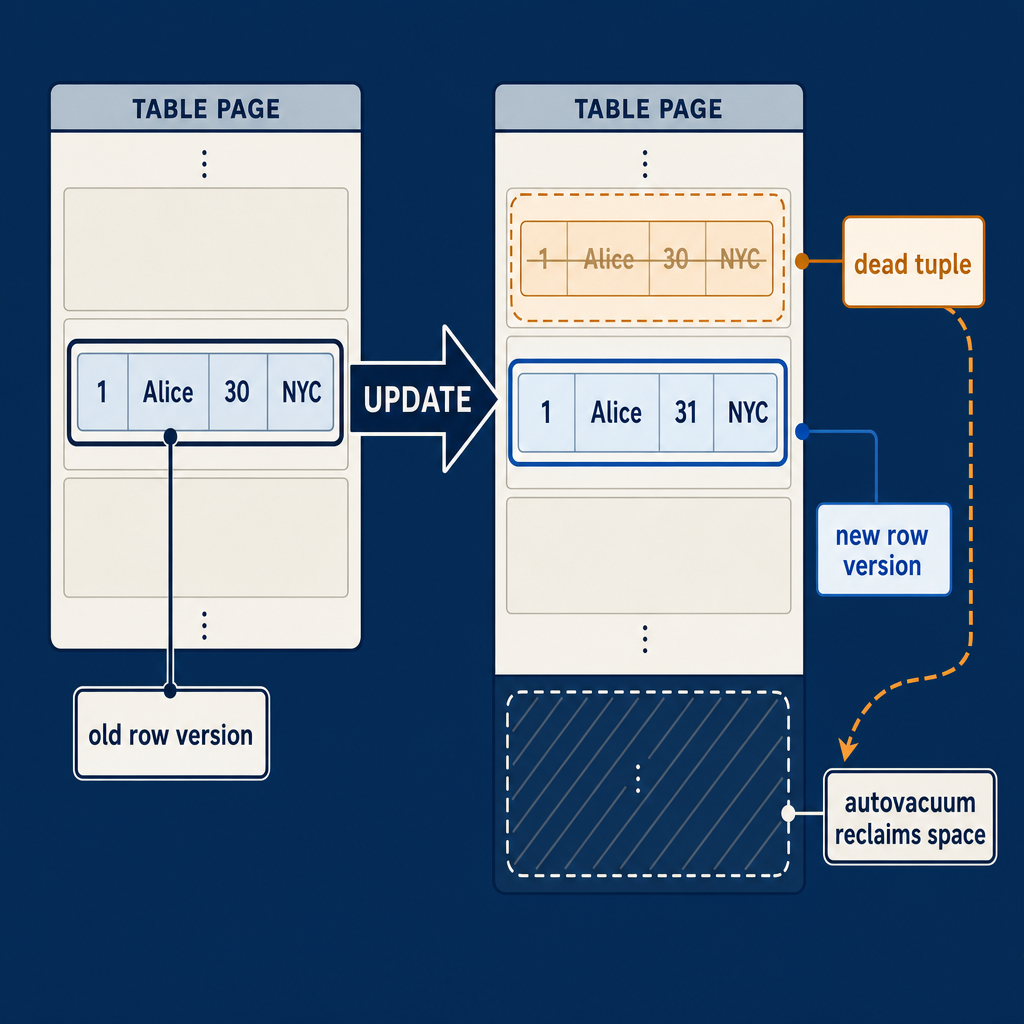
If you’ve spent any time with Postgres, you’ve probably heard that an UPDATE is really an INSERT followed by a DELETE. That’s not a clever analogy — it’s exactly how the storage engine works. In normal operation, Postgres’ multi-version concurrency control (MVCC) avoids overwriting a row in place; typically, an UPDATE creates a new physical row version and marks the old one as dead. A DELETE simply marks the existing row as dead. The old versions stick around because a concurrent SELECT started before your change still needs to see the world as it existed at that snapshot. Yanking the row out from under a long-running query would violate transaction isolation.
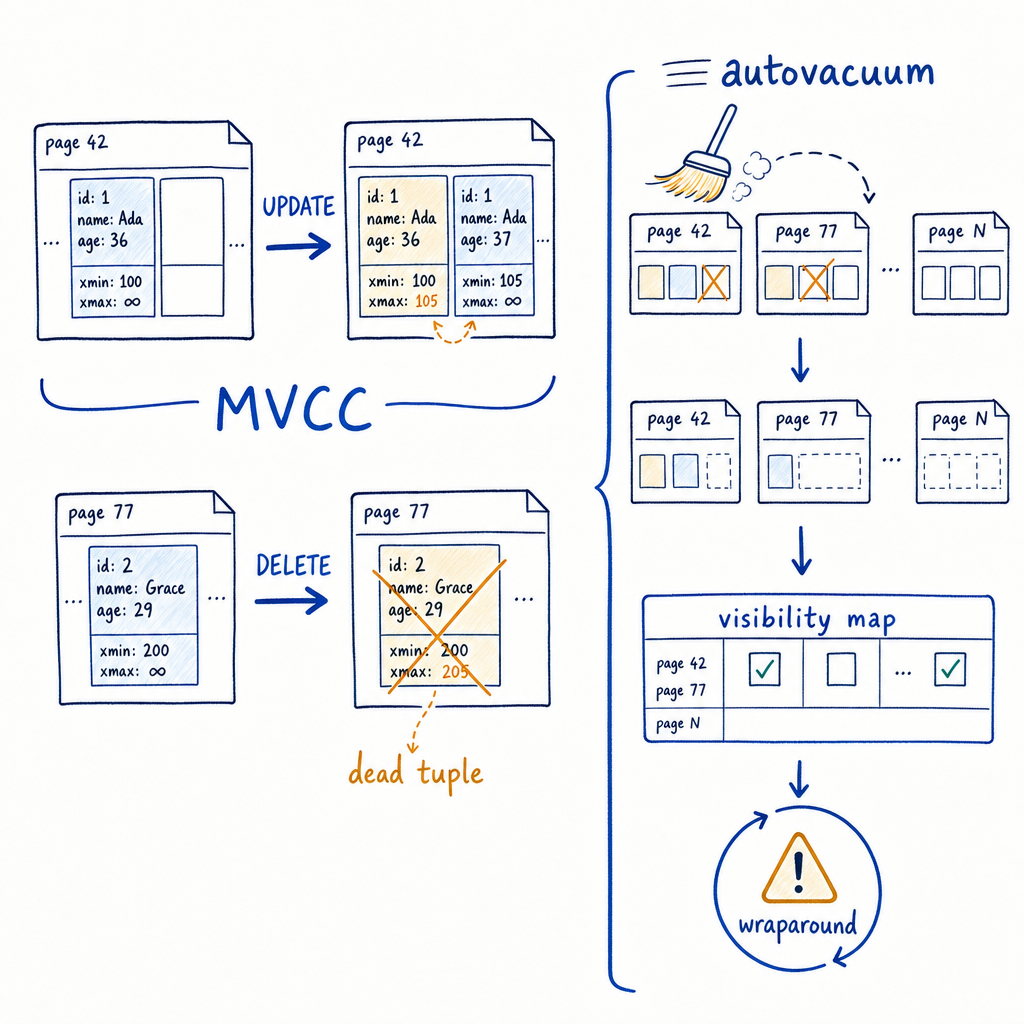
Our companion YouTube video gives a visual primer on this if you want the animated version. Here, we’ll get into the exact mechanisms, the math, and the failure modes you’ll meet when you least want to.
Because those dead row versions don’t magically disappear. They sit in the heap pages, bloating the table and its indexes. They consume disk, slow down sequential scans, and confuse the query planner. The process that keeps this from spiraling out of control is autovacuum. And contrary to the name, it does a lot more than vacuum.
The Four Jobs of Autovacuum

Autovacuum isn’t just a janitor. It’s a four-headed background daemon that keeps the entire database healthy. If you treat it as optional maintenance, you will eventually get paged.
1. Space Reclamation (Vacuum)
Dead rows pile up in both the heap and all indexes pointing to that table. Autovacuum scans a table when the dead row count crosses a threshold, removes index entries pointing to dead tuples, then marks the heap space as reusable. It doesn’t normally shrink the physical file on disk unless the very last pages of the table become empty and can be truncated, but it frees up space for future INSERTs and UPDATEs within the same table.
If this doesn’t happen, a busy table can go from 10M live rows to 20M total rows in a day, with half of them dead. Sequential scans suddenly read twice as many blocks. The OS cache gets flooded with useless data. Index scans spend time skipping dead tuples that heap_hot_search has to ignore. Performance degrades gradually until someone runs a query that used to finish in 50ms and now takes 10 seconds.
2. Analyze / Planner Statistics
Every time autovacuum touches a table, it also evaluates whether a separate ANALYZE is needed. That job samples the table, updates pg_statistic, and gives the planner column-level statistics: number of distinct values, most common values, histograms, null fractions. Without fresh stats, the optimizer uses stale row count estimates, picks nested loops instead of hash joins, underestimates cardinality on a table that grew 5× since last week, and your query plan falls over.
When you see a query that suddenly goes from index to full-table scan and nobody changed the SQL, autovacuum’s ANALYZE side is often the culprit. The trigger formula for analyze is separate from the vacuum trigger — we’ll cover both shortly.
3. Transaction ID Freezing / Wraparound Prevention
Postgres uses a 32-bit transaction ID (XID) counter. Every transaction gets a new XID. At some point, the counter wraps around. Postgres handles this by treating XIDs modulo 2^32, but older XIDs are “in the past” only if they’re within 2 billion transactions of the current counter. Transactions with XIDs that are more than 2 billion in the past suddenly appear to be in the future, which breaks all visibility logic and corrupts data silently.
To prevent this, autovacuum freezes old row versions — it marks them with a special FrozenTransactionId that’s always considered older than everything. The freeze horizon is governed by autovacuum_freeze_max_age (default 200 million). When any database’s age(datfrozenxid) approaches autovacuum_freeze_max_age, autovacuum kicks off an aggressive anti-wraparound vacuum, even if the dead tuple count is low. If that doesn’t happen in time, Postgres will refuse new transactions and force a shutdown to protect data. I’ll dig into this separately because it’s the one failure nobody thinks about until the database stops accepting writes.
4. Visibility Map Maintenance
Postgres maintains a visibility map for each table, marking heap pages that contain only tuples visible to all transactions. Autovacuum updates this map as it goes. When a page is all-visible, index-only scans can skip fetching the heap row entirely, and vacuum itself can skip that page on the next pass unless the map gets reset. If the visibility map starves, index-only scans turn into regular index scans, hitting the heap for every row, and vacuum efficiency drops because it has to re-scan pages unnecessarily. The visibility map lives in _vm forks and is small, but its hit ratio is a quiet multiplier on read performance.
---
Transaction ID Wraparound: The Silent Killer
XID wraparound is the boogeyman of Postgres operations. The XID space is 2^32 (~4.29 billion). The current XID is available via SELECT txid_current(). Because half the space is considered the “past,” you have roughly 2.1 billion transactions of headroom from the oldest unfrozen XID. When the distance between the current XID and the oldest unfrozen XID exceeds autovacuum_freeze_max_age, autovacuum forces an anti-wraparound vacuum on that database, even if it has zero dead tuples. During an anti-wraparound vacuum, autovacuum cannot be interrupted, it ignores any cost limits or throttling parameters you have configured, and it will aggressively scan every page in the table to freeze old tuples. This emergency vacuum can peg your I/O subsystem for hours.
If that vacuum can’t keep up and the oldest transaction age continues to climb, Postgres will eventually stop accepting new transactions and emit:
FATAL: database is not accepting commands to avoid wraparound data loss in database "production"
HINT: Stop the postmaster and vacuum that database in single-user mode.
The only way out is to start a single-user backend and run VACUUM FREEZE manually. On a multi-terabyte database, this manual recovery can take hours or days, during which your application is entirely offline. If you’ve never done that at 3 AM on a production box, consider yourself lucky.
Monitor it with:
SELECT
    datname AS database_name,
    age(datfrozenxid) AS transaction_id_age,
    CURRENT_SETTING('autovacuum_freeze_max_age')::BIGINT AS freeze_max_limit
FROM
    pg_database
WHERE
    datallowconn = true
ORDER BY
    2 DESC;
If you see an age above 200 million, you need to act immediately — either tune autovacuum to be more aggressive on that database, or start a manual VACUUM FREEZE. Do not wait. Set up monitoring that fires an alert when any database exceeds 100 million. The default autovacuum_freeze_max_age is 200 million, but by the time you hit 150 million you’re already in the danger zone given IO throughput.
---
How Autovacuum Decides to Run
Autovacuum does not run continuously in a random loop. Instead, a launcher background process wakes up every autovacuum_naptime (default: 1 minute) and evaluates the tables in your database using a strict mathematical formula. The trigger math is precise, but the defaults are tuned for a small database running on a laptop in 2002.
In simplified terms, the condition for vacuum can be expressed as:
vacuum threshold ≈ autovacuum_vacuum_threshold + autovacuum_vacuum_scale_factor * n_live_tupautovacuum_vacuum_thresholddefault: 50autovacuum_vacuum_scale_factordefault: 0.2 (20%)
When the number of dead tuples exceeds that approximate threshold, autovacuum launches on that table (provided a worker is available).
Take a table with 10 million live rows. The trigger is roughly:
50 + 0.2 * 10,000,000 = 2,000,050 dead tuplesYou need to accumulate around 2 million dead tuples before autovacuum does a thing. For a table that processes 50,000 UPDATEs per minute, that’s 40 minutes of churn. During those 40 minutes, every query scans 20% more dead data. When the vacuum finally starts, it’s a massive operation that might take an hour, leaving the table bloated the whole time.
For analyze, the formula is the same shape:
analyze threshold ≈ autovacuum_analyze_threshold + autovacuum_analyze_scale_factor * n_live_tupDefaults: threshold 50, scale_factor 0.1 (10%). So on our 10M-row table, analyze kicks in only after about 1,000,050 rows have been changed since the last analyze. Queries that rely on a recent histogram for the changed columns may run with stale plans for a long time.
For tables above a few hundred million rows, even those thresholds become absurd. You’ll need per-table tuning, which we’ll get to.
---
Watching It Happen: Practical Monitoring Queries
You don’t have to guess whether autovacuum is working. Postgres exposes per-table statistics that tell you exactly the state of dead tuples and the last vacuum/analyze times. Run this weekly (or daily on hot tables):
SELECT
  schemaname,
  relname,
  n_live_tup,
  n_dead_tup,
  round(n_dead_tup * 100.0 / nullif(n_live_tup + n_dead_tup, 0), 2) AS dead_pct,
  last_autovacuum,
  last_autoanalyze
FROM pg_stat_user_tables
ORDER BY n_dead_tup DESC;
Look for tables where dead_pct consistently exceeds 10–15% even after autovacuum runs. That’s a sign the vacuum can’t keep up. Check last_autovacuum — if it’s been hours and the dead tuple count is rising, the trigger threshold is too high or the vacuum is getting throttled.
While a vacuum is running, you can watch its progress:
SELECT
  relid::regclass AS table_name,
  phase,
  heap_blks_total,
  heap_blks_scanned,
  round((heap_blks_scanned::numeric / nullif(heap_blks_total, 0) * 100), 2) AS scan_progress_pct,
  index_vacuum_count,
  num_dead_tuples
FROM pg_stat_progress_vacuum;
Phases include “scanning heap,” “vacuuming indexes,” “vacuuming heap,” and “truncating.” If the scan is moving slowly, you can cross-reference autoanalyze lock conflicts or I/O throttling.
---
Tuning Autovacuum Per Table
The global default configurations in postgresql.conf are designed to protect tiny staging environments and legacy servers. However, raising global settings can sometimes cause excessive disk I/O across your entire cluster. The professional approach is to tune your large, highly active tables individually.
For large tables, overriding the defaults is mandatory. Use ALTER TABLE to set storage parameters on the specific table:
ALTER TABLE orders SET (
  autovacuum_vacuum_scale_factor = 0.05,
  autovacuum_vacuum_threshold = 1000
);
With a scale factor of 0.05, our 10M-row table now triggers vacuum at roughly 50 + 0.05*10M = 500,050 dead tuples. That’s a quarter of the original threshold, which keeps the table much leaner. Some workloads with extremely high update rates on a small fraction of rows (e.g., a session counter table) need scale_factor below 0.01 and threshold near zero.
You can also tweak analyze scale factor similarly:
ALTER TABLE orders SET (autovacuum_analyze_scale_factor = 0.02);Understanding Cost-Based Throttling
If the problem is vacuum throughput rather than trigger sensitivity, you can change the cost-based throttling. Postgres uses a cost-based mechanism to prevent autovacuum from consuming all available disk I/O. Workers are assigned an arbitrary "cost budget" and must pause when they reach it.
autovacuum_vacuum_cost_limit(default 200): The maximum cost units a worker can accumulate before it sleeps.autovacuum_vacuum_cost_delay(default 2ms): How long the worker sleeps once it hits the limit.
Inside the engine, these actions have fixed, system-defined costs:
- A page found in the shared buffer cache: 1 unit
- A page read from disk: 10 units
- A page dirtied and written to disk: 20 units
Under the defaults (Limit 200, Delay 2ms), if a worker must read pages from How Cost Limit and Workers Interact
There’s a subtlety that trips people up: the autovacuum_vacuum_cost_limit is divided among all running autovacuum workers. If you have autovacuum_max_workers = 3 and the cost limit is 200, each worker effectively gets about 66 units. On a busy server with multiple large tables triggering vacuum simultaneously, each worker becomes starved for I/O budget. They sleep constantly and fall further behind. Raising the cost limit globally to 2000 or even 4000 on modern SSD-backed storage is common, but you can also set a higher limit per table:
ALTER TABLE orders SET (
  autovacuum_vacuum_cost_limit = 2000,
  autovacuum_vacuum_cost_delay = 0
);
On this table, the worker will process up to 2000 cost units before pausing — and cost_delay = 0 means it effectively ignores the global delay for this table. This is appropriate for the highest-churn tables where you’re willing to trade some foreground query latency for keeping bloat under control. For deeper guidance on balancing these settings, the Postgres performance resources on MyDBA include runbook-grade configurations.
The Long-Running Transaction Trap
Every tuning effort fails if you have a long-running transaction holding an old snapshot. Autovacuum can only remove dead tuples that are older than the oldest running transaction. If a reporting query runs for 5 hours with REPEATABLE READ or a forgotten BEGIN hangs in idle in transaction, every dead tuple generated during that window stays dead and inaccessible to vacuum. The bloat compounds.
Query pg_stat_activity sorted by xact_start or backend_start for sessions in state idle in transaction:
SELECT pid, usename, application_name, state, xact_start,
       now() - xact_start AS xact_age
FROM pg_stat_activity
WHERE state = 'idle in transaction'
ORDER BY xact_start;
Kill any session older than a few minutes unless you know exactly why it’s open. Set idle_in_transaction_session_timeout in postgresql.conf to a reasonable value like 300000 (5 minutes) to let Postgres do this automatically.
---
How to Think About Autovacuum
Autovacuum is not a background detail you can ignore after your first initdb. It’s a subsystem that you tune alongside connection pooling, memory settings, and index design. The four jobs — vacuum, analyze, freeze, and visibility map maintenance — each degrade in different ways when neglected. Bloat causes slower scans. Stale statistics cause wrong plans. Wraparound failure causes total shutdown. Visibility map starvation silently kills index-only scan performance.
For tables over 100M rows, default scale_factor thresholds create windows measured in hours. You must bring those thresholds down with per-table storage parameters. On high-throughput servers, you must also lift the cost budget so workers can finish before the next churn cycle begins. Monitor pg_stat_user_tables.n_dead_tup, age(datfrozenxid), and pg_stat_progress_vacuum as routinely as you check replication lag.
The investment is small. Set alerts, tune a few tables, kill long-running transactions, and schedule manual VACUUM FREEZE drills before you need them under duress. Get this right, and Postgres’ MVCC design stops being a liability and becomes exactly what it was meant to be: a guarantee that your readers never block your writers and your data stays consistent under the highest concurrency you can throw at it. When you’re ready to move from theory to implementation, MyDBA’s expert Postgres guides walk through real-world configurations that keep even petabyte-scale clusters healthy.