Partition a Live Postgres Table With Zero Downtime
Partition a Live Postgres Table With Zero Downtime
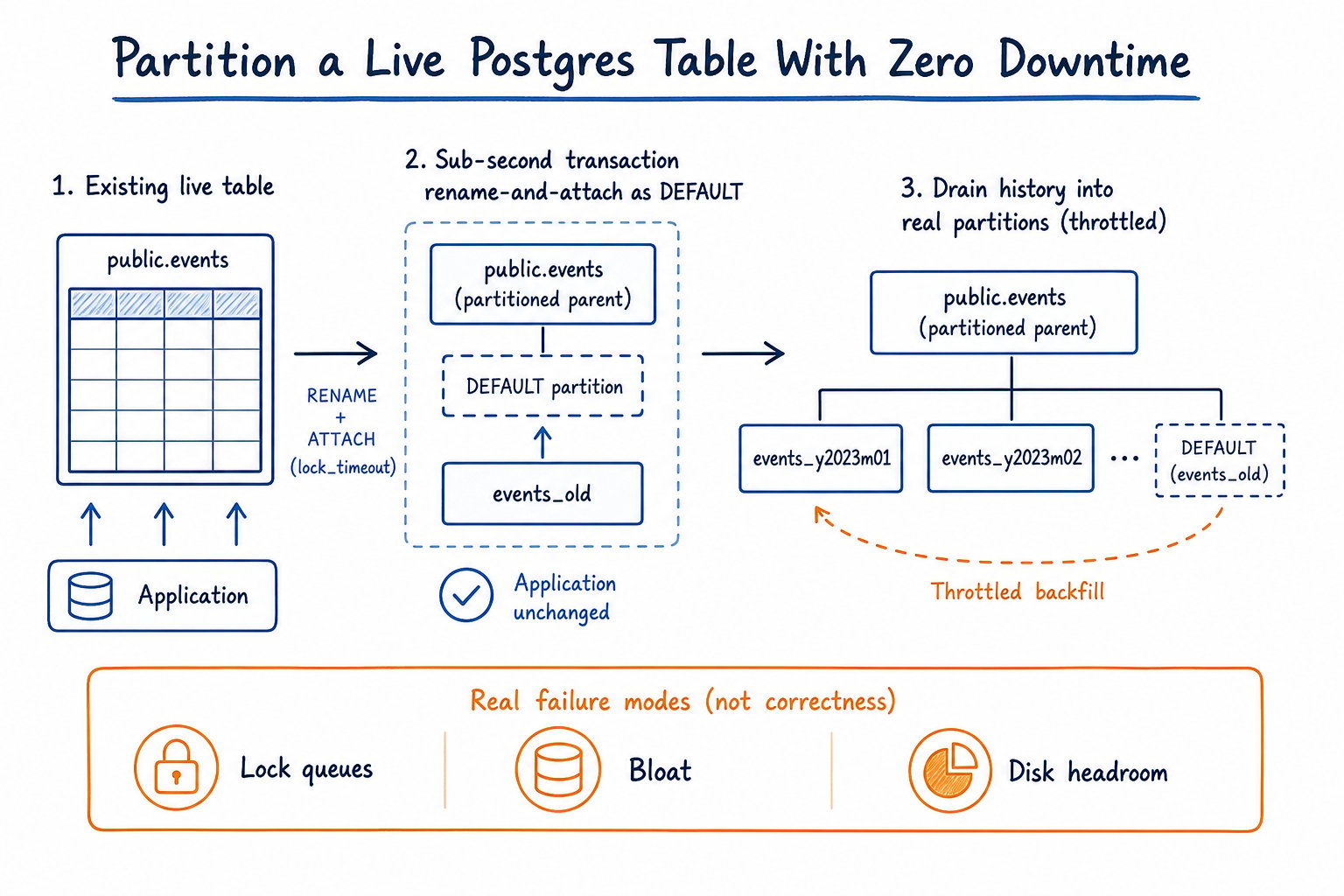
You can partition an existing Postgres table without downtime by renaming it into an empty partitioned shell as the DEFAULT partition inside a sub-second transaction, then draining history into real partitions afterward. No maintenance window, no dual-write, no application config change. This article is the full runbook: the SQL, the catalogue queries, and the edge cases that trip people up.
The table you can't take offline
orders is 450 million rows and about 380 GB with indexes. It takes roughly 2,500 inserts per second at peak, every hour of every day, and autovacuum is already losing ground on it: dead tuple counts climb faster than the workers can clear them. Nobody gets a maintenance window for this table. There is no 2 a.m. quiet period to exploit because the write load barely dips.
There are two credible ways to turn this into a partitioned table. One is to build a new partitioned table alongside it, backfill history, dual-write or replicate the delta, then cut the application over to the new name. The other is to build an empty partitioned shell, rename the existing table into it as the DEFAULT partition inside a sub-second transaction, and then drain history into real partitions afterward. I default to the second one for tables like this, and I'll explain exactly when I don't.
If you want the five-minute version of this argument, I walk through it on video. This article is the runbook.
Two migration patterns, and why attach-as-default wins for most live tables
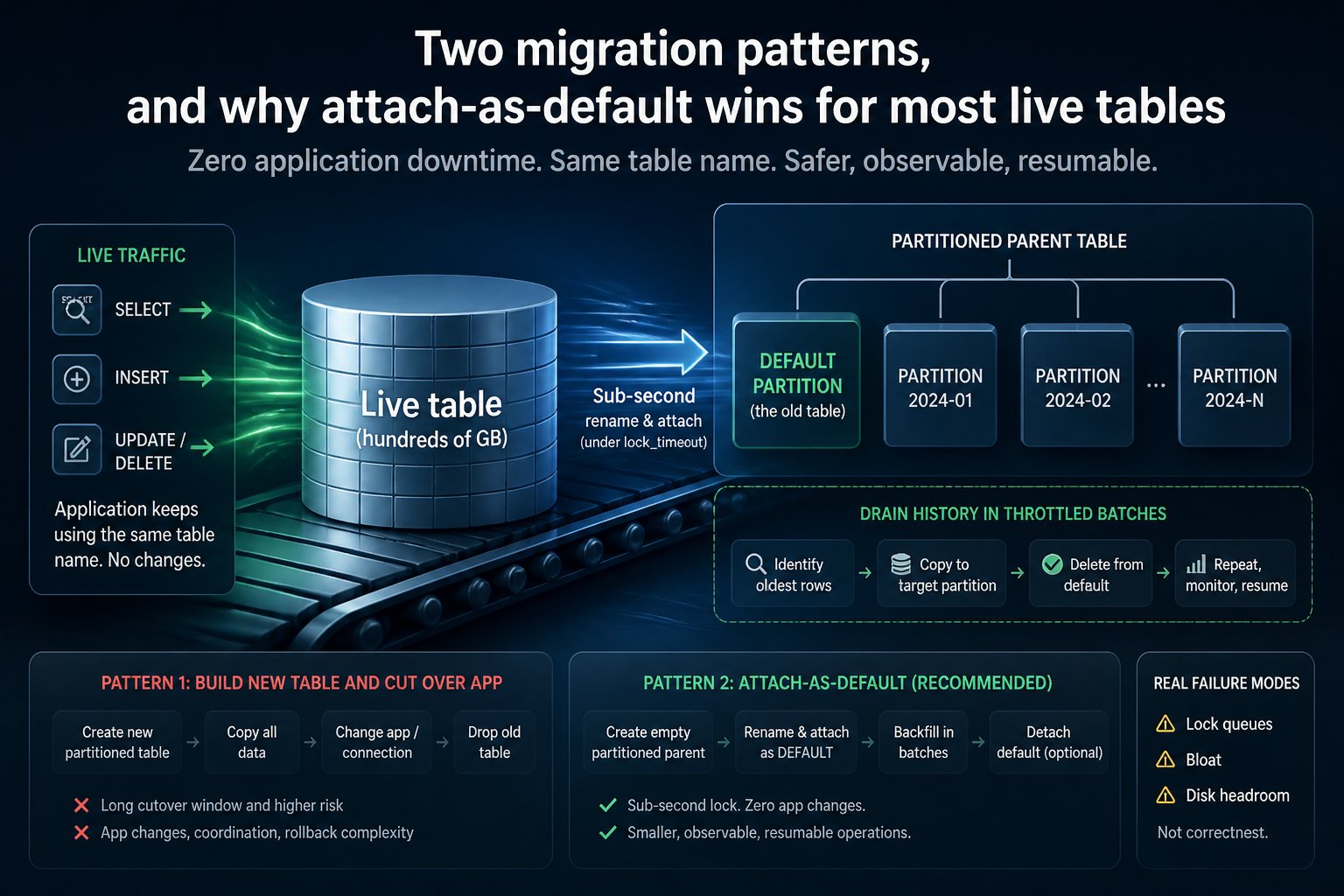
The new-table pattern is well understood and it's the right call in some situations, so I'm not going to pretend otherwise. You create orders_new already partitioned, backfill historical rows in batches, keep the app writing to both tables (or replicate the gap with logical replication), then flip application configuration to point at orders_new. The strength of that approach is that it never touches the live table's locks during backfill: all the risk is isolated in the new object, and you can take your time.
The attach-as-default pattern does the opposite. It swaps the catalog entry for orders in one short transaction and defers the expensive work to afterward.
| | New table + batch copy + cutover | Rename + attach as DEFAULT | |---|---|---| | App change required | Yes: connection string, table name, or both | No: table name and OID identity persist for consumers using it by name | | Dual-write window | Yes, until cutover completes | None: writes never leave the original heap | | Peak disk during migration | ~2x table size (old + new coexist fully) | Old heap size, plus new partitions filling as history drains | | Rollback speed | Fast before cutover, expensive after (revert app config, dual-write cleanup) | Fast before drain finishes (detach default, rename back); mid-drain it's a valid steady state | | Time to first benefit (pruning, smaller indexes) | Only after full cutover | Only after real partitions are attached and populated, same order of effort | | When it wins | Global unique key on id alone that must survive partitioning; app already tolerant of a rename; you want a completely clean partition scheme from day one | App can't tolerate any config change; you need the swap to be effectively instant; history can be drained on your own schedule |
The one hard limitation on attach-as-default: if the application needs a global unique constraint on id alone, this pattern doesn't give you one. A unique index or primary key on a partitioned table must include every partition key column, so partitioning orders by created_at means uniqueness can only be enforced as (id, created_at), per partition. If a bare UNIQUE (id) is non-negotiable, use the new-table pattern with an external uniqueness guarantee, or don't partition on created_at at all.
Version matters throughout. DEFAULT partitions require Postgres 11 as a hard floor. Foreign keys referencing a partitioned table need 12. DETACH PARTITION CONCURRENTLY needs 14. Confirm what you're actually running with SELECT version(); on the primary before committing to this plan. Don't work from memory or from what the last migration assumed.
Pre-flight: the schema audit that decides whether this is a two-hour job or a two-week job
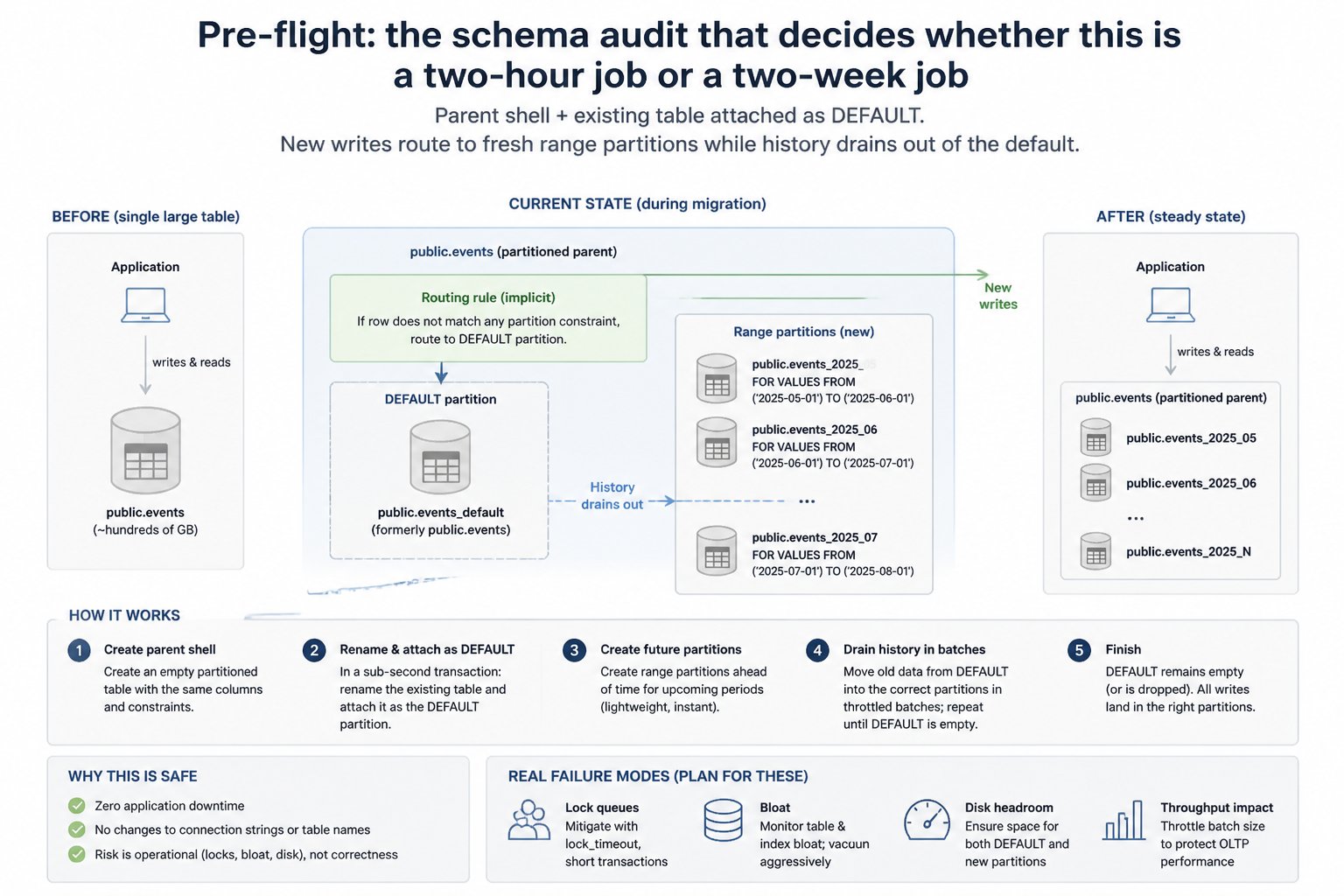
Before writing any DDL, run through the full dependency surface. Each of these queries tells you something to handle before the swap, not after.
-- Constraints not containing the partition key (created_at)
SELECT conname, contype, pg_get_constraintdef(oid)
FROM pg_constraint
WHERE conrelid = 'orders'::regclass;

-- Incoming foreign keys — tables that reference orders
SELECT conname, conrelid::regclass AS referencing_table,
       pg_get_constraintdef(oid)
FROM pg_constraint
WHERE confrelid = 'orders'::regclass;

-- Dependent views and matviews
SELECT DISTINCT v.oid::regclass, v.relkind
FROM pg_depend d
JOIN pg_rewrite r ON r.oid = d.objid
JOIN pg_class v ON v.oid = r.ev_class
WHERE d.refobjid = 'orders'::regclass
  AND v.relkind IN ('v','m');

-- Triggers
SELECT tgname, tgrelid::regclass, tgtype
FROM pg_trigger
WHERE tgrelid = 'orders'::regclass AND NOT tgisinternal;

-- Row-level security policies
SELECT polname, polcmd, pg_get_expr(polqual, polrelid)
FROM pg_policy
WHERE polrelid = 'orders'::regclass;

-- Grants
SELECT grantee, privilege_type
FROM information_schema.role_table_grants
WHERE table_name = 'orders';

-- Index inventory
SELECT indexname, indexdef
FROM pg_indexes
WHERE tablename = 'orders';

-- Table and index sizes
SELECT pg_size_pretty(pg_total_relation_size('orders')) AS total,
       pg_size_pretty(pg_relation_size('orders')) AS heap_only;
The primary key check tells you whether you need to redefine it as (id, created_at). Incoming foreign keys matter because a partitioned table can only be a foreign key target from Postgres 12 onward. On 11 you'd have to drop and reimplement referencing FKs at the application layer, or wait to partition. Dependent views need to be dropped and recreated after the swap, because they follow the renamed heap by OID, not by the name orders. Triggers, RLS policies and grants all live on the object being renamed, and none of them automatically transfer to the new parent shell.
Walk away from this plan entirely if the audit turns up a required unique constraint that excludes created_at and can't be relaxed, or if there's a hard requirement on PG 10 or earlier that nobody can move off in a reasonable timeframe.
For disk, budget at least 1.5x the size of orders_hist free before starting the drain, because every row moved is written twice (once into its new partition, once as a dead tuple in the source) plus WAL for both the insert and the delete, across every index. On a 380 GB table with several indexes, that's not a rounding error: budget in the hundreds of gigabytes, not tens. If that headroom isn't there and nobody will provision a volume, this plan doesn't proceed.
Sizing the partitions before you write any DDL
Aim for a few hundred partitions at steady state, not tens of thousands. Every partition touched by a query takes its own lock, and a high partition count can exhaust the shared lock table, producing the "out of shared memory / You might need to increase max_locks_per_transaction" error. Planning time also grows with partition count, even with pruning working correctly.
To pick monthly versus weekly, look at real row-rate data rather than guessing:
SELECT date_trunc('month', created_at) AS month, count(*)
FROM orders
WHERE created_at > now() - interval '6 months'
GROUP BY 1
ORDER BY 1;
At 2,500 inserts/sec peak (and lower average), monthly partitions on orders land somewhere around 40 to 60 GB each: a comfortable size, and five years of history is only 60 partitions. Weekly only makes sense once monthly partitions start exceeding a couple hundred GB.
Step 1 — Build the parent shell so it's byte-for-byte compatible
Generate the base DDL from pg_dump --schema-only -t orders rather than typing it from memory, specifically to avoid drift on column order, types, and NOT NULL flags. Diff the output against the shell DDL until they match exactly. Two things need manual attention: the primary key must include the partition key, and the id column's default must point at the existing sequence rather than creating a new identity column. This is the core step in any convert-table-to-partitioned-table-postgres migration — get the shell wrong and everything downstream inherits the mistake.
CREATE TABLE orders_shell (
    id           bigint NOT NULL DEFAULT nextval('orders_id_seq'),
    customer_id  bigint NOT NULL,
    status       text NOT NULL,
    created_at   timestamptz NOT NULL,
    updated_at   timestamptz NOT NULL,
    total_cents  integer NOT NULL,
    PRIMARY KEY (id, created_at)
) PARTITION BY RANGE (created_at);
Reusing orders_id_seq matters. If you let a new identity column create its own sequence, every application code path that reads currval('orders_id_seq') or relies on the existing sequence's ownership breaks quietly.
Step 2 — The swap: rename and attach partition default in one transaction
DEFAULT partitions arrived in Postgres 11, so this whole pattern requires 11 or newer. The swap itself is one transaction with a short lock_timeout, so a blocked ACCESS EXCLUSIVE request never sits in the queue accumulating everyone behind it.
BEGIN;
SET lock_timeout = '2s';

ALTER TABLE orders RENAME TO orders_hist;
ALTER TABLE orders_shell RENAME TO orders;
ALTER TABLE orders ATTACH PARTITION orders_hist DEFAULT;

COMMIT;
Attaching as DEFAULT before any range partitions exist means the partition constraint is trivially satisfied: there's nothing to validate against, so no scan happens. That only holds true at this moment, before other partitions exist. Once range partitions are present, every new ALTER TABLE ... ATTACH PARTITION also has to scan the default to prove no rows belong there — exactly what Step 4 avoids.
Pre-creating indexes on orders_hist that match the ones on orders_shell before this transaction runs is what keeps the attach fast. If matching indexes already exist, Postgres attaches them instead of rebuilding. Confirm the existing table's indexes are one-for-one equivalents of the parent's; any mismatch means the attach triggers a rebuild, and the swap stops being sub-second.
Never run this cold against production. Take a physical restore of the live database, run the transaction, and time it, consistently, across at least ten runs — that's the only honest way to know whether 2 seconds is enough or whether you need 5. A swap that can't be rehearsed under a couple hundred milliseconds on a realistic copy is a swap you don't run live.
For production, don't send the transaction and hope. Retry with backoff so a busy moment doesn't turn into a long lock queue, and check the loop's exit code rather than trusting a glance at the log tail:
for i in $(seq 1 10); do
  psql -v ON_ERROR_STOP=1 -f swap.sql && break
  sleep $((i * 2))
done
Step 3 — Post-swap repairs nobody warns you about
Dependencies track objects by OID, not name. Any view built on orders now points at orders_hist, silently, because the rename moved the underlying object and the view's OID reference followed it. Same story for RLS policies and grants: they live on the renamed relation, not the new parent.
-- Recreate views pointed at the new parent
CREATE OR REPLACE VIEW recent_orders AS
SELECT * FROM orders WHERE created_at > now() - interval '30 days';

-- Reapply grants and policies on the parent
GRANT SELECT, INSERT, UPDATE ON orders TO app_role;
ALTER TABLE orders ENABLE ROW LEVEL SECURITY;
CREATE POLICY orders_tenant_isolation ON orders
    USING (tenant_id = current_setting('app.tenant_id')::int);

-- Row triggers must be recreated on the parent explicitly
CREATE TRIGGER orders_set_updated_at
    BEFORE UPDATE ON orders
    FOR EACH ROW EXECUTE FUNCTION set_updated_at();
Autovacuum never processes the partitioned parent itself, only its individual partitions, so the parent starts life with empty statistics until you run an explicit ANALYZE:
ANALYZE orders;Skip this and the planner has nothing to reason about join selectivity or row estimates on the parent, which shows up as bad plans days later with no obvious cause. Schedule this ANALYZE to run nightly going forward, not just once after the swap.
Step 4 — Adding real partitions without an alter table attach partition lock scan
Attaching a range partition normally forces a scan of the default partition, to prove it holds no rows that belong in the new range — and that scan holds a lock the whole time. On a 380 GB default, that's expensive. The workaround is a validated CHECK constraint that already proves the boundary, added in two steps so the proof doesn't cost a blocking scan:
ALTER TABLE orders_hist
    ADD CONSTRAINT orders_hist_before_cutover
    CHECK (created_at < '2026-09-01') NOT VALID;

ALTER TABLE orders_hist
    VALIDATE CONSTRAINT orders_hist_before_cutover;
NOT VALID records the constraint immediately, with no scan, and is enforced for all new rows from that point on. VALIDATE CONSTRAINT then does the scan, but under SHARE UPDATE EXCLUSIVE: it doesn't block concurrent SELECT, INSERT, UPDATE or DELETE. Once that constraint is validated, attaching September's partition skips scanning the default entirely, because Postgres can prove from the constraint alone that no September rows live there.
CREATE TABLE orders_2026_09 PARTITION OF orders
    FOR VALUES FROM ('2026-09-01') TO ('2026-10-01');
Create forward-dated partitions this way and verify pruning is actually working with EXPLAIN before you trust it: a query scoped to next month should touch exactly one partition.
As history drains out of orders_hist in Step 5, move this boundary backward per drained year or month: drop the old constraint, add a tighter one as NOT VALID, then VALIDATE, so the default keeps shrinking and each new attach stays cheap.
Step 5 — Backfilling partitions in batches
History partitions get created as standalone tables with matching CHECK constraints first, then attached. This keeps the attach step itself cheap since the constraint proof is already in place. The batch worker is a DELETE-with-RETURNING feeding an INSERT, scoped to orders_hist only, walked across an indexed key range so each transaction stays sub-second:
WITH moved AS (
    DELETE FROM ONLY orders_hist
    WHERE id BETWEEN :batch_start AND :batch_end
    RETURNING *
)
INSERT INTO orders SELECT * FROM moved;
Config card for the worker session:
lock_timeout = 2s
statement_timeout = 5s
idle_in_transaction_session_timeout = 10s
A single long-running transaction holds back the xmin horizon and stops VACUUM from clearing dead tuples anywhere in the cluster — precisely why backfilling partitions in batches beats one sweeping migration. Start around 5,000 rows per batch and tune from there depending on row width, sleeping 100-300ms between batches, and log progress into a small tracking table so the job survives a restart:
CREATE TABLE orders_drain_progress (
    batch_end bigint PRIMARY KEY,
    moved_at timestamptz DEFAULT now()
);
Rows that arrive with a created_at inside an already-drained range get routed to the correct partition automatically by the parent's own routing. Since Postgres 11, an UPDATE that changes the partition key moves the row to the right partition instead of erroring, so there's no special-case handling needed there.
If you'd rather not hand-roll the worker, pg_partman's partition_data_proc (or partition_data_time for time-based keys) does the same batched move with configurable batch size, and run_maintenance_proc pre-creates future partitions on a schedule.
What to watch while it runs
Five things, in order of how often they've caused problems, all belonging on a dashboard someone is actually watching, not a query someone remembers to run occasionally:
Dead tuples and bloat in the shrinking default. Batch DELETEs don't return space to the OS, so orders_hist stays physically large until it's dropped, not vacuumed thin:
SELECT relname, n_dead_tup, n_live_tup
FROM pg_stat_user_tables WHERE relname = 'orders_hist';
xmin horizon. Any session holding a transaction open for minutes blocks vacuum cluster-wide:
SELECT pid, state, now() - xact_start AS age, query
FROM pg_stat_activity
WHERE state <> 'idle' ORDER BY age DESC LIMIT 5;
WAL and replica lag. Moved rows generate WAL twice over, so archive and replica backlog both rise during the drain. Watch pg_current_wal_lsn() deltas and replication lag directly.
Lock waits. Check pg_locks for anything waiting on the parent or default during a batch run. If waits appear, the batch is too big or too close to a competing DDL window.
Free disk trajectory. Track headroom daily against the drain rate, not just at the start.
This is the exact set of signals MyDBA's health checks were built around — dead tuple growth, lock wait queues, disk headroom trend, all on one estate view — because watching five separate pg_stat_* queries by hand during a multi-day drain gets tedious fast. If you're not running it, the raw SQL above covers the same ground.
Step 6 — Detach partition concurrently and retire the default
Once orders_hist is empty, detach it and drop it. Don't vacuum it:
SELECT count(*) FROM ONLY orders_hist; -- confirm zero first

ALTER TABLE orders DETACH PARTITION orders_hist CONCURRENTLY;
DROP TABLE orders_hist;
DETACH PARTITION CONCURRENTLY was added in Postgres 14 and avoids the ACCESS EXCLUSIVE lock on the parent that a plain DETACH requires; it can't run inside a transaction block. On 13 and earlier, use plain DETACH PARTITION and accept the brief exclusive lock. By that point the table is empty, so the lock is held only briefly, not for the duration of a scan. VACUUM FULL or pg_repack on the drained default is wasted effort either way, because you're about to discard the whole relation. DROP reclaims the space instantly, no rewrite needed. Confirm the free space actually came back afterward.
Verify the finished state: total row count against the number you recorded before the swap, per-partition counts summing correctly, and pruning working on your hottest queries:
SELECT tableoid::regclass, count(*) FROM orders GROUP BY 1 ORDER BY 1;

SELECT count(*) FROM orders; -- compare against your pre-swap count plus inserts taken during migration

EXPLAIN (COSTS OFF)
SELECT * FROM orders WHERE created_at = '2026-07-15';
If the row count disagrees with what you wrote down before the swap, stop and reconcile before you drop anything else. The EXPLAIN output should show a single partition scanned, confirming enable_partition_pruning (on by default since 11) is doing its job at plan time.
Indexes, uniqueness and foreign keys: the constraints that actually kill this plan
CREATE INDEX CONCURRENTLY doesn't work directly on a partitioned table. The supported sequence is:
CREATE INDEX ON ONLY orders (customer_id);
-- creates an invalid index on the parent

CREATE INDEX CONCURRENTLY orders_2026_08_customer_id_idx
    ON orders_2026_08 (customer_id);

ALTER INDEX orders_customer_id_idx
    ATTACH PARTITION orders_2026_08_customer_id_idx;
Repeat the CONCURRENTLY step per partition; the parent index becomes valid automatically once every partition has one attached, with no blocking scan anywhere in the sequence. Verify nothing was missed with a direct catalog check rather than trusting that every partition got covered:
SELECT c.relname
FROM pg_class c
JOIN pg_index i ON i.indexrelid = c.oid
WHERE NOT i.indisvalid AND c.relname LIKE 'orders%';
An empty result means every parent index is fully backed across all partitions.
On uniqueness: a unique index or primary key on a partitioned table has to include every partition key column, so a bare UNIQUE (id) is not achievable once orders is partitioned by created_at. If that guarantee is contractual — say another system dereferences orders by id alone and assumes global uniqueness — your options are a per-partition unique index on (id, created_at) combined with an application- or sequence-based guarantee that id values never repeat across partitions, or abandoning attach-as-default for the new-table pattern where you control the uniqueness scheme from scratch.
Foreign keys referencing a partitioned table only work from Postgres 12 onward. On 11, a partitioned table can reference other tables but nothing can reference it back. If order_items.order_id has to be an FK into orders, you need 12 or later, or you need to drop that FK and enforce the relationship at the application layer until you upgrade.
Rollback, and when to walk away from this plan
Before the drain starts, rollback is cheap: detach orders_hist as DEFAULT and rename it back to orders, undoing the swap in another short transaction. Mid-drain, there's no need to roll back at all. A hybrid state with some months in real partitions and the rest still in the shrinking default is a valid, stable steady state. You can pause the drain for weeks without consequence beyond disk pressure.
Reach for pgslice, pg_partman's full rebuild mode, or a logical-replication-based cutover instead when the app needs a bare unique id, the platform is on Postgres 10 or earlier, disk headroom can't clear 1.5x the source table's size, the rehearsed swap can't be brought consistently under a couple hundred milliseconds, or the table already has enough foreign key fan-out that redefining every referencing constraint is a bigger job than the migration itself.
Postgres partition migration checklist
Go/no-go gates first. All five must be green before any DDL runs in production.
1. Disk: at least 1.5x orders_hist size free on the data volume, plus separate pg_wal headroom, measured with df, not estimated. 2. Swap timing proven: the full swap transaction run against a restored copy of a recent backup, timed, consistently under a couple hundred milliseconds across at least ten runs. 3. Audit clean: no PK or UNIQUE constraint excluding created_at; every incoming FK, view, trigger, policy and grant catalogued with a written repair step. 4. Monitoring live: dead tuples, xmin horizon age, WAL rate, replica lag, lock waits and free disk all on a dashboard someone is actually watching. 5. Version confirmed: PG 11 minimum, PG 12 if incoming FKs exist, PG 14 for concurrent detach, checked with SELECT version(); on the primary, not assumed.
Then, in order:
1. Run the pre-flight catalogue queries; resolve every blocking constraint, view, trigger, policy and grant. 2. Generate parent DDL from pg_dump --schema-only, fix the sequence default and composite PK, diff against the source until they match. 3. Pre-create matching indexes on the source table before the swap so attach doesn't trigger a rebuild. 4. Run the swap transaction with lock_timeout set and a retry/backoff loop ready; check the exit code, not the log. 5. Recreate views, grants, RLS policies and row triggers on the new parent; run ANALYZE and schedule it nightly. 6. Add the NOT VALID + VALIDATE CONSTRAINT boundary on the default; attach the first real partition and confirm pruning with EXPLAIN. 7. Create history partitions as standalone tables with matching CHECK constraints; start the batched drain worker with a resumable progress table and throttling in place. 8. Per drained period, tighten the default's boundary (NOT VALID then VALIDATE) and attach that period's partitions. 9. Monitor dead tuples, xmin horizon, WAL/replica lag, lock waits and disk trajectory daily. 10. Attach per-partition indexes via ON ONLY / CONCURRENTLY / ATTACH PARTITION; confirm none are left invalid with the pg_index.indisvalid check. 11. Once the default is empty, detach concurrently and drop it; confirm free space returned. 12. Final verification: total row count matches the pre-migration number, per-partition counts sum correctly, and EXPLAIN on your hottest queries shows pruning.
What this actually bought
On the orders table described here, the drain took 21 hours spread across four evenings, the swap itself came in at 84 ms, and the application team was told about it after the fact rather than before. Autovacuum now works on 40-60 GB partitions instead of a 380 GB heap and finishes in minutes instead of losing ground. The monthly archival job that used to be a DELETE running for six hours is now a DROP TABLE.
None of that came from cleverness. It came from moving the risk out of one irreversible event and into a sequence of small operations, each of which you can watch, pause and resume. The failure modes that remain are lock queues, bloat and disk headroom — and all three are things you already know how to monitor.