Tuning pgvector Queries: Probes, ef_search, and Distance Functions
Tuning pgvector Queries: Probes, ef_search, and Distance Functions
The Problem
pgvector gives PostgreSQL native vector similarity search, but its indexes are approximate by design. They trade accuracy for speed -- and the default trade-off is worse than most teams realize.
IVFFlat indexes partition vectors into lists during index creation. At query time, the ivfflat.probes setting controls how many lists are searched. The default is 1. If your index has 100 lists, probes=1 means you are searching 1% of the index and hoping your nearest neighbor happens to land in that single partition. For non-trivial datasets, this produces terrible recall -- your query returns results, but they are not the actual nearest neighbors.
HNSW indexes use a graph-based approach with better default behavior. The hnsw.ef_search parameter controls how many candidates are evaluated during the graph traversal. The default of 40 is reasonable for casual use, but it falls short for applications that need high-precision results -- recommendation engines, RAG pipelines, or duplicate detection where missing the true nearest neighbor has real consequences.
The insidious part is that both index types always return results. There is no error, no warning. Your similarity search runs fast and returns rows. The problem is that those rows are not the best matches -- they are whatever the index found within its limited search scope. You get confident-looking results with silently poor recall.
Most teams deploy pgvector, create an index with defaults, see that queries return results, and move on. The accuracy gap only surfaces when users notice that search quality is inconsistent, or when someone finally runs a recall benchmark and discovers that the index is missing 30-50% of the true nearest neighbors.
How to Detect It
Start by checking what search parameters your sessions are actually using:
-- Check current session-level pgvector settings
SHOW ivfflat.probes;
SHOW hnsw.ef_search;
If ivfflat.probes returns 1 or hnsw.ef_search returns 40, you are running on defaults. Next, find your slowest vector queries and check whether they are even using an index:
-- Find vector queries doing sequential scans (missing or unused index)
SELECT
    query,
    calls,
    mean_exec_time,
    rows
FROM pg_stat_statements
WHERE query LIKE '%<->%'  -- vector distance operator
   OR query LIKE '%<=>%'  -- cosine distance
   OR query LIKE '%<#>%'  -- inner product
ORDER BY mean_exec_time DESC
LIMIT 10;
Queries with high mean_exec_time relative to their row count are likely doing sequential scans -- either because no vector index exists, or because the planner decided the index was not worth using (common with small tables or high probes values). Run EXPLAIN on the worst offenders to confirm whether they hit an index scan or a sequential scan.
A subtler issue is distance function mismatch. If your index was built with vector_cosine_ops but your query uses the L2 distance operator <->, PostgreSQL cannot use the index at all. It falls back to a sequential scan silently. Check that the operator in your query matches the operator class on your index:
- Cosine distance:
<=>withvector_cosine_ops - L2 (Euclidean) distance:
<->withvector_l2_ops - Inner product:
<#>withvector_ip_ops
How myDBA.dev Shows It
myDBA.dev's pgvector monitoring page surfaces vector query performance in a single view. You can see which distance functions are in use, query execution times, and whether queries are hitting indexes or falling back to sequential scans. Slow vector queries that should be using an index but are not stand out immediately.
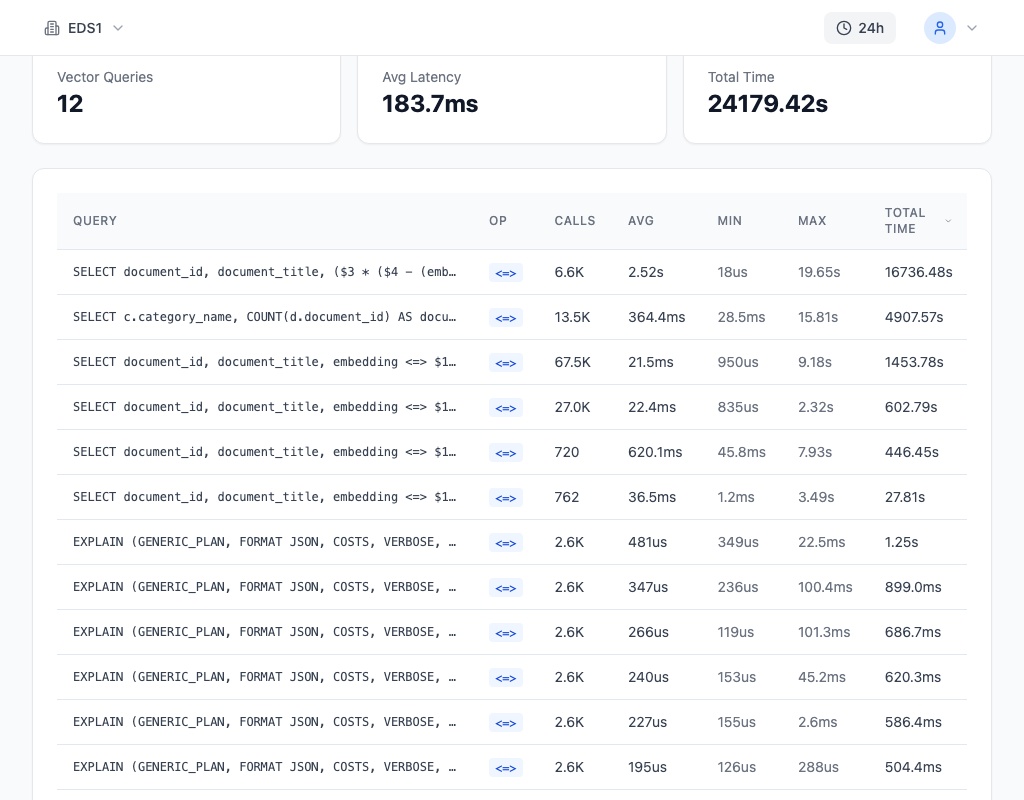
The Queries page complements this by showing the slowest vector queries ranked by execution time. If a query using <=> is orders of magnitude slower than expected, you can drill into its explain plan directly to confirm whether a sequential scan is the cause -- and whether a distance function mismatch or missing index is responsible.
How to Fix It
Tune ivfflat.probes and hnsw.ef_search based on your accuracy requirements. The defaults prioritize speed over recall -- you almost certainly want to shift that balance.
-- Tune IVFFlat probes (higher = better recall, slower query)
-- Default is 1, recommended starting point is sqrt(lists)
SET ivfflat.probes = 32;

-- Tune HNSW ef_search (higher = better recall, slower query)
-- Default is 40, increase for better accuracy
SET hnsw.ef_search = 100;

-- Set at the database level for all sessions
ALTER DATABASE mydb SET ivfflat.probes = 32;
ALTER DATABASE mydb SET hnsw.ef_search = 100;
For IVFFlat, a good starting point for probes is the square root of the number of lists in your index. If you created the index with lists = 1000, start with probes = 32 and measure recall. For HNSW, ef_search = 100 provides noticeably better recall than the default 40, with modest latency increase. For high-precision applications (RAG, deduplication), try ef_search = 200 or higher.
Make sure your distance function matches your index operator class:
-- Verify distance function matches your index
-- cosine: <=> with vector_cosine_ops
-- L2: <-> with vector_l2_ops
-- inner product: <#> with vector_ip_ops
SELECT * FROM documents
ORDER BY embedding <=> '[0.1, 0.2, ...]'::vector
LIMIT 10;
If you discover a mismatch, either change your queries to use the correct operator or rebuild the index with the operator class that matches your queries. Rebuilding is often the right call -- it is a one-time cost versus fixing every query.
For queries that combine vector similarity with filters (e.g., WHERE category = 'science' ORDER BY embedding <=> $1), consider partial indexes or the iterative index scan approach introduced in pgvector 0.7.0+. Filtered similarity queries are a common source of sequential scans because the planner may decide the filter selectivity makes the index less efficient.
How to Prevent It
The only reliable way to prevent recall degradation is to benchmark it. Run periodic recall tests by comparing approximate results (with your production settings) against exact results (sequential scan):
-- Monitor recall quality by comparing exact vs approximate results
-- Run periodically on a sample to check if probes/ef_search need adjustment
WITH exact AS (
    SELECT id, embedding <=> $1 AS distance
    FROM documents ORDER BY distance LIMIT 10
),
approximate AS (
    SET LOCAL ivfflat.probes = 1;
    SELECT id, embedding <=> $1 AS distance
    FROM documents ORDER BY distance LIMIT 10
)
SELECT count(*) AS overlap FROM exact
JOIN approximate USING (id);
If the overlap between exact and approximate results drops below 8 out of 10, your search parameters need adjustment. Run this test with a representative sample of query vectors -- not just one.
As your dataset grows, recall with fixed settings will degrade. An IVFFlat index built for 100K vectors with lists = 100 and probes = 10 may deliver 95% recall. At 1M vectors with the same settings, recall could drop to 70%. Rebuild indexes periodically and re-evaluate probes/ef_search as your data scales.
Track vector query performance continuously with myDBA.dev. Monitor execution times, scan types, and distance function usage across all your vector queries -- catching a recall regression early is far easier than debugging inconsistent search results reported by users weeks after the data outgrew your index parameters.