Your pgvector Queries Are Doing Sequential Scans — Here's Why
Your pgvector Queries Are Doing Sequential Scans -- Here's Why
The Problem
You install pgvector, add a vector column to your documents table, start inserting embeddings from OpenAI or Cohere, and everything feels fast. Your similarity search returns results in a few milliseconds against a few hundred rows. Then the table grows to 50,000 rows, and the same query takes 800ms. At 500,000 rows, it takes 8 seconds. At 5 million rows, it times out entirely.
The reason is straightforward: pgvector does not create indexes automatically. When you run a nearest-neighbour query like ORDER BY embedding <=> query_vector LIMIT 10, PostgreSQL computes the cosine distance between the query vector and every single row in the table. This is a brute-force sequential scan -- O(n) with a very expensive per-row operation (comparing 1536-dimensional floating point vectors is not cheap). Every row gets read, every distance gets computed, and only then are the top 10 results returned.
This catches teams off guard because regular B-tree indexes in PostgreSQL are typically created as part of schema design -- you add an index on email when you add a unique constraint, or on created_at when you add a foreign key. Vector indexes are different. There is no unique constraint to trigger them, no foreign key pattern that hints at their necessity. The column just sits there, unindexed, and queries degrade linearly as data grows.
The compounding factor is that vector similarity searches are often the most latency-sensitive queries in the application. They power real-time search, RAG pipelines, and recommendation engines -- features where users expect sub-100ms responses. A sequential scan that takes 2 seconds defeats the purpose of having embeddings in the database at all.
How to Detect It
pgvector stores vector columns with a dedicated vector type registered in pg_type. You can query the system catalogs to find every vector column that lacks an index:
-- Find vector columns without any index
SELECT
    a.attrelid::regclass AS table_name,
    a.attname AS column_name,
    a.atttypmod AS dimensions
FROM pg_attribute a
WHERE a.atttypid = 'vector'::regtype
  AND NOT EXISTS (
      SELECT 1 FROM pg_index i
      JOIN pg_class c ON i.indexrelid = c.oid
      WHERE i.indrelid = a.attrelid
        AND a.attnum = ANY(i.indkey)
  );
Any row returned by this query is a vector column with no index at all -- not HNSW, not IVFFlat, nothing. Every similarity search on that column is doing a full table scan.
To quantify the damage, check sequential scan statistics on the affected tables:
-- Check sequential scan count on tables with vector columns
SELECT
    schemaname, relname,
    seq_scan, idx_scan,
    seq_tup_read
FROM pg_stat_user_tables
WHERE seq_scan > 100
  AND relname IN (
      SELECT attrelid::regclass::text
      FROM pg_attribute
      WHERE atttypid = 'vector'::regtype
  );
A table with thousands of sequential scans and zero index scans is computing brute-force distance calculations on every query. The seq_tup_read column tells you exactly how many rows were scanned -- if this number is orders of magnitude larger than the table size, the same rows are being scanned over and over by repeated queries.
How myDBA.dev Shows It
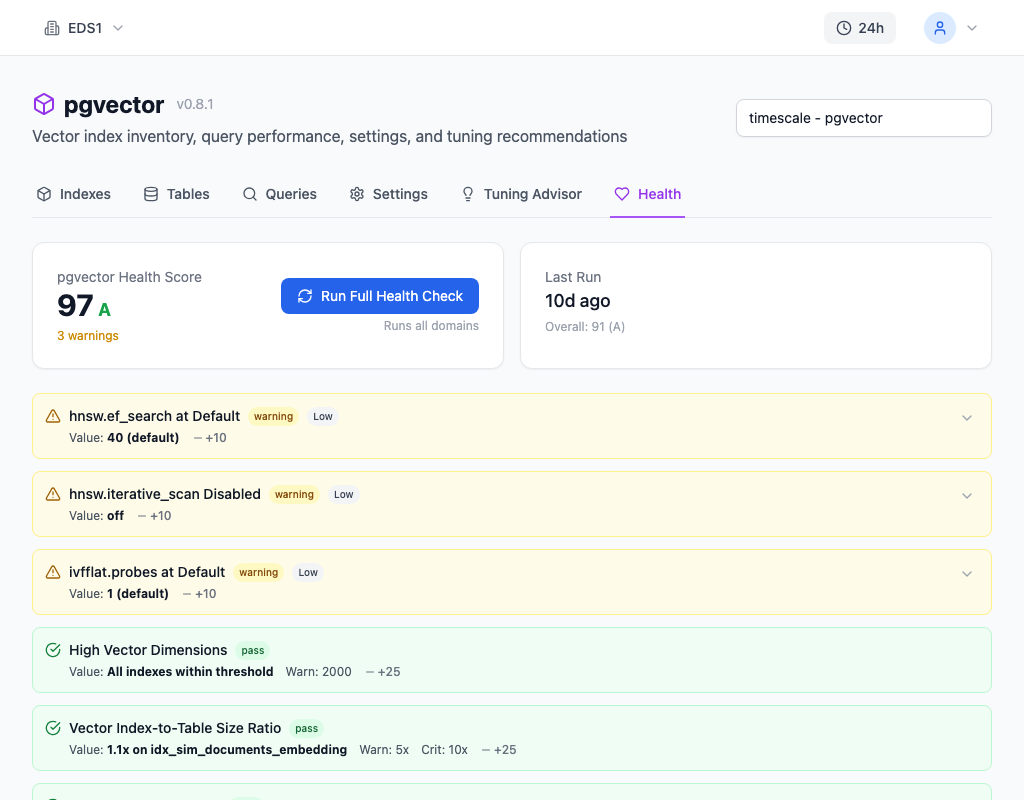
myDBA.dev's pgvector monitoring page detects unindexed vector columns automatically. The health checks flag every vector column that lacks an HNSW or IVFFlat index, showing the table name, column name, dimensions, and current row count. This surfaces the problem before queries become noticeably slow -- you can see that a vector column is unindexed the moment data starts flowing, rather than discovering it after users report latency.
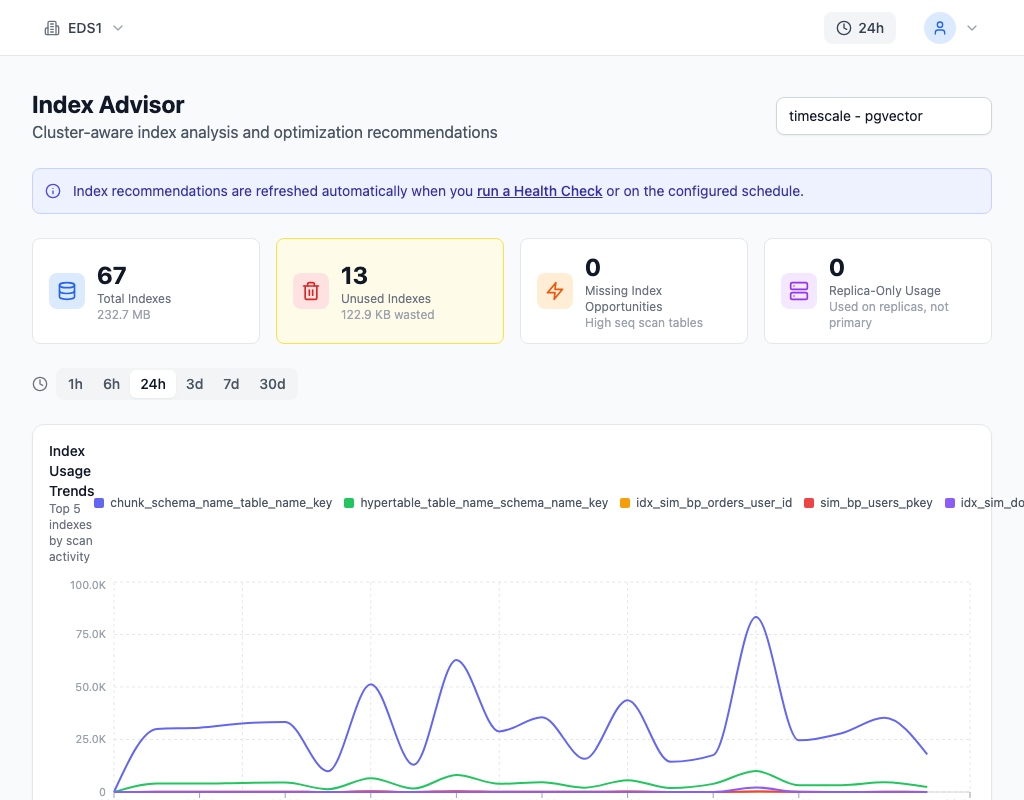
The Index Advisor complements this by analyzing query patterns on vector tables. It identifies which vector columns are being searched most frequently and recommends specific index configurations based on the distance operator in use (cosine, L2, inner product). The recommendations include the appropriate operator class -- vector_cosine_ops for <=>, vector_l2_ops for <-> -- so you can create the index with the correct configuration on the first attempt.
How to Fix It
Create an HNSW index on the vector column. HNSW (Hierarchical Navigable Small World) is the recommended default for most workloads -- it provides fast approximate nearest-neighbour search with tunable accuracy:
-- Add an HNSW index (recommended default)
SET maintenance_work_mem = '2GB';
CREATE INDEX CONCURRENTLY idx_docs_embedding
ON documents USING hnsw (embedding vector_cosine_ops)
WITH (m = 16, ef_construction = 200);
A few things to understand about this:
maintenance_work_mem controls how much memory PostgreSQL allocates for the index build. HNSW index construction is memory-intensive -- the algorithm needs to hold the graph structure in memory as it inserts each vector. The default 64MB is far too low for tables with hundreds of thousands of vectors. Set it to 1-2GB for the session before building the index.
vector_cosine_ops must match the distance operator your queries use. If your queries use <=> (cosine distance), use vector_cosine_ops. For <-> (L2 distance), use vector_l2_ops. For <#> (inner product), use vector_ip_ops. Using the wrong operator class means the planner cannot use the index -- it silently falls back to a sequential scan.
m and ef_construction control the accuracy-speed tradeoff. Higher values build a denser graph that produces more accurate results but takes longer to build and uses more memory. The defaults (m=16, ef_construction=64) are conservative. For production workloads where recall matters, ef_construction=200 is a reasonable starting point.
After building the index, verify it is being used:
-- Verify the index is being used
EXPLAIN ANALYZE
SELECT * FROM documents
ORDER BY embedding <=> '[0.1, 0.2, ...]'::vector
LIMIT 10;
You should see Index Scan using idx_docs_embedding in the output. If you still see Seq Scan, check that the operator class matches your distance operator, that enable_indexscan is on, and that the table has been analyzed (ANALYZE documents).
How to Prevent It
Build vector index creation into your standard column-addition workflow. Every time a vector column is added to a table, the corresponding index should be part of the same migration -- not a follow-up task.
A practical checklist for vector column setup:
- Create the HNSW index in the same migration that adds the vector column. Even if the table is empty at migration time, the index will be ready when data arrives.
- Choose the operator class before writing queries. Decide on cosine, L2, or inner product up front and document it. Mixing operators across queries on the same column means you need multiple indexes or some queries will scan sequentially.
- Set
maintenance_work_memin the migration script. Do not rely on the server default -- 64MB will cause the index build to spill to disk on any table with more than a few thousand vectors. - Monitor for new unindexed vector columns. Tables evolve. A new column added three months later might not get the same attention as the original schema. myDBA.dev flags unindexed vector columns in its health checks, catching gaps as they appear rather than after queries degrade.
- Test with realistic vector counts. A similarity search on 100 rows will always be fast, indexed or not. Test against at least 100,000 rows to see the real query plan and confirm the index is being used.
The gap between "pgvector works" and "pgvector works at scale" is almost entirely about indexing. The extension does not enforce it, the planner does not warn you, and small test datasets hide the problem completely. The fix takes one SQL statement -- the challenge is remembering to run it.