pgvector Distance Functions: Cosine vs L2 vs Inner Product
pgvector Distance Functions: Cosine vs L2 vs Inner Product
The Problem
pgvector provides three distance operators, and each one measures similarity differently:
<=>Cosine distance -- measures the angle between two vectors. Two vectors pointing in the same direction have cosine distance 0, regardless of their magnitude. Range: 0 to 2.<->L2 (Euclidean) distance -- measures the straight-line distance between two points in vector space. Sensitive to magnitude. Range: 0 to infinity.<#>Inner product (negative) -- measures the dot product, negated so thatORDER BYreturns the highest similarity first. Sensitive to both angle and magnitude.
Each operator exists for a reason, and choosing the wrong one produces subtly wrong results. The retrieval still "works" -- you get rows back, ordered by some number -- but the ranking is wrong, and your application returns less relevant results without any error or warning.
The most common mistake is an operator/index mismatch. pgvector indexes are built with a specific operator class (vector_cosine_ops, vector_l2_ops, or vector_ip_ops), and each operator class only accelerates its corresponding distance operator. If your index uses vector_cosine_ops but your query uses <-> (L2 distance), PostgreSQL cannot use the index. It falls back to a sequential scan, computing distances row by row across the entire table. On a table with millions of embeddings, that is the difference between 5ms and 30 seconds.
The second mistake is choosing the wrong distance function for your data:
- Using L2 when embeddings are normalized. Most modern embedding models (OpenAI, Cohere, Voyage) output normalized vectors where all vectors have unit length. When vectors are normalized, cosine distance and L2 distance produce equivalent rankings, but cosine distance is the conventional choice and communicates intent more clearly. More importantly, if you later mix in embeddings from a model that does not normalize, L2 will give wrong results while cosine will still work correctly.
- Using cosine for spatial or positional data. If your vectors represent physical coordinates, sensor readings, or any data where magnitude carries meaning, cosine distance discards that information. Two vectors
[1, 2, 3]and[100, 200, 300]have cosine distance 0 -- they point the same direction -- but they represent very different magnitudes. L2 distance preserves this distinction.
- Using inner product without understanding the negation. pgvector's
<#>operator returns the negative inner product so thatORDER BYworks correctly (smallest first = most similar). If your application code interprets the raw distance value, you need to negate it back to get the actual dot product similarity score.
How to Detect It
Start by identifying which distance operators your queries are actually using and whether they match your indexes:
-- Find which distance operators your queries use
SELECT
    query,
    calls,
    mean_exec_time
FROM pg_stat_statements
WHERE query LIKE '%<->%'   -- L2 distance
   OR query LIKE '%<=>%'   -- cosine distance
   OR query LIKE '%<#>%'   -- inner product (negative)
ORDER BY calls DESC
LIMIT 20;

-- Check if index operator class matches query operator
SELECT indexname, indexdef
FROM pg_indexes
WHERE indexdef LIKE '%vector%'
ORDER BY indexname;
Compare the results. If your index definition shows vector_cosine_ops but your queries use <->, you have a mismatch. The index exists but PostgreSQL is not using it.
Confirm by running EXPLAIN on a representative query:
EXPLAIN (ANALYZE, BUFFERS)
SELECT id, embedding <=> '[0.1, 0.2, ...]'::vector AS distance
FROM docs
ORDER BY embedding <=> '[0.1, 0.2, ...]'::vector
LIMIT 10;
If the plan shows Index Scan using your HNSW/IVFFlat index, the operator matches. If it shows Seq Scan or Parallel Seq Scan on a table that has a vector index, the operator class does not match the query operator.
How myDBA.dev Shows It
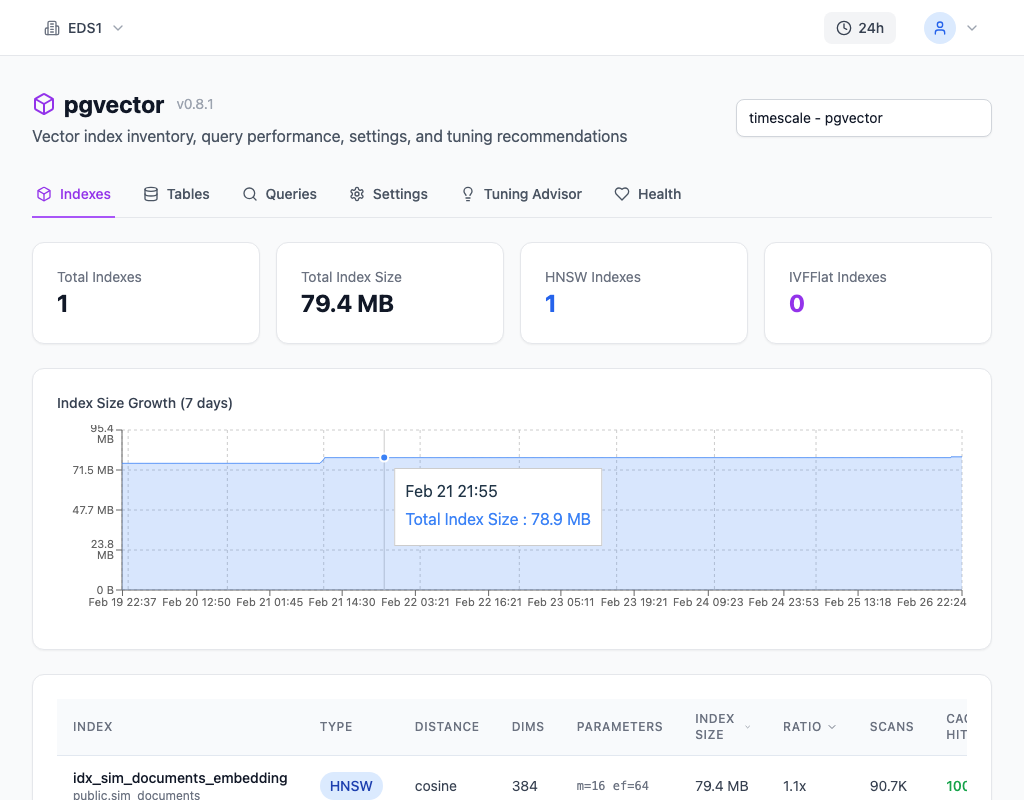
myDBA.dev's pgvector monitoring page surfaces distance function usage across all your queries in one view. You can see which operators are in use, how many queries use each one, and whether there are queries using operators that don't match any existing index. This eliminates the guesswork of scanning pg_stat_statements manually.
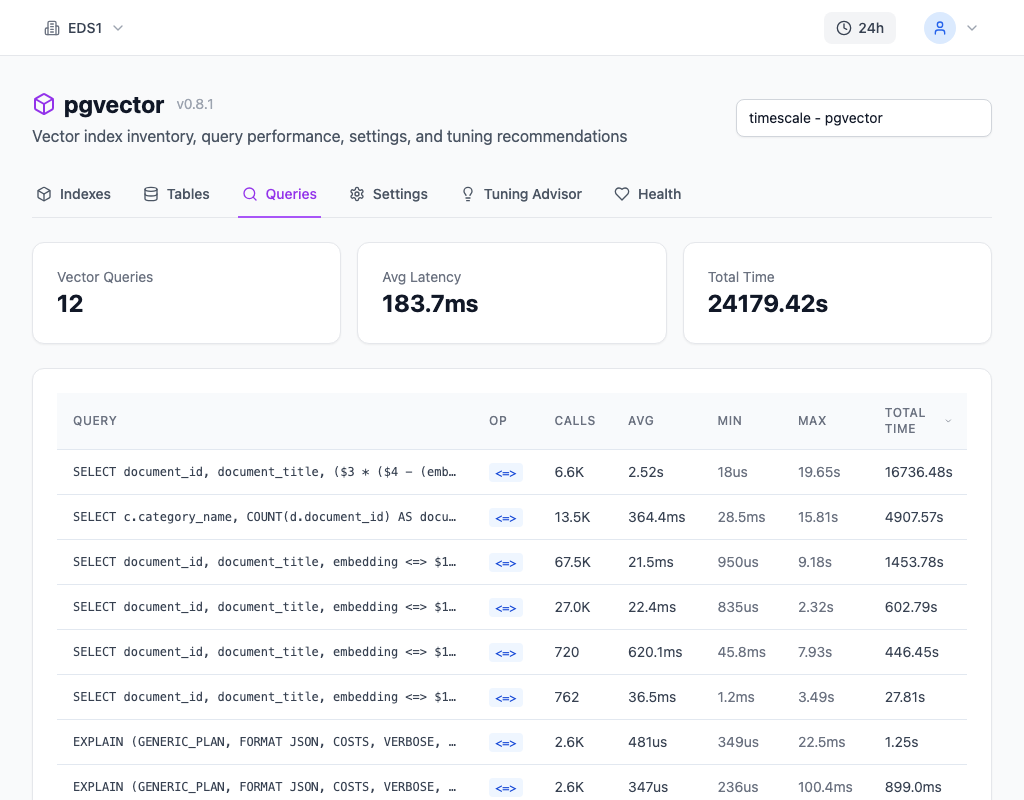
The Queries page complements this by showing individual queries with their distance operators, execution times, and call counts. If a similarity search query is taking orders of magnitude longer than expected, you can trace it directly to an operator/index mismatch or a missing index.
How to Fix It
Ensure every distance operator in your queries has a matching index with the correct operator class:
-- Cosine distance (<=>): best for normalized embeddings (most LLMs)
-- Index must use vector_cosine_ops
CREATE INDEX idx_cosine ON docs USING hnsw (embedding vector_cosine_ops);
SELECT * FROM docs ORDER BY embedding <=> query_vec LIMIT 10;

-- L2 distance (<->): best for spatial/positional data
-- Index must use vector_l2_ops
CREATE INDEX idx_l2 ON docs USING hnsw (embedding vector_l2_ops);
SELECT * FROM docs ORDER BY embedding <-> query_vec LIMIT 10;

-- Inner product (<#>): best for MaxIP retrieval (note: returns negative)
-- Index must use vector_ip_ops
CREATE INDEX idx_ip ON docs USING hnsw (embedding vector_ip_ops);
SELECT * FROM docs ORDER BY embedding <#> query_vec LIMIT 10;
When to use each:
| Distance Function | Operator | Best For | Index Operator Class | |-------------------|----------|----------|---------------------| | Cosine | <=> | Normalized embeddings from LLMs (OpenAI, Cohere, etc.) | vector_cosine_ops | | L2 (Euclidean) | <-> | Spatial data, sensor readings, any data where magnitude matters | vector_l2_ops | | Inner Product | <#> | Maximum inner product search, recommendation scores | vector_ip_ops |
If you are using embeddings from a modern LLM and are unsure, start with cosine distance. It is the most forgiving choice -- it works correctly whether or not vectors are normalized, and it is the standard in the embedding retrieval ecosystem.
If you discover a mismatch, you need to either change your queries to use the operator that matches your index, or rebuild the index with the operator class that matches your queries:
-- Drop the mismatched index and rebuild with the correct operator class
DROP INDEX idx_wrong_ops;
CREATE INDEX idx_correct_ops ON docs USING hnsw (embedding vector_cosine_ops);
For large tables, building an HNSW index can take minutes to hours. Schedule this during a maintenance window or use CREATE INDEX CONCURRENTLY to avoid locking the table (note: concurrent index builds take longer and use more memory).
How to Prevent It
Establish a convention for your project and document it. The decision is straightforward:
1. Check your embedding model's documentation. If it outputs normalized vectors (most do), use cosine distance (<=>). 2. If vectors represent physical quantities where magnitude is meaningful, use L2 distance (<->). 3. If you specifically need maximum inner product search (common in recommendation systems), use inner product (<#>). 4. Pick one and standardize. Mixing distance functions across queries on the same table is almost always a mistake. If different queries on the same column use different operators, only one can be index-accelerated (unless you create multiple indexes, which doubles storage and slows writes).
Verify your choice in code review. The operator/index mismatch is easy to introduce: a developer copies a query example from a blog post that uses <-> while the project convention is <=>. The query runs without error, returns results, but skips the index entirely.
Add an EXPLAIN check to your test suite for critical similarity search queries. If the plan does not show an index scan, fail the test.
myDBA.dev's pgvector monitoring catches these mismatches automatically by correlating your indexes' operator classes with the operators used in active queries, flagging any discrepancies before they silently degrade search quality.