jsonb array to rows in Postgres: A DBA’s guide to jsonb_array_elements, jsonb_to
jsonb array to rows in Postgres: A DBA’s guide to jsonb_array_elements, jsonb_to_recordset, and beyond
Midnight. The revenue report, promised in ten minutes, crawls. A Node.js process loops over a thousand API payloads, parses a line_items array out of one JSONB column, and inserts rows one by one. The DBA in me wants to delete that entire service and replace it with three lines of SQL. Postgres has given you everything you need to explode a JSONB array into queryable rows directly in the FROM clause for years.
<div style="position:relative;padding-bottom:56.25%;height:0;overflow:hidden;border-radius:0.75rem;margin:2rem 0;"> <iframe src="https://www.youtube.com/embed/9j-hlwKZ_Yw" title="Turn Any JSON Array Into Rows Without Writing a Loop" style="position:absolute;top:0;left:0;width:100%;height:100%;border:0;" allow="accelerometer; autoplay; clipboard-write; encrypted-media; gyroscope; picture-in-picture; web-share" allowfullscreen></iframe> </div>
▶ Watch on YouTube: Turn Any JSON Array Into Rows Without Writing a Loop
If you caught the companion video walkthrough, you already know the basic shapes. This piece goes deeper: copy‑paste SQL, edge cases I’ve seen at production scale, and a decision framework that tells you when to stop being clever with JSONB and actually normalize.
You’re here because you have a column full of JSONB arrays and you want to treat each element as a row without touching application code. Tags, event logs, line items, sensor readings: anything that arrived as a payload and landed as jsonb. I’ll show you which function to reach for, how NULLs and extra keys behave, how to preserve array order, and where the pattern breaks down.
The problem: JSONB arrays that behave like rows, if you ask nicely
Your API receives an order. You stash the whole incoming JSONB payload in a column because you might need it later and the data model is still evolving. Inside that payload sits an array of objects — line_items — each with a sku, qty, and price. Reporting needs to sum revenue per SKU, join item data to the product catalog, and filter on quantities over one. Without SQL, you’d write a loop in your backend: fetch rows, unmarshal, iterate, aggregate. That’s CPU time and network round trips you don’t need.
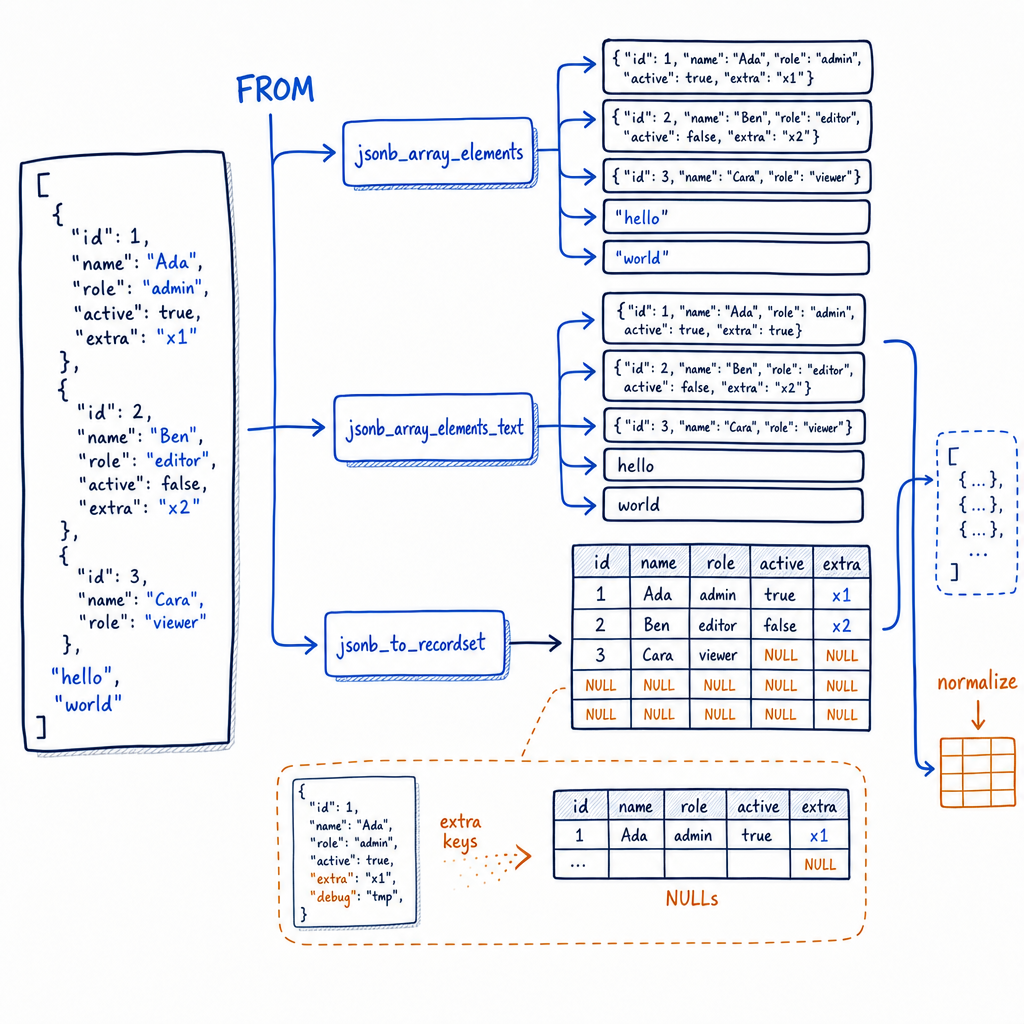
Postgres gives you three functions that turn an array into a set of rows right in the FROM clause:
jsonb_array_elements– returns each element asjsonbjsonb_array_elements_text– returns each element astext(strings only)jsonb_to_recordset– returns structured rows for arrays of objects
You can join these sets to the parent row, aggregate them, filter them, and never leave SQL. Let’s walk through each one, then I’ll show you the patterns that stop you from reinventing an ORM at the database level.
jsonb_array_elements and jsonb_array_elements_text: exploding scalar and object arrays
Start simple. You have an articles table with a tags column that is a JSONB array of strings: ["postgres", "jsonb", "performance"]. You want one tag per row, perhaps to join against a taxonomy table.
SELECT jsonb_array_elements_text(tags) AS tag
FROM articles;
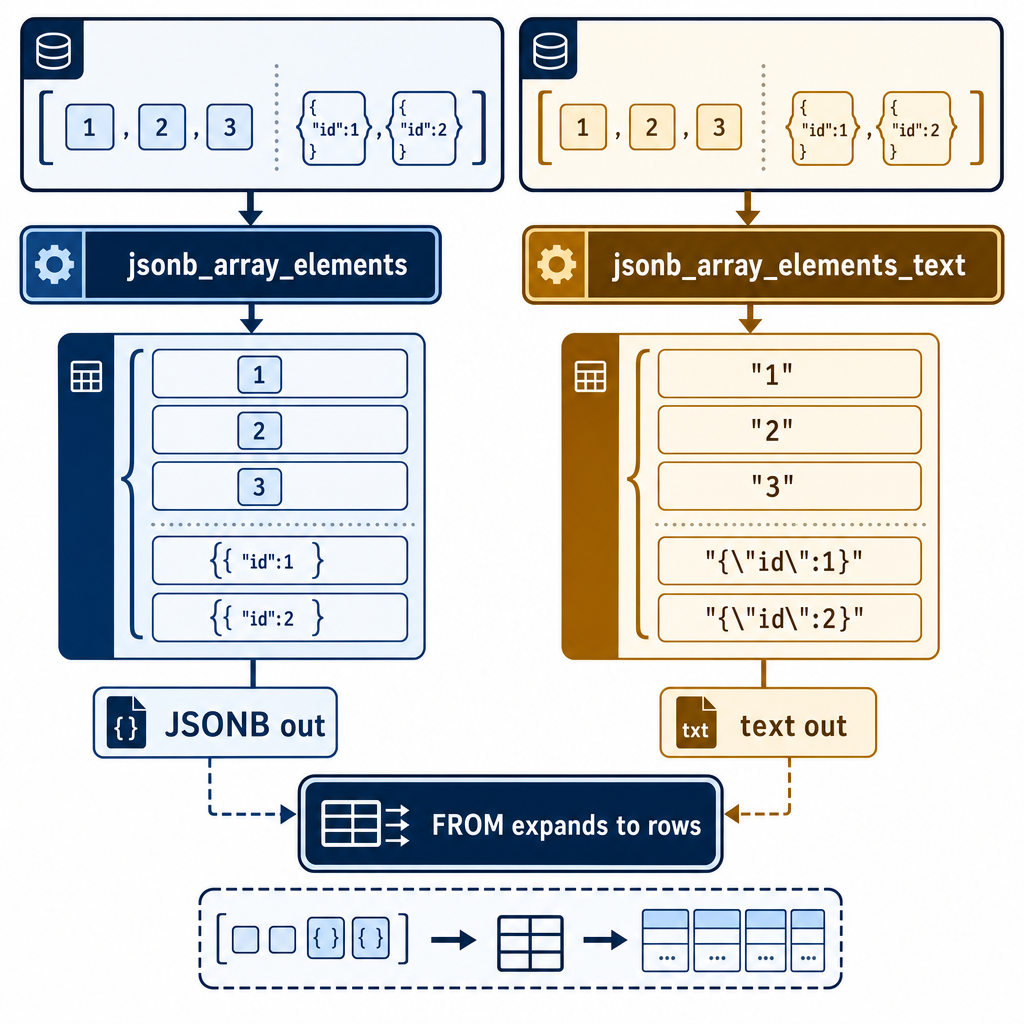
jsonb_array_elements_text takes a JSONB array and returns a set of text values — no casting, no ->> operators. It throws an error if any element isn’t a JSON string, so use it only when you’re sure the array contains text scalars.
If you need the array element as JSONB (for example, the array contains objects or numbers and you plan to use -> to dig deeper), reach for jsonb_array_elements:
SELECT jsonb_array_elements(tags) AS tag_jsonb
FROM articles;
That yields a jsonb column. To get the text value, apply the ->> operator: jsonb_array_elements(tags)->>0 to grab the first element’s text, or chain with ->>. The core distinction is output type. jsonb_array_elements gives you jsonb; jsonb_array_elements_text gives you text. The latter saves a cast and a mental step when you know the array is purely strings.
Avoid set‑returning functions in the SELECT list. While you can place jsonb_array_elements_text(tags) directly in the select list, this can produce surprising results when multiple set‑returning functions mix or when the query gets refactored. The modern, reliable pattern is to keep the explosion inside the FROM clause using LATERAL, which we’ll cover shortly. Always write these explosions as lateral joins for predictable behavior.
For a quick test on a literal array, run:
SELECT jsonb_array_elements_text('["postgres","jsonb","performance"]'::jsonb);Or use a CTE that mimics a table:
WITH articles(id, tags) AS (
  VALUES
    (1, '["postgres","jsonb"]'::jsonb),
    (2, '["sql","performance"]')
)
SELECT id, jsonb_array_elements_text(tags) AS tag
FROM articles;
That yields:
| id | tag | |----|-------------| | 1 | postgres | | 1 | jsonb | | 2 | sql | | 2 | performance |
No loop. No application code. No extra marshaling.
-> vs ->> quick rule: -> returns a JSONB sub‑object or scalar; ->> returns text. When you explode an array of objects with jsonb_array_elements, you’ll typically use ->> to extract a key to text. But if you’re already using jsonb_to_recordset, you don’t need ->> at all because that function returns typed columns.
jsonb_to_recordset: schema-on-read for arrays of objects
The video example shows an orders table with a line_items column containing [{"sku": "ABC", "qty": 2, "price": 9.99}, ...]. You need those objects as rows with proper columns: sku text, qty int, price numeric.
Here’s jsonb_to_recordset with the exact syntax you’ll copy into psql:
WITH payload(json) AS (
  VALUES ('[
    {"sku":"ABC","qty":2,"price":9.99},
    {"sku":"DEF","qty":1,"price":4.50}
  ]'::jsonb)
)
SELECT *
FROM jsonb_to_recordset(json) AS x(sku text, qty int, price numeric);
The function demands a column definition list right in the query: you declare exactly what columns you expect and their types. This is schema-on-read. Any keys in the objects that aren’t listed are silently ignored, and missing keys come back as NULL. That behavior makes it perfect for extracting a known subset of fields from an evolving JSON structure.
When you join back to the parent row, LATERAL becomes your friend. A common pattern:
SELECT o.id, li.sku, li.qty
FROM orders o,
LATERAL jsonb_to_recordset(o.line_items) AS li(sku text, qty int)
WHERE li.qty > 1;
This lateral join guarantees that the recordset explosion happens per row, and you can reference the outer table’s columns inside the JSON field path if the array lives at some nested key. It’s also the clean way to handle NULL arrays: if line_items is NULL, LATERAL simply produces no rows for that order, without errors. That’s a huge win over jsonb_array_elements, which would choke. I’ll say it again: always use LATERAL in the FROM clause.
Preserving array order? jsonb_to_recordset implicitly respects the order of elements in the array, just like jsonb_array_elements. The set‑returning functions emit rows in the same sequence as the JSON array, and you can rely on that. If you need an explicit surrogate key, add WITH ORDINALITY to the function call inside a lateral join:
SELECT li.*
FROM orders o,
LATERAL jsonb_to_recordset(o.line_items) WITH ORDINALITY AS li(sku text, qty int, ord int);
That ord column gives you the 1‑based index of each element, handy when you later need to reconstruct the original order after a join or aggregation.
Now for the edge cases. Extra keys are a non‑issue: they vanish. NULLs inside the array? jsonb_to_recordset turns a NULL element into a row where all defined columns are NULL — not an empty row, but a real row with NULLs. That’s different from jsonb_array_elements, which would return a SQL NULL for the whole element. If the entire line_items column is NULL, the lateral join emits zero rows. If the array is empty ('[]'::jsonb), you also get zero rows.
When is this pattern a liability? If you find yourself exploding arrays and immediately joining them to dozens of normalized tables, applying complex aggregates every time a report runs, you’ve crossed the line. Normalize. Extract those line items into a proper table with indexes. JSONB explosion is ideal for ad‑hoc analysis, moderate‑volume reporting, and pivot queries where the schema truly isn’t fixed. Once the shape stabilizes and query performance matters, treat it as a staging artifact, not your permanent storage model. Once you find yourself pre‑exploding the same array into a materialized view just to make a dashboard tolerable, the schema has told you it wants to grow up.
The right tool for the right stage: from ad‑hoc to hardened
Postgres’s jsonb explosion functions are the DBA’s scalpel for quick access to nested data without touching the app layer. Use jsonb_array_elements_text for plain string lists, jsonb_array_elements when you need further JSON operations, and jsonb_to_recordset to stamp out typed rows from known object shapes. Always lateral‑join in the FROM clause to handle nulls and keep order with WITH ORDINALITY when needed. These patterns eliminate loops, reduce network chatter, and let you aggregate as fast as the query planner permits.
The day that shape freezes and the queries become routine, the same functions become a performance bottleneck. That’s your cue to extract the jsonb into proper relational tables, index them, and let the jsonb be a log of what arrived, not the live query surface. For more hard‑won DBA patterns that keep Postgres fast and your blood pressure low, the team at MyDBA shares battle‑tested advice regularly at https://mydba.dev.