Best PostgreSQL IDE and GUI Tools in 2026
Best PostgreSQL IDE and GUI Tools in 2026
You can do everything through psql. You probably shouldn't. A good PostgreSQL GUI saves hours per week on schema exploration, query development, data visualization, and team collaboration. Here is every tool worth considering.
Choosing a PostgreSQL IDE or GUI client is a surprisingly personal decision. Some developers want a full IDE with refactoring, version control integration, and intelligent code completion. Others want a lightweight client that opens fast and gets out of the way. DBAs need deep server management capabilities. Analysts want visual query builders.
There is no single "best PostgreSQL IDE" because the best tool depends on how you work. This guide covers every serious option in 2026 — full-featured IDEs, lightweight GUI clients, terminal tools, web-based interfaces, and specialized analytics platforms — with honest assessments of strengths, weaknesses, pricing, and who each tool is actually for.
Full-Featured IDEs
These are the heavy hitters. They do everything: schema introspection, query editing, refactoring, debugging, version control, and team collaboration. If you spend most of your day writing SQL or managing database schemas, a full IDE pays for itself quickly.
DataGrip (JetBrains)
The most powerful SQL IDE available.
DataGrip is JetBrains' dedicated database IDE, and it shows. If you have used IntelliJ, PyCharm, or any other JetBrains product, you know the level of polish to expect. DataGrip applies that same depth to databases.
Strengths:
- Intelligent autocompletion that understands your schema. It resolves table aliases, completes column names through joins, and suggests functions based on column types. This is not simple keyword matching — it parses your query and understands context.
- Database introspection that goes deep. View table structures, indexes, constraints, triggers, sequences, functions, and dependencies in a navigable tree. Diff schemas between databases. Generate DDL from existing objects.
- Refactoring support for SQL. Rename a table and DataGrip updates all references across your SQL files. Extract subqueries, inline CTEs, change column names with cascading updates.
- Version control integration. DataGrip connects to Git, tracks changes to your SQL files, and supports database migration workflows. You can compare your local schema against a target database and generate migration scripts.
- Query profiling and EXPLAIN plan visualization. Run EXPLAIN ANALYZE and get a visual tree showing actual vs estimated rows, node costs, and bottlenecks. This alone justifies the price for performance work.
- Support for every major database. PostgreSQL is a first-class citizen, but you can also connect to MySQL, Oracle, SQL Server, MongoDB, Redis, ClickHouse, and dozens more from the same tool.
- Local history for every query you run. Accidentally close a tab? Your query history is preserved.
Weaknesses:
- Expensive at $229/year for individuals ($149/year after the first year with the continuity discount). The organizational license is even higher.
- Heavy on system resources. DataGrip is a JVM application. Expect 500 MB to 1 GB of RAM usage, and startup time is measured in seconds, not milliseconds.
- Overwhelming for simple tasks. If you just want to browse a table or run a quick query, DataGrip's interface has more panels, toolbars, and options than you need.
- The learning curve is real. JetBrains tools are powerful precisely because they have deep feature sets. Discovering and mastering those features takes weeks.
Pricing: $229/year for individuals (first year), $149/year renewal. Free for students, open-source maintainers, and educational use. 30-day trial available.
Best for: Professional developers and DBAs who spend significant time writing SQL, managing schemas, or optimizing queries. If you already use JetBrains tools, DataGrip is the natural choice.
DBeaver
The universal database tool.
DBeaver is the Swiss Army knife of database clients. The free Community Edition covers PostgreSQL admirably, supports over 100 database types, and has an active community of millions of users. It is the most popular open-source database GUI for good reason.
Strengths:
- Free and open-source (Community Edition). For a zero-cost tool, the feature set is remarkably deep: SQL editor with autocompletion, visual query builder, ER diagrams, data export/import, and database comparison.
- Supports over 100 databases through JDBC drivers. Connect to PostgreSQL, MySQL, SQLite, Oracle, MongoDB, Cassandra, ClickHouse, and more — all from a single application.
- ER diagram generation. Select tables and DBeaver renders an entity-relationship diagram showing foreign key relationships. Useful for understanding unfamiliar schemas quickly.
- Robust data export. Export query results or entire tables to CSV, JSON, XML, SQL INSERT statements, Excel, or HTML. The export wizard handles large datasets efficiently.
- Active development with frequent releases. The DBeaver team ships updates regularly, and the community contributes plugins and extensions.
- Cross-platform. Runs on Windows, macOS, and Linux with a consistent experience.
- SQL formatting and code templates. Built-in SQL formatter plus snippet support for common query patterns.
Weaknesses:
- The interface can feel cluttered and dated compared to more modern tools. Eclipse-based UI conventions show their age.
- Autocompletion is good but not as context-aware as DataGrip. It sometimes suggests irrelevant completions, especially in complex multi-table queries.
- Performance with very large result sets can be slow. Scrolling through millions of rows is not as smooth as in native clients.
- The Pro edition ($199/year) is required for some useful features: NoSQL support, visual query builder for complex joins, team collaboration, and SSH tunneling enhancements. The free-vs-paid boundary occasionally frustrates.
- ER diagrams, while functional, lack the polish and interactivity of dedicated data modeling tools.
Pricing: Free (Community Edition). Pro: $199/year for individuals. Enterprise and team licenses available.
Best for: Teams that work with multiple database types and want a single, capable, free tool. DBeaver Community is the best free PostgreSQL GUI available.
Lightweight GUI Clients
Not everyone needs a full IDE. These tools trade breadth of features for speed, simplicity, and a focused experience. They open fast, feel responsive, and are designed for developers who primarily want to browse data, run queries, and make quick edits.
TablePlus
Clean, fast, native.
TablePlus takes the opposite approach to heavyweight IDEs. It is a native application (not Electron, not JVM) that feels fast because it is fast. The interface is minimal and opinionated, which means fewer decisions and less visual noise.
Strengths:
- Native performance. TablePlus is built with native frameworks on each platform (Cocoa on macOS, WinUI on Windows). It starts instantly and scrolls smoothly through large result sets.
- Inline data editing. Click a cell, edit the value, and commit the change. No need to write UPDATE statements for quick fixes. Changes are staged and committed explicitly, reducing accidental modifications.
- Tabbed interface with multiple connections. Work with several databases simultaneously, each in its own tab. Switching between development, staging, and production is seamless.
- Dark mode that actually looks good. For developers who spend hours staring at database clients, this matters more than you might think.
- Keyboard-driven workflow. Most actions have keyboard shortcuts, and the command palette (
Cmd+Pon macOS) lets you jump to any table, view, or function by name. - Clean SSH tunneling support. Configure jump hosts and SSH keys directly in the connection settings, no external tools needed.
- Supports PostgreSQL, MySQL, SQLite, Redis, MongoDB, SQL Server, and more.
Weaknesses:
- Limited SQL editing features. No intelligent refactoring, no schema diffing, no visual query builder. You write raw SQL and execute it.
- No ER diagram generation. If you need to visualize table relationships, you need another tool.
- Query autocompletion is basic compared to DataGrip or DBeaver. Table and column names autocomplete, but it does not understand query context deeply.
- The free tier limits you to two open tabs, one database connection at a time, and one advanced filter. It is enough to evaluate the tool, but not enough for daily use.
- No built-in version control integration or migration support.
Pricing: $89 one-time payment for a personal license (macOS). $59 for iOS. Subscription option available at $79/year. Free tier available with limitations.
Best for: Developers who want a fast, clean database client for daily use. If your workflow is "connect, browse, query, edit, done" — and you value speed and aesthetics — TablePlus is hard to beat.
Postico (macOS Only)
The most Mac-native PostgreSQL experience.
Postico is built exclusively for macOS and exclusively for PostgreSQL. That dual focus shows in every interaction. It feels like an Apple-designed app that happens to connect to PostgreSQL.
Strengths:
- Beautiful, intuitive interface that follows macOS design conventions. If you know how to use a Mac, you already know how to use Postico.
- PostgreSQL-specific features. Because Postico only supports PostgreSQL, every feature is tailored to Postgres: enum types display correctly, array columns are browsable, JSONB data is formatted and navigable, and PostgreSQL-specific column types are handled natively.
- Excellent table browsing. The grid view is fast and responsive, with inline filtering, sorting, and editing. Foreign key relationships are clickable — select a foreign key value and jump directly to the referenced row.
- Smart query editor. Syntax highlighting, basic autocompletion, and query history. Not as deep as DataGrip, but perfectly adequate for most query writing.
- Sidebar with full schema navigation. Tables, views, functions, sequences, and indexes are organized clearly and searchable.
Weaknesses:
- macOS only. No Windows, no Linux, no web version.
- PostgreSQL only. If you also work with MySQL, Redis, or other databases, you need a second tool.
- No ER diagrams, no schema comparison, no version control integration.
- Feature set is intentionally limited. Postico is a client, not an IDE. Advanced operations like schema migration, stored procedure debugging, or query plan analysis require other tools.
- The free trial is fully functional but limited to three connections.
Pricing: $39.99 one-time purchase.
Best for: Mac users who primarily work with PostgreSQL and value design, simplicity, and a native Mac experience. At $39.99, it is the best value on this list.
pgAdmin
The official PostgreSQL administration tool.
pgAdmin has been the default PostgreSQL GUI since the early days of Postgres. It is maintained by the pgAdmin Development Team as part of the PostgreSQL community, and it is the most feature-complete administration tool available. It is also the tool people love to complain about.
Strengths:
- Completely free and open-source. No paid tier, no feature limitations, no license restrictions.
- Comprehensive server management. pgAdmin is not just a query tool — it is a full administration interface. Manage roles, tablespaces, extensions, replication slots, logical replication, foreign data wrappers, event triggers, and every other PostgreSQL server object.
- Dashboard with real-time server activity. Monitor active sessions, lock contention, transaction rates, and resource usage without switching tools.
- EXPLAIN plan visualization. Graphical representation of query execution plans with cost, row, and timing details at each node.
- Multi-server management. Connect to dozens of PostgreSQL instances and organize them into server groups. Useful for DBAs managing multiple environments.
- Cross-platform via web browser. pgAdmin 4 runs as a web application (either desktop mode or server mode), accessible from any browser on any platform.
- Backup and restore wizards. pg_dump and pg_restore wrapped in a guided interface with option selection.
Weaknesses:
- The web-based interface feels sluggish compared to native applications. Every interaction involves an HTTP round-trip, and it shows — especially for browsing tables and scrolling result sets.
- The UI is dense and complex. First-time users are often overwhelmed by the number of panels, tree nodes, and configuration options. The learning curve is steep for a GUI tool.
- Query autocompletion is functional but basic. It lags behind DataGrip, DBeaver, and even TablePlus in completion intelligence.
- Desktop startup time is slow. pgAdmin launches a local web server, then opens a browser or Electron window. It takes several seconds to become usable.
- Data editing is clunky. Compared to the smooth inline editing of TablePlus or Postico, pgAdmin's grid editor feels dated.
Pricing: Free and open-source.
Best for: DBAs who need full PostgreSQL server management capabilities and prefer an official, community-maintained tool. The price (free) cannot be beat for the depth of features.
Terminal-Based Tools
For those who live in the terminal and have no intention of leaving.
psql
The original. Ships with PostgreSQL.
psql is the interactive terminal for PostgreSQL, included with every PostgreSQL installation. It is not a GUI, but it belongs on this list because many experienced PostgreSQL developers consider it the best tool available — and they are not entirely wrong.
Useful psql tips most people miss:
-- Expanded display for wide rows
\x auto

-- Show query execution time
\timing on

-- Re-run a query every 5 seconds (monitoring)
SELECT count(*) FROM orders WHERE status = 'pending'; \watch 5

-- Copy query results to CSV
\copy (SELECT * FROM users WHERE created_at > '2026-01-01') TO '/tmp/users.csv' CSV HEADER

-- Describe a table in detail (indexes, constraints, triggers)
\d+ users

-- List all indexes on all tables
\di+

-- Show current connections and activity
SELECT pid, state, query FROM pg_stat_activity WHERE state != 'idle';

-- Edit the last query in your $EDITOR
\e
Strengths:
- Zero installation (comes with PostgreSQL). Available everywhere PostgreSQL runs.
- Extremely fast. No GUI overhead, no startup delay, no memory footprint.
- Tab completion for SQL keywords, table names, and column names.
- Scriptable. Pipe SQL files, use variables, and chain commands. Essential for CI/CD pipelines and automation.
\dfamily of commands for quick schema exploration is unmatched in speed.
Weaknesses:
- No visual feedback. No syntax highlighting (by default), no result set browsing, no data visualization.
- Painful for complex queries. Writing multi-line SQL in a terminal without proper editing support is slow.
- No data editing interface. Every modification requires a written SQL statement.
- Output formatting is basic. Wide tables wrap awkwardly, and large result sets scroll past before you can read them.
Best for: Experienced PostgreSQL users who value speed, scriptability, and direct control. Essential knowledge even if you primarily use a GUI.
pgcli
psql, but better.
pgcli is a drop-in replacement for psql that adds intelligent autocompletion and syntax highlighting. If you use psql regularly, pgcli is a free upgrade with zero learning curve.
# Install
pip install pgcli

# Connect (same syntax as psql)
pgcli -h localhost -U postgres mydb
Strengths:
- Smart autocompletion that understands your schema. It suggests table names, column names, join conditions, and function signatures based on context, not just keyword matching.
- Syntax highlighting that makes SQL readable in the terminal.
- Multi-line editing with proper cursor movement and history.
- Compatible with all psql backslash commands (
\d,\dt,\di,\l, etc.). - vi and Emacs keybinding support.
- Auto-formatting of query output for readability.
Weaknesses:
- Requires Python. Not always available in minimal Docker containers or production servers.
- Slightly slower startup than psql due to schema introspection on connect.
- Some edge cases where psql compatibility breaks (rare, but it happens with very new PostgreSQL features).
Pricing: Free and open-source.
Best for: Anyone who uses psql regularly. There is no reason not to switch.
Web-Based Tools
These tools run in the browser. Some are database clients; others are platforms that happen to include a PostgreSQL interface.
Supabase Studio
Built-in GUI for Supabase projects.
If your PostgreSQL database is hosted on Supabase, Studio is the built-in administration interface. It is not a general-purpose PostgreSQL client — it is specifically designed for the Supabase workflow.
Strengths:
- Table editor with inline editing, filtering, and sorting. Create tables, add columns, and set constraints without writing DDL.
- SQL editor with autocompletion and query history. Run arbitrary SQL and view results.
- Row-level security (RLS) policy editor. Visually create and test RLS policies — one of the most confusing aspects of PostgreSQL security, made approachable.
- Real-time log viewer for database queries, auth events, and edge functions.
- API documentation auto-generated from your schema.
- Free with every Supabase project, including the free tier.
Weaknesses:
- Only works with Supabase-hosted databases. Cannot connect to external PostgreSQL instances.
- Feature set is narrower than dedicated database clients. No ER diagrams, no schema comparison, no advanced query profiling.
- Performance depends on your browser and internet connection. Large result sets can be slow to render.
Pricing: Free with Supabase.
Best for: Supabase users who want a convenient, integrated database interface without leaving the browser.
Retool and Appsmith
Low-code platforms with PostgreSQL connectivity.
Retool and Appsmith are not database clients — they are platforms for building internal tools, admin panels, and dashboards on top of your PostgreSQL data. They deserve mention because many teams end up here when their needs outgrow a simple query client.
Strengths:
- Drag-and-drop UI builder connected directly to PostgreSQL queries. Build CRUD interfaces, dashboards, and workflows without a traditional frontend.
- Role-based access control. Give support teams read access, operations teams edit access, and admins full access — all through a visual permission system.
- Scheduled queries and workflows. Automate reporting, data cleanup, and notifications.
- Retool supports over 100 integrations. Combine PostgreSQL data with Stripe, Twilio, Slack, and other APIs in a single interface.
Weaknesses:
- Expensive for production use. Retool starts at $10/user/month, and enterprise features are significantly more.
- Not a database development tool. You cannot use Retool to develop schemas, debug stored procedures, or optimize queries.
- Vendor lock-in. Your internal tools become dependent on the platform.
- Appsmith is self-hostable and open-source (Community Edition), but the cloud version has similar pricing to Retool.
Pricing: Retool: $10/user/month (Standard). Appsmith: Free self-hosted, $40/user/month cloud.
Best for: Teams building internal admin panels, customer support dashboards, or operations tools on top of PostgreSQL data.
Specialized Tools
Metabase
Business intelligence and analytics on PostgreSQL.
Metabase is not a PostgreSQL client. It is a BI tool that connects to PostgreSQL and lets non-technical users explore data, build dashboards, and generate reports without writing SQL.
Strengths:
- Visual query builder. Select tables, apply filters, group results, and create charts — all without writing SQL. Business analysts and product managers can self-serve their data questions.
- Dashboard system with automatic refresh, filters, and drill-down. Build real-time business dashboards that pull directly from PostgreSQL.
- SQL mode for power users. When the visual builder is not enough, write raw SQL with parameterized filters and save it as a reusable question.
- Self-hosted (free, open-source) or cloud-hosted ($85/month for 5 users). The open-source version is genuinely complete.
- Embedding support. Embed Metabase dashboards and questions directly into your product.
Weaknesses:
- Not a database administration or development tool. No schema management, no query optimization, no server monitoring.
- Performance depends on your PostgreSQL instance. Complex dashboards with many queries can put significant load on your database without proper caching or materialized views.
- The visual query builder has limits. Multi-table joins, subqueries, and window functions eventually require raw SQL.
Pricing: Free self-hosted (open-source). Cloud: $85/month for Starter (5 users), $500/month for Pro.
Best for: Teams that need business users to access PostgreSQL data without writing SQL. A complement to your IDE, not a replacement.
IDEs vs Monitoring Tools
Every tool in this guide helps you work with your database — writing queries, browsing data, managing schemas, building dashboards. That is development and administration.
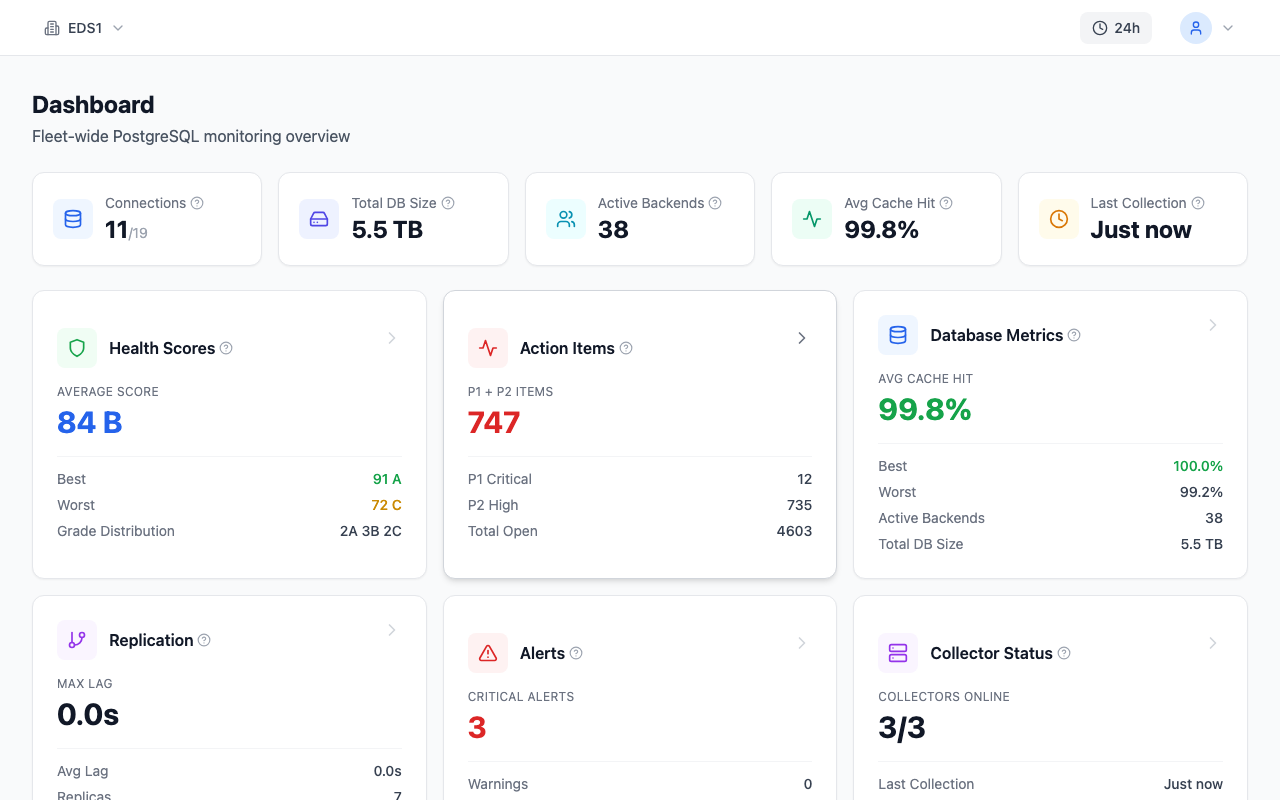
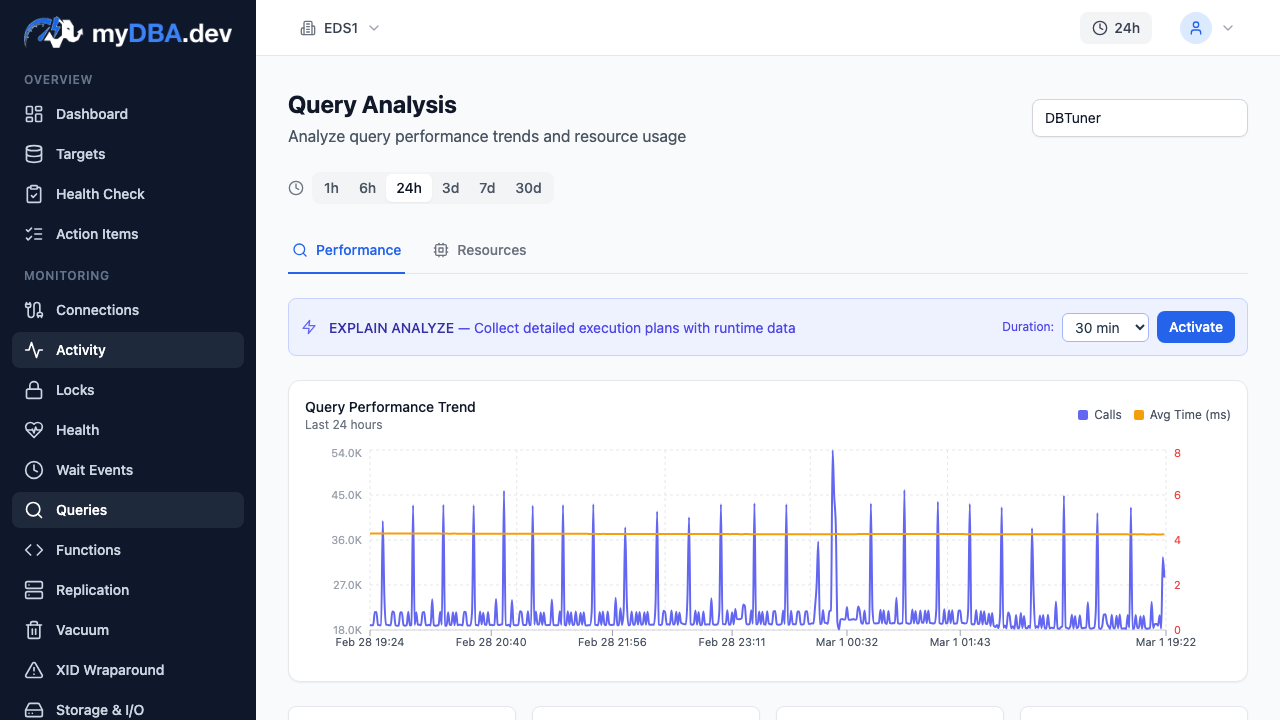
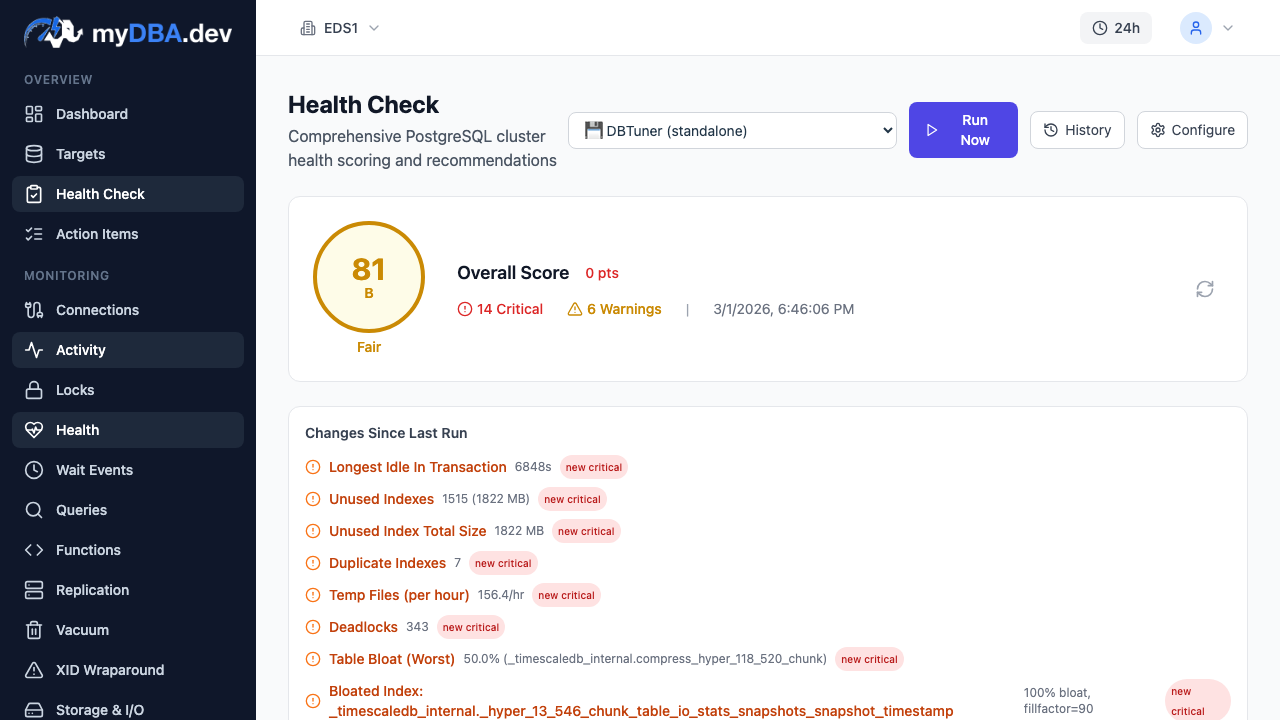
But production PostgreSQL databases also need continuous monitoring: automated health checks that catch problems before users notice, query performance trend analysis that reveals slow regressions over days, EXPLAIN plan tracking that detects when the planner changes strategy, index recommendations based on actual workload patterns, and alerting when metrics cross thresholds.
Your IDE cannot tell you that a query that ran in 2 ms last week now takes 400 ms in production. It cannot tell you that a sequential scan started appearing after a statistics update. It cannot tell you that table bloat has reached 60% on your busiest table while you were focused on a feature branch.
That is where monitoring tools like myDBA.dev fit in. Your IDE helps you write better queries. A monitoring tool tells you which queries in production need attention — and why.
Comparison Table
| Tool | Pricing | Platform | PG-Specific | Autocomplete | ER Diagrams | Data Export | Open Source | |---|---|---|---|---|---|---|---| | DataGrip | $229/yr | Win/Mac/Linux | No (multi-DB) | Excellent | Yes | Yes | No | | DBeaver | Free / $199/yr | Win/Mac/Linux | No (multi-DB) | Good | Yes | Yes | Community: Yes | | TablePlus | $89 one-time | Win/Mac/Linux | No (multi-DB) | Basic | No | Yes | No | | Postico | $39.99 | macOS only | Yes | Basic | No | Yes | No | | pgAdmin | Free | Web (all) | Yes | Basic | No | Yes | Yes | | psql | Free | Terminal (all) | Yes | Basic | No | \copy | Yes | | pgcli | Free | Terminal (all) | Yes | Excellent | No | \copy | Yes | | Supabase Studio | Free | Web | Yes | Good | No | CSV | Source-available | | Retool | $10/user/mo | Web | No (multi-DB) | Basic | No | Yes | No | | Appsmith | Free / $40/user/mo | Web | No (multi-DB) | Basic | No | Yes | Community: Yes | | Metabase | Free / $85/mo | Web | No (multi-DB) | N/A (visual) | No | Yes | Yes |
My Pick for Each Use Case
Full IDE for professional SQL development: DataGrip. The autocompletion, refactoring, and query profiling are in a class of their own. Worth the price if you write SQL daily.
Free universal database tool: DBeaver Community. Supports everything, does everything adequately, costs nothing. The default recommendation for teams that cannot justify per-developer IDE licensing.
Fast and clean daily driver: TablePlus. Opens instantly, looks great, handles common tasks without friction. The one-time pricing model is refreshing.
Mac-native PostgreSQL client: Postico. If you only work with PostgreSQL on a Mac and want the most polished, focused experience, Postico at $39.99 is the best value on this list.
Full DBA administration: pgAdmin. Free, comprehensive, and maintained by the PostgreSQL community. The interface takes getting used to, but nothing else gives you this depth of server management at no cost.
Terminal power user: pgcli. All the benefits of psql with intelligent autocompletion and syntax highlighting. Install it once and never go back.
Business analytics: Metabase (self-hosted). Free, open-source, and genuinely useful for giving non-technical team members access to PostgreSQL data.
Production monitoring: None of the tools above. For continuous health checks, query performance tracking, EXPLAIN plan analysis, and automated recommendations on production PostgreSQL, look at a dedicated monitoring tool like myDBA.dev.
Final Thoughts
The PostgreSQL ecosystem has reached a point where there is a genuinely good tool for every workflow and budget. You do not need to compromise.
If you are just starting out, install DBeaver (free) and pgcli (free). That combination covers GUI and terminal workflows with zero cost. As your needs grow, DataGrip or TablePlus are worth evaluating.
The real mistake is not which IDE you choose — it is thinking your IDE covers monitoring. Write better queries in your IDE. Monitor those queries in production with a dedicated tool. They solve different problems, and both matter.